- Don’t miss your chance to experience Discovery Summit Europe at our best available rate! Early bird registration through 31 Oct.
- Graph Builder Toolbar streamlines interactive graphing. Creates shortcuts on Report and GraphBuilder Helpers toolbars. Download and install the extension.
- Subscribe to RSS Feed
- Mark Topic as New
- Mark Topic as Read
- Float this Topic for Current User
- Bookmark
- Subscribe
- Mute
- Printer Friendly Page
Discussions
Solve problems, and share tips and tricks with other JMP users.- User Community
- :
- Discussions
- :
- Re: How to read two rows from txt-file as column name

- Mark as New
- Bookmark
- Subscribe
- Mute
- Subscribe to RSS Feed
- Get Direct Link
- Report Inappropriate Content
How to read two rows from txt-file as column name
Hello,
Is there an option in JSL to read in the first two lines of a text file as a column header or
alternatively (and even better) the first as Column name and the second as the column property (Units)
Thank you
Mirko

Accepted Solutions


- Mark as New
- Bookmark
- Subscribe
- Mute
- Subscribe to RSS Feed
- Get Direct Link
- Report Inappropriate Content
Re: How to read two rows from txt-file as column name
Craige's example below is a better solution, but this code might also be useful.
Here is a little script that does the conversion you want
Names Default To Here( 1 );

dt = Open(
	"<Path to BSP_jmp.TXT>",
	columns(
		New Column( "YYYY", Numeric, "Continuous", Format( "Best", 12 ) ),
		New Column( "MM/DD", Character, "Nominal" ),
		New Column( "DAY", Character, "Nominal" ),
		New Column( "hh:mm:ss", Numeric, "Continuous", Format( "h:m:s", 11, 0 ), Input Format( "h:m:s", 0 ) )
	)
);

// Add 2nd line text to Column Name
For( i = 1, i <= N Cols( dt ), i++,
	If( Column( dt, i ) << get data type == "Character" & Column( dt, i )[1] != "",
		Column( dt, i ) << set name( Column( dt, i ) << get name || Column( dt, i )[1] )
	)
);

// Delete second name row
dt << delete rows(1);

// Convert columns that are character but should be numeric, to numeric
For( i = 1, i <= N Cols( dt ), i++,
	If( Column( dt, i ) << get data type == "Character" & Is Missing( Num( Column( dt, i )[1] ) ) != 1,
		Column( dt, i ) << set data type( Numeric ) << set modeling type( Continuous )
	)
);

- Mark as New
- Bookmark
- Subscribe
- Mute
- Subscribe to RSS Feed
- Get Direct Link
- Report Inappropriate Content
Re: How to read two rows from txt-file as column name
- Mark as New
- Bookmark
- Subscribe
- Mute
- Subscribe to RSS Feed
- Get Direct Link
- Report Inappropriate Content
Re: How to read two rows from txt-file as column name
Craige's example below is a better solution, but this code might also be useful.
Here is a little script that does the conversion you want
Names Default To Here( 1 );

dt = Open(
	"<Path to BSP_jmp.TXT>",
	columns(
		New Column( "YYYY", Numeric, "Continuous", Format( "Best", 12 ) ),
		New Column( "MM/DD", Character, "Nominal" ),
		New Column( "DAY", Character, "Nominal" ),
		New Column( "hh:mm:ss", Numeric, "Continuous", Format( "h:m:s", 11, 0 ), Input Format( "h:m:s", 0 ) )
	)
);

// Add 2nd line text to Column Name
For( i = 1, i <= N Cols( dt ), i++,
	If( Column( dt, i ) << get data type == "Character" & Column( dt, i )[1] != "",
		Column( dt, i ) << set name( Column( dt, i ) << get name || Column( dt, i )[1] )
	)
);

// Delete second name row
dt << delete rows(1);

// Convert columns that are character but should be numeric, to numeric
For( i = 1, i <= N Cols( dt ), i++,
	If( Column( dt, i ) << get data type == "Character" & Is Missing( Num( Column( dt, i )[1] ) ) != 1,
		Column( dt, i ) << set data type( Numeric ) << set modeling type( Continuous )
	)
);
- Mark as New
- Bookmark
- Subscribe
- Mute
- Subscribe to RSS Feed
- Get Direct Link
- Report Inappropriate Content
Re: How to read two rows from txt-file as column name
Thank you very much for the support.
I prefer this JSL solution.
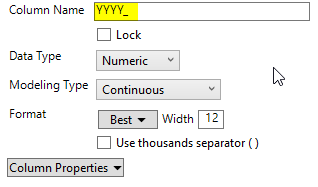
The multiple file import works fine too but adds an “_” to the header name.
- Mark as New
- Bookmark
- Subscribe
- Mute
- Subscribe to RSS Feed
- Get Direct Link
- Report Inappropriate Content
Re: How to read two rows from txt-file as column name
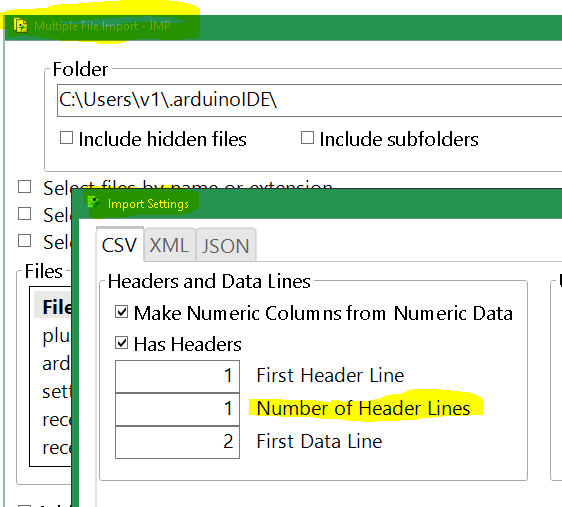
Multiple File Import can do it, even for a single file.
- Mark as New
- Bookmark
- Subscribe
- Mute
- Subscribe to RSS Feed
- Get Direct Link
- Report Inappropriate Content
Re: How to read two rows from txt-file as column name
Thank you very much.
- Mark as New
- Bookmark
- Subscribe
- Mute
- Subscribe to RSS Feed
- Get Direct Link
- Report Inappropriate Content
Re: How to read two rows from txt-file as column name
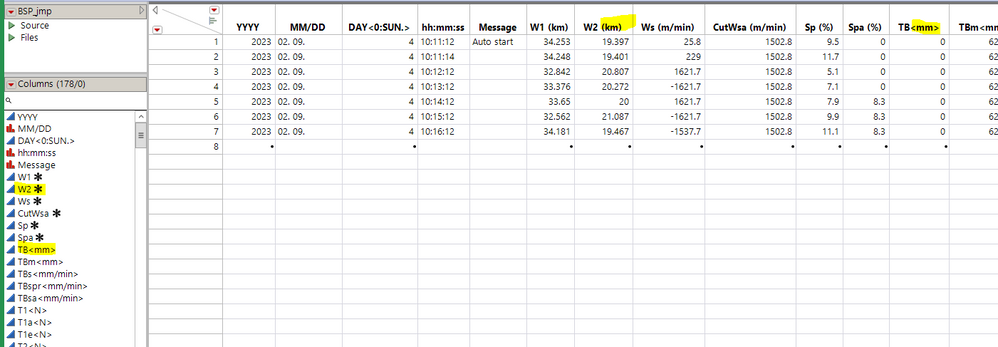
dtlist = Multiple File Import(
	<<Set Folder( "Z:\" ),
	<<Set Name Filter( "BSP_JMP.txt" ),
	<<Set Name Enable( 1 ),
	<<Set CSV First Header Line( 1 ),
	<<Set CSV Number Of Header Lines( 2 ),
	<<Set CSV First Data Line( 3 )
) << Import Data;

dt = dtlist[1];

namelist = dt << getColumnNames();
// since the _ does not appear in the CSV file, you can use it to
// split the names and then rejoin them.
For Each( {c}, namelist, {txt, parts, newname, p1, p2},
	txt = c << getname;
	parts = Words( txt, "_" );
	p1 = Trim( parts[1] );
	If( N Items( parts ) == 2,
		p2 = Trim( parts[2] );
		If( Contains( {"km", "m/min", "%", "deg/min", "um"}, p2 ), // identify real units
			c << Set Property( "Units", Eval( p2 ) ); // and use units property
			newname = p1;
		, // else not real units
			newname = p1 || "<" || p2 || ">"; // make part of name
		);
	, // only one part? still need the rename to remove the trailing _
		newname = p1
	);
	c << setname( newname );
);


- Mark as New
- Bookmark
- Subscribe
- Mute
- Subscribe to RSS Feed
- Get Direct Link
- Report Inappropriate Content
Re: How to read two rows from txt-file as column name
You could use the multiple file import to do the import and use then a script to replace the "_" between the header lines in the column names with whatever you like. Just an idea.
Recommended Articles
- © 2026 JMP Statistical Discovery LLC. All Rights Reserved.
- Terms of Use
- Privacy Statement
- Contact Us