- Discovery Summit 2026: Early User Edition - September 23-24.Register. It's free.
- Graph Builder Toolbar streamlines interactive graphing. Creates shortcuts on Report and GraphBuilder Helpers toolbars. Download and install the extension.
- Subscribe to RSS Feed
- Mark Topic as New
- Mark Topic as Read
- Float this Topic for Current User
- Bookmark
- Subscribe
- Mute
- Printer Friendly Page
Discussions
Solve problems, and share tips and tricks with other JMP users.- User Community
- :
- Discussions
- :
- How to prevent the popup of alert window ("Microsoft SQL Server Login") when SQL...

- Mark as New
- Bookmark
- Subscribe
- Mute
- Subscribe to RSS Feed
- Get Direct Link
- Report Inappropriate Content
How to prevent the popup of alert window ("Microsoft SQL Server Login") when SQL connection failed
Try(
	batch interactive(1);
	dbc = Create Database Connection("Driver={SQL Server};Server=xx.xxx.x.xx;Database=testDB;UID=test;PWD=test;");
	batch interactive(0);
);
If the SQL DB connection through JSL code fails (due to the network issue), the following window appears and exposing the server address to users.
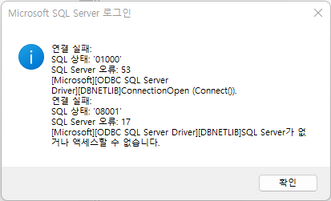
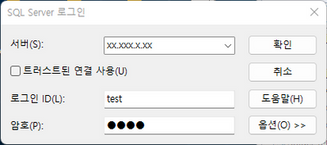
I encrypt the JSL code before deploying it since I don't want the server address to be exposed to users. However, if I cannot hide that window, encrypting the code becomes pointless :(
Accepted Solutions


- Mark as New
- Bookmark
- Subscribe
- Mute
- Subscribe to RSS Feed
- Get Direct Link
- Report Inappropriate Content
Re: How to prevent the popup of alert window ("Microsoft SQL Server Login") when SQL connection failed
These dialogs are coming from the ODBC driver manager / SQL Server interaction, and are out of JMP's control. You might try searching on SQL Server connection parameters to see if these can be suppressed. There is one article that suggests adding the following to the SQL Server connection string, but this is typically more for password prompts than error messages.
ConnectOption='SQL_DRIVER_CONNECT,SQL_DRIVER_NOPROMPT'
Brian Corcoran
JMP Development
- Mark as New
- Bookmark
- Subscribe
- Mute
- Subscribe to RSS Feed
- Get Direct Link
- Report Inappropriate Content
Re: How to prevent the popup of alert window ("Microsoft SQL Server Login") when SQL connection failed
These dialogs are coming from the ODBC driver manager / SQL Server interaction, and are out of JMP's control. You might try searching on SQL Server connection parameters to see if these can be suppressed. There is one article that suggests adding the following to the SQL Server connection string, but this is typically more for password prompts than error messages.
ConnectOption='SQL_DRIVER_CONNECT,SQL_DRIVER_NOPROMPT'
Brian Corcoran
JMP Development
Recommended Articles
- © 2026 JMP Statistical Discovery LLC. All Rights Reserved.
- Terms of Use
- Privacy Statement
- Contact Us