cancel
Showing results for 
Show  only  | Search instead for 
Did you mean: 

Discussions

Solve problems, and share tips and tricks with other JMP users.
%3CLINGO-SUB%20id%3D%22lingo-sub-343454%22%20slang%3D%22en-US%22%20mode%3D%22NONE%22%3EWie%20%C3%A4ndere%20ich%20die%20gr%C3%BCne%20Farbe%20und%20alle%20JMP-Diagramme%20dauerhaft%3F%3C%2FLINGO-SUB%3E%3CLINGO-BODY%20id%3D%22lingo-body-343454%22%20slang%3D%22en-US%22%20mode%3D%22NONE%22%3E%3CP%3EHallo%2C%3C%2FP%3E%3CP%3E%26nbsp%3B%3C%2FP%3E%3CP%3EStandardm%C3%A4%C3%9Fig%20verwenden%20viele%20Diagramme%20in%20jmp%20(insbesondere%20im%20Graph%20Builder)%20eine%20gr%C3%BCne%20Farbe%2C%20was%20mir%20eindeutig%20nicht%20gef%C3%A4llt.%20Ich%20kann%20die%20Farbe%20oder%20jedes%20Diagramm%20%C3%A4ndern%2C%20aber%20das%20ist%20nicht%20sehr%20praktisch.%20Ich%20kenne%20Preferences%20-%26gt%3B%20Styles%2C%20Preferences%20-%26gt%3B%20Style%2C%20Preferences%20-%26gt%3B%20Platforms%2C%20aber%20ich%20finde%20keine%20M%C3%B6glichkeit%2C%20diese%20Farbe%20zu%20%C3%A4ndern%20...%20Ich%20habe%20diese%20Frage%20in%20der%20Vergangenheit%20gestellt%2C%20ohne%20eine%20Antwort%20zu%20erhalten.%20Wirklich%2C%20eine%20Software%20wie%20JMP%20kann%20so%20viele%20Dinge%20tun%2C%20aber%20nicht%20die%20Pr%C3%A4ferenz%20der%20in%20allen%20Diagrammen%20verwendeten%20Standardfarbe%20%C3%A4ndern%3F%3C%2FP%3E%3CP%3EVielen%20Dank%20f%C3%BCr%20jede%20Hilfe.%20F.%3C%2FP%3E%3C%2FLINGO-BODY%3E%3CLINGO-LABS%20id%3D%22lingo-labs-343454%22%20slang%3D%22en-US%22%20mode%3D%22NONE%22%3E%3CLINGO-LABEL%3EMassenanpassung%3C%2FLINGO-LABEL%3E%3C%2FLINGO-LABS%3E%3CLINGO-SUB%20id%3D%22lingo-sub-343549%22%20slang%3D%22en-US%22%20mode%3D%22NONE%22%3EBetreff%3A%20Wie%20kann%20ich%20die%20gr%C3%BCne%20Farbe%20und%20alle%20JMP-Diagramme%20dauerhaft%20%C3%A4ndern%3F%3C%2FLINGO-SUB%3E%3CLINGO-BODY%20id%3D%22lingo-body-343549%22%20slang%3D%22en-US%22%20mode%3D%22NONE%22%3E%3CP%3EMein%20Fehler%2C%20ich%20habe%20das%20JSL-Fragment%20ausprobiert%20und%20es%20funktioniert%20f%C3%BCr%20das%20Graph%20Builder-Histogramm.%20Es%20ist%20nicht%20die%20gleiche%20Pr%C3%A4ferenz%20wie%20die%20im%20Vertrieb%2C%20wie%20ich%20dachte.%20Entschuldigung.%3C%2FP%3E%3C%2FLINGO-BODY%3E%3CLINGO-SUB%20id%3D%22lingo-sub-343548%22%20slang%3D%22en-US%22%20mode%3D%22NONE%22%3EBetreff%3A%20Wie%20kann%20ich%20die%20gr%C3%BCne%20Farbe%20und%20alle%20JMP-Diagramme%20dauerhaft%20%C3%A4ndern%3F%3C%2FLINGO-SUB%3E%3CLINGO-BODY%20id%3D%22lingo-body-343548%22%20slang%3D%22en-US%22%20mode%3D%22NONE%22%3E%3CP%3ESie%20k%C3%B6nnen%20das%20Bedienfeld%20%E2%80%9EEinstellungen%E2%80%9C%20verwenden%2C%20um%20die%20Farbe%20des%20Verteilungshistogramms%20zu%20%C3%A4ndern.%3C%2FP%3E%0A%3CP%3E%26nbsp%3B%3C%2FP%3E%0A%3CP%3EDies%20hat%20jedoch%20keinen%20Einfluss%20auf%20die%20Farbe%20des%20Histogramms%20im%20Graph%20Builder.%3C%2FP%3E%0A%3CP%3E%26nbsp%3B%3C%2FP%3E%3C%2FLINGO-BODY%3E%3CLINGO-SUB%20id%3D%22lingo-sub-343547%22%20slang%3D%22en-US%22%20mode%3D%22NONE%22%3EBetreff%3A%20Wie%20kann%20ich%20die%20gr%C3%BCne%20Farbe%20und%20alle%20JMP-Diagramme%20dauerhaft%20%C3%A4ndern%3F%3C%2FLINGO-SUB%3E%3CLINGO-BODY%20id%3D%22lingo-body-343547%22%20slang%3D%22en-US%22%20mode%3D%22NONE%22%3EIch%20suchte%20nach%20einer%20L%C3%B6sung%2C%20um%20die%20Farbe%20dauerhaft%20zu%20%C3%A4ndern%2C%20nicht%20f%C3%BCr%20ein%20einzelnes%20Diagramm.%20Die%20L%C3%B6sung%20wurde%20gefunden%20(siehe%20Diskussion)%2C%20erfordert%20jedoch%20ein%20JSL-Skript.%3CBR%20%2F%3E%20Danke%20!%3C%2FLINGO-BODY%3E%3CLINGO-SUB%20id%3D%22lingo-sub-343528%22%20slang%3D%22en-US%22%20mode%3D%22NONE%22%3EBetreff%3A%20Wie%20kann%20ich%20die%20gr%C3%BCne%20Farbe%20und%20alle%20JMP-Diagramme%20dauerhaft%20%C3%A4ndern%3F%3C%2FLINGO-SUB%3E%3CLINGO-BODY%20id%3D%22lingo-body-343528%22%20slang%3D%22en-US%22%20mode%3D%22NONE%22%3EErledigt%20!%3C%2FLINGO-BODY%3E%3CLINGO-SUB%20id%3D%22lingo-sub-343526%22%20slang%3D%22en-US%22%20mode%3D%22NONE%22%3EBetreff%3A%20Wie%20kann%20ich%20die%20gr%C3%BCne%20Farbe%20und%20alle%20JMP-Diagramme%20dauerhaft%20%C3%A4ndern%3F%3C%2FLINGO-SUB%3E%3CLINGO-BODY%20id%3D%22lingo-body-343526%22%20slang%3D%22en-US%22%20mode%3D%22NONE%22%3E%3CP%3EKlicken%20Sie%20mit%20der%20rechten%20Maustaste%20auf%20die%20Legende%20und%20w%C3%A4hlen%20Sie%20%E2%80%9EF%C3%BCllfarbe%E2%80%9C%2C%20um%20die%20Farbe%20des%20Histogramms%20zu%20%C3%A4ndern%3C%2FP%3E%0A%3CP%3E%3CSPAN%20class%3D%22lia-inline-image-display-wrapper%20lia-image-align-inline%22%20image-alt%3D%22histcolor.PNG%22%20style%3D%22width%3A%20622px%3B%22%3E%3CSPAN%20class%3D%22lia-inline-image-display-wrapper%22%20image-alt%3D%22histcolor.PNG%22%20style%3D%22width%3A%20622px%3B%22%3E%3Cspan%20class%3D%22lia-inline-image-display-wrapper%22%20image-alt%3D%22histcolor.PNG%22%20style%3D%22width%3A%20622px%3B%22%3E%3Cimg%20src%3D%22https%3A%2F%2Fcommunity.jmp.com%2Ft5%2Fimage%2Fserverpage%2Fimage-id%2F29056i2E77C3B09E60FF92%2Fimage-size%2Flarge%3Fv%3Dv2%26amp%3Bpx%3D999%22%20role%3D%22button%22%20title%3D%22histcolor.PNG%22%20alt%3D%22histcolor.PNG%22%20%2F%3E%3C%2Fspan%3E%3C%2FSPAN%3E%3C%2FSPAN%3E%3C%2FP%3E%3C%2FLINGO-BODY%3E%3CLINGO-SUB%20id%3D%22lingo-sub-343524%22%20slang%3D%22en-US%22%20mode%3D%22NONE%22%3EBetreff%3A%20Wie%20kann%20ich%20die%20gr%C3%BCne%20Farbe%20und%20alle%20JMP-Diagramme%20dauerhaft%20%C3%A4ndern%3F%3C%2FLINGO-SUB%3E%3CLINGO-BODY%20id%3D%22lingo-body-343524%22%20slang%3D%22en-US%22%20mode%3D%22NONE%22%3E%3CP%3EIch%20empfehle%2C%20dies%20zur%20JMP-Wunschliste%20hinzuzuf%C3%BCgen%2C%20damit%20es%20nachverfolgt%20werden%20kann%20und%20andere%20Benutzer%20dar%C3%BCber%20abstimmen%20k%C3%B6nnen.%3C%2FP%3E%3C%2FLINGO-BODY%3E%3CLINGO-SUB%20id%3D%22lingo-sub-343521%22%20slang%3D%22en-US%22%20mode%3D%22NONE%22%3EBetreff%3A%20Wie%20kann%20ich%20die%20gr%C3%BCne%20Farbe%20und%20alle%20JMP-Diagramme%20dauerhaft%20%C3%A4ndern%3F%3C%2FLINGO-SUB%3E%3CLINGO-BODY%20id%3D%22lingo-body-343521%22%20slang%3D%22en-US%22%20mode%3D%22NONE%22%3EJa%20!%20Das%20funktioniert%20!%20Es%20gibt%20tausend%20Optionen%20in%20den%20Einstellungen%2C%20aber%20nicht%20diese!%20Es%20scheint%2C%20als%20h%C3%A4tten%20sie%20das%20einfach%20vergessen%20...%20Danke%20!%3C%2FLINGO-BODY%3E%3CLINGO-SUB%20id%3D%22lingo-sub-343520%22%20slang%3D%22en-US%22%20mode%3D%22NONE%22%3EBetreff%3A%20Wie%20kann%20ich%20die%20gr%C3%BCne%20Farbe%20und%20alle%20JMP-Diagramme%20dauerhaft%20%C3%A4ndern%3F%3C%2FLINGO-SUB%3E%3CLINGO-BODY%20id%3D%22lingo-body-343520%22%20slang%3D%22en-US%22%20mode%3D%22NONE%22%3E%3CP%3EAh%2C%3CEM%3E%20Das%3C%2FEM%3E%20Farbe%20gr%C3%BCn.Ich%20wei%C3%9F%20nicht%2C%20wie%20ich%20das%20im%20Einstellungsdialog%20finde%2C%20aber%20ich%20versuche%2C%20es%20in%20einem%20JSL-Skript%20auszuf%C3%BChren%3A%3C%2FP%3E%3CP%3E%26nbsp%3B%3C%2FP%3E%3CPRE%3E%3CCODE%20class%3D%22%20language-jsl%22%3EPreferences(%20Histogram%20Color(%20blue%20)%20)%3B%3C%2FCODE%3E%3C%2FPRE%3E%3C%2FLINGO-BODY%3E%3CLINGO-SUB%20id%3D%22lingo-sub-343519%22%20slang%3D%22en-US%22%20mode%3D%22NONE%22%3EBetreff%3A%20Wie%20kann%20ich%20die%20gr%C3%BCne%20Farbe%20und%20alle%20JMP-Diagramme%20dauerhaft%20%C3%A4ndern%3F%3C%2FLINGO-SUB%3E%3CLINGO-BODY%20id%3D%22lingo-body-343519%22%20slang%3D%22en-US%22%20mode%3D%22NONE%22%3E%3CP%3EVielen%20Dank%20f%C3%BCr%20Ihre%20Antwort%2C%20aber%20das%20ist%20nicht%20die%20L%C3%B6sung.%20Mit%20diesem%20Bedienfeld%20k%C3%B6nnen%20Sie%20beispielsweise%20die%20Hintergrundfarbe%20eines%20Diagramms%20oder%20die%20Hintergrundfarbe%20eines%20Fensters%20%C3%A4ndern.%20Das%20funktioniert%20und%20wirkt%20sich%20auf%20den%20Graph%20Builder%20aus%20(ich%20habe%20es%20versucht%2C%20siehe%20beigef%C3%BCgtes%20Bild)%2C%20aber%20auf%20die%20gr%C3%BCne%20Farbe%20des%20Histogramms.%3C%2FP%3E%3C%2FLINGO-BODY%3E%3CLINGO-SUB%20id%3D%22lingo-sub-343499%22%20slang%3D%22en-US%22%20mode%3D%22NONE%22%3EBetreff%3A%20Wie%20kann%20ich%20die%20gr%C3%BCne%20Farbe%20und%20alle%20JMP-Diagramme%20dauerhaft%20%C3%A4ndern%3F%3C%2FLINGO-SUB%3E%3CLINGO-BODY%20id%3D%22lingo-body-343499%22%20slang%3D%22en-US%22%20mode%3D%22NONE%22%3EVielen%20Dank%20f%C3%BCr%20Ihre%20Antwort%2C%20aber%20ich%20glaube%20nicht%2C%20dass%20dies%20die%20L%C3%B6sung%20ist%20(es%20sei%20denn%2C%20ich%20%C3%BCbersehe%20etwas).%20Dies%20ist%20ein%20Farbthema%20zur%20Darstellung%20verschiedener%20Werte%20einer%20kategorialen%20Variablen.%20Ich%20habe%20unter%20%E2%80%9EEinstellungen%E2%80%9C%20-%26gt%3B%20%E2%80%9EPlattformen%E2%80%9C%20-%26gt%3B%20%E2%80%9EVerteilungen%E2%80%9C%20herausgefunden%2C%20wie%20man%20den%20Standardwert%20des%20Histogramms%20%C3%A4ndern%20kann%2C%20aber%20das%20ist%20nicht%20derselbe%20Wert%2C%20der%20im%20Diagrammersteller%20verwendet%20wird.%20%3A(%3C%2Fimg%3E%3C%2FLINGO-BODY%3E%3CLINGO-SUB%20id%3D%22lingo-sub-343497%22%20slang%3D%22en-US%22%20mode%3D%22NONE%22%3EBetreff%3A%20Wie%20kann%20ich%20die%20gr%C3%BCne%20Farbe%20und%20alle%20JMP-Diagramme%20dauerhaft%20%C3%A4ndern%3F%3C%2FLINGO-SUB%3E%3CLINGO-BODY%20id%3D%22lingo-body-343497%22%20slang%3D%22en-US%22%20mode%3D%22NONE%22%3E%3CP%3E%3CSPAN%20class%3D%22lia-inline-image-display-wrapper%20lia-image-align-inline%22%20image-alt%3D%22mlo1_0-1608566837579.png%22%20style%3D%22width%3A%20400px%3B%22%3E%3CSPAN%20class%3D%22lia-inline-image-display-wrapper%22%20image-alt%3D%22mlo1_0-1608566837579.png%22%20style%3D%22width%3A%20400px%3B%22%3E%3Cspan%20class%3D%22lia-inline-image-display-wrapper%22%20image-alt%3D%22mlo1_0-1608566837579.png%22%20style%3D%22width%3A%20400px%3B%22%3E%3Cimg%20src%3D%22https%3A%2F%2Fcommunity.jmp.com%2Ft5%2Fimage%2Fserverpage%2Fimage-id%2F29054i3B77486DDC9DC47B%2Fimage-size%2Fmedium%3Fv%3Dv2%26amp%3Bpx%3D400%22%20role%3D%22button%22%20title%3D%22mlo1_0-1608566837579.png%22%20alt%3D%22mlo1_0-1608566837579.png%22%20%2F%3E%3C%2Fspan%3E%3C%2FSPAN%3E%3C%2FSPAN%3E%3C%2FP%3E%3CP%3EDie%20Hintergrundfarbe%20des%20Diagramms%20und%20des%20Fensters%20sollte%20den%20Zweck%20erf%C3%BCllen%3C%2FP%3E%3C%2FLINGO-BODY%3E%3CLINGO-SUB%20id%3D%22lingo-sub-343475%22%20slang%3D%22en-US%22%20mode%3D%22NONE%22%3EBetreff%3A%20Wie%20kann%20ich%20die%20gr%C3%BCne%20Farbe%20und%20alle%20JMP-Diagramme%20dauerhaft%20%C3%A4ndern%3F%3C%2FLINGO-SUB%3E%3CLINGO-BODY%20id%3D%22lingo-body-343475%22%20slang%3D%22en-US%22%20mode%3D%22NONE%22%3E%3CP%3EW%C3%BCrden%20Einstellungen%20%26gt%3B%20Diagramme%20%26gt%3B%20Farbthemen%20(insbesondere%20kategorisch)%20helfen%3F%3C%2FP%3E%3C%2FLINGO-BODY%3E
Choose Language Hide Translation Bar
Fabrice_L
Level II

How to permanently change the green color and all JMP graphs ?

Hi,


By default, many graphs in jmp (particularly in the graph builder) use a green color, which, I clearly do not like. I can change the color or each graph, but this is not very practical. I know Preferences -> Styles, Preferences -> Style, Preferences -> Platforms, but I can not find a way to change this color... I have asked this question in the past, with no answer. Really, a software like JMP can do so many things but can not change the preference of the default color used in all graphs ? 

Thanks for any help. F.

1 ACCEPTED SOLUTION

Accepted Solutions
ih
Super User (Alumni) ih
Super User (Alumni)

Re: How to permanently change the green color and all JMP graphs ?

Ah, that color green.  I don't know how to find this in the preferences dialog, but trying running this in a JSL script:


Preferences( Histogram Color( blue ) );

View solution in original post

12 REPLIES 12
ih
Super User (Alumni) ih
Super User (Alumni)

Re: How to permanently change the green color and all JMP graphs ?

Would Preferences > Graphs > Color Themes (specifically categorical) help?

Fabrice_L
Level II

Re: How to permanently change the green color and all JMP graphs ?

Thanks for your answer, but I don't think this is the solution (unless I miss something). This is a the color theme to represent different values of a categorical variable. I have found in Preferences -> Platforms -> Distributions how to change the default value of the histogram, but this is not the same value used in the graph builder. :(
ih
Super User (Alumni) ih
Super User (Alumni)

Re: How to permanently change the green color and all JMP graphs ?

Ah, that color green.  I don't know how to find this in the preferences dialog, but trying running this in a JSL script:


Preferences( Histogram Color( blue ) );
Fabrice_L
Level II

Re: How to permanently change the green color and all JMP graphs ?

Yeah ! This works ! There is a thousand of options ins the preferences, but not this one ! It seems they have just forgotten this one... Thanks !
nascif_jmp
Level VI

Re: How to permanently change the green color and all JMP graphs ?

I recommend adding this to the JMP Wish List so that it can be tracked and other users can vote on it.

Fabrice_L
Level II

Re: How to permanently change the green color and all JMP graphs ?

DOne !
mlo1
Level IV

Re: How to permanently change the green color and all JMP graphs ?

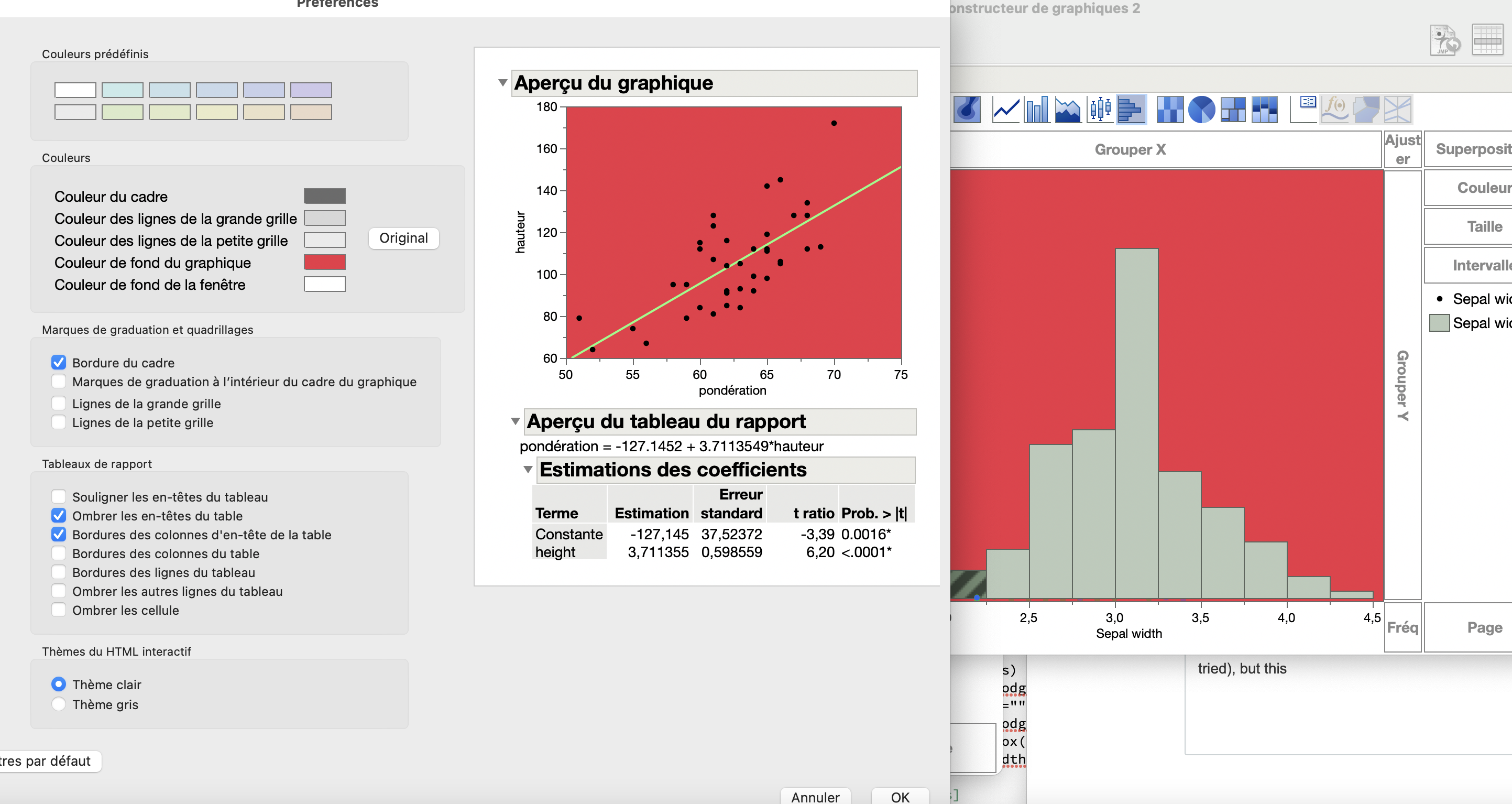
mlo1_0-1608566837579.png

The Graph and Window Background Colour should do the job

Fabrice_L
Level II

Re: How to permanently change the green color and all JMP graphs ?

Thanks for your answer, but this is not the solution. This panel permits to change (for example) the color of the background of a graph, or the color of the background of the window; this works and affect the graph builder (I've tried, see attached image), but the green color of the histogram. 

txnelson
Super User

Re: How to permanently change the green color and all JMP graphs ?

Right click on the legend and select Fill Color to change the color of the Historgram

histcolor.PNG

Jim

Recommended Articles