cancel
Showing results for 
Show  only  | Search instead for 
Did you mean: 
  • Don’t miss your chance to experience Discovery Summit Europe at our best available rate! Early bird registration through 31 Oct.
  • Graph Builder Toolbar streamlines interactive graphing. Creates shortcuts on Report and GraphBuilder Helpers toolbars. Download and install the extension.
  • JMP will suspend normal business operations for our Rest and Recharge Day on Friday, October 2, 2026.
    Regular business hours will resume on Monday, October 5, 2026.

Discussions

Solve problems, and share tips and tricks with other JMP users.
Choose Language Hide Translation Bar
UserID16644
Level V

How to loop images to append and save in ppt slides with different outline box title?

Hi all


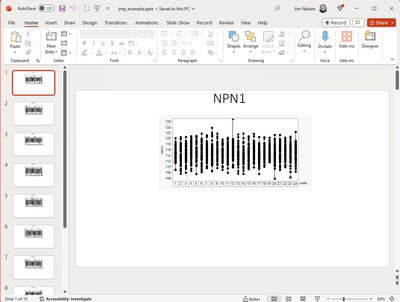
I have created a function for variability plots with different parameters. My question is, can I append the images and save them as PowerPoint slides with their respective names in the outline box? I am currently doing this individually and is running this on JMP 15

1 REPLY 1
txnelson
Super User

Re: How to loop images to append and save in ppt slides with different outline box title?

Here is a simple example using JMP 15 syntax

Names Default To Here( 1 );

dt = 
// Open Data Table: semiconductor capability.jmp
// → Data Table( "semiconductor capability" )
Open( "$SAMPLE_DATA/semiconductor capability.jmp" );

// Get a list of all of the parameter columns
colList = dt << get column names( continuous, string );

// Use only the first 10 columns for this example
Remove From( colList, 11, Length( colList ) - 10 );

// Create a Journal to be used for the creation of the .ppt
jr = New Window( "The Journal", <<journal, vlb = V List Box() );

// Loop across the columns and create the Variability Charts and 
// place them into the journal with new names
For( i = 1, i <= Length( colList ), i++,
	vc = Variability Chart( invisible,
		Y( Column( colList[i] ) ),
		X( :wafer ),
		Model( "Main Effect" ),
		Std Dev Chart( 0 )
	);
	Report( vc )[Outline Box( 2 )] << set title( colList[i] );
	vlb << append( Report( vc )[Outline Box( 2 )] );
	vc << close window;
);

// Save the journal to a PowerPoint
jr << Save Presentation( "$TEMP/jmp_example.pptx" );

// Close the Journal
jr << close window;

// Open the PowerPoint document
Open( "$TEMP/jmp_example.pptx" );
txnelson_0-1709102439460.png


Jim

Recommended Articles