- JMP will suspend normal business operations for our Winter Holiday beginning on Wednesday, Dec. 24, 2025, at 5:00 p.m. ET (2:00 p.m. ET for JMP Accounts Receivable).
Regular business hours will resume at 9:00 a.m. EST on Friday, Jan. 2, 2026. - We’re retiring the File Exchange at the end of this year. The JMP Marketplace is now your destination for add-ins and extensions.
- Subscribe to RSS Feed
- Mark Topic as New
- Mark Topic as Read
- Float this Topic for Current User
- Bookmark
- Subscribe
- Mute
- Printer Friendly Page
Discussions
Solve problems, and share tips and tricks with other JMP users.- JMP User Community
- :
- Discussions
- :
- How to get pointer to existing Jrn file

- Mark as New
- Bookmark
- Subscribe
- Mute
- Subscribe to RSS Feed
- Get Direct Link
- Report Inappropriate Content
How to get pointer to existing Jrn file
Hi -
How can I open an existing journal file which is closed in a new Jmp instance and append a new journal to it.
I wrote following JSL code but it is not working as expected
nw_existing = Open( "C:\Existing.jrn" );
nw = New Window( "Final", container = V List Box() );
nw << append( nw_existing );
I am unable to find a way to get reference to existing journal. Appreciate any pointers.
Thanks!
- Tags:
- windows
Accepted Solutions


- Mark as New
- Bookmark
- Subscribe
- Mute
- Subscribe to RSS Feed
- Get Direct Link
- Report Inappropriate Content
Re: How to get pointer to existing Jrn file
I changed
//create new window
nw = New Window( "Final" );
into making it a journal
//create new window
nw = New Window( "Final",<<journal );
and both of the saved journal entries are properly copied into the new journal
Names Default To Here( 1 );
dt = Open( "$SAMPLE_DATA/Big Class.jmp" );

j1 = New Window( "Journal_1",
    <<journal,
    dt << bivariate( x( :weight ), y( :height ) )
);
Current Journal() << save journal( "$TEMP\Existing.jrn" );
Current Journal() << close window();

//Open closed journal
nw_existing = Open( "$TEMP\Existing.jrn" );

//Create New journal
nw2 = New Window( "Journal_2", <<journal, dt << oneway( x( :sex ), y( :height ) ) );
Current Journal() << save journal( "$TEMP\New.jrn" );

//create new window
nw = New Window( "Final",<<journal );

//add older jrn first, followed by recent one
nw << append( nw_existing );
//nw << append( Report(nw_existing)); // does not make any difference
nw << append( nw2 );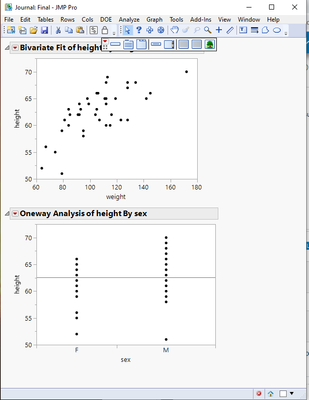

- Mark as New
- Bookmark
- Subscribe
- Mute
- Subscribe to RSS Feed
- Get Direct Link
- Report Inappropriate Content
Re: How to get pointer to existing Jrn file
Hi,
I tried to replicate your problem in JMP 14.1 on Windows but I cannot reproduce the issue. Indeed, upon running your short script, I end up with a JMP window entitled "Final" that contains all the elements of the Existing.jrn journal, as expected. However, it sounds like you would like to append some outputs to the Existing.jrn journal in which case, you just need to call the [analysis report xxx] << Journal command after the Open statement.
If I'm still off, could you describe in more details how your script is not yielding the expected result?
Best,
TS
- Mark as New
- Bookmark
- Subscribe
- Mute
- Subscribe to RSS Feed
- Get Direct Link
- Report Inappropriate Content
Re: How to get pointer to existing Jrn file
Hi Thierry -
I am using Jmp 12.2.0 on Windows. Wondering if there is a difference due to Jmp version.
I get empty "Final" journal with previous code.
Including modified code below. Expecting two plots in "Final". Only get one
Names Default To Here( 1 );
dt = Open( "$SAMPLE_DATA/Big Class.jmp" );

j1 = New Window( "Journal_1",
    <<journal,
    dt << bivariate( x( :weight ), y( :height ) )
);
Current Journal() << save journal( "C:\logs\Existing.jrn" );
Current Journal() << close window();

//Open closed journal
nw_existing = Open( "C:\logs\Existing.jrn" );

//Create New journal
nw2 = New Window( "Journal_2", <<journal, dt << oneway( x( :sex ), y( :height ) ) );
Current Journal() << save journal( "C:\logs\New.jrn" );

//create new window
nw = New Window( "Final" );

//add older jrn first, followed by recent one
nw << append( nw_existing );
//nw << append( Report(nw_existing)); // does not make any difference
nw << append( nw2 );
I could not figure out how to incorporate your suggestion about analysis report xxx << journal. Appreciate if you could show the usage in this code. Thank you.
- Mark as New
- Bookmark
- Subscribe
- Mute
- Subscribe to RSS Feed
- Get Direct Link
- Report Inappropriate Content
Re: How to get pointer to existing Jrn file
Hi,
One thing that comes immediately to mind is that your call to nw = New Window ("Final") should include a contained such as a V LIST BOX ().
And sorry, it looks like I inadvertently clicked on the Select as Solution which was not my intent.
Best,
TS
- Mark as New
- Bookmark
- Subscribe
- Mute
- Subscribe to RSS Feed
- Get Direct Link
- Report Inappropriate Content
Re: How to get pointer to existing Jrn file
Not sure why the question above is marked as solution now. Is there any way to remove the 'solution' tag?
- Mark as New
- Bookmark
- Subscribe
- Mute
- Subscribe to RSS Feed
- Get Direct Link
- Report Inappropriate Content
Re: How to get pointer to existing Jrn file
Let me look into it. Sorry for the confusion
- Mark as New
- Bookmark
- Subscribe
- Mute
- Subscribe to RSS Feed
- Get Direct Link
- Report Inappropriate Content
Re: How to get pointer to existing Jrn file
I changed
//create new window
nw = New Window( "Final" );
into making it a journal
//create new window
nw = New Window( "Final",<<journal );
and both of the saved journal entries are properly copied into the new journal
Names Default To Here( 1 );
dt = Open( "$SAMPLE_DATA/Big Class.jmp" );

j1 = New Window( "Journal_1",
    <<journal,
    dt << bivariate( x( :weight ), y( :height ) )
);
Current Journal() << save journal( "$TEMP\Existing.jrn" );
Current Journal() << close window();

//Open closed journal
nw_existing = Open( "$TEMP\Existing.jrn" );

//Create New journal
nw2 = New Window( "Journal_2", <<journal, dt << oneway( x( :sex ), y( :height ) ) );
Current Journal() << save journal( "$TEMP\New.jrn" );

//create new window
nw = New Window( "Final",<<journal );

//add older jrn first, followed by recent one
nw << append( nw_existing );
//nw << append( Report(nw_existing)); // does not make any difference
nw << append( nw2 );
- Mark as New
- Bookmark
- Subscribe
- Mute
- Subscribe to RSS Feed
- Get Direct Link
- Report Inappropriate Content
Re: How to get pointer to existing Jrn file
Thanks a bunch, txnelson!
On Jmp 12.2, it did not work as is. Opening closed jrn via Open and appending new distribution to it worked.
Recommended Articles
- © 2025 JMP Statistical Discovery LLC. All Rights Reserved.
- Terms of Use
- Privacy Statement
- Contact Us