- Don’t miss your chance to experience Discovery Summit Europe at our best available rate! Early bird registration through 31 Oct.
- Graph Builder Toolbar streamlines interactive graphing. Creates shortcuts on Report and GraphBuilder Helpers toolbars. Download and install the extension.
- JMP will suspend normal business operations for our Rest and Recharge Day on Friday, October 2, 2026.
Regular business hours will resume on Monday, October 5, 2026.
- Subscribe to RSS Feed
- Mark Topic as New
- Mark Topic as Read
- Float this Topic for Current User
- Bookmark
- Subscribe
- Mute
- Printer Friendly Page
Discussions
Solve problems, and share tips and tricks with other JMP users.- User Community
- :
- Discussions
- :
- Re: How to get entire row values using JSL?

- Mark as New
- Bookmark
- Subscribe
- Mute
- Subscribe to RSS Feed
- Get Direct Link
- Report Inappropriate Content
How to get entire row values using JSL?
Accepted Solutions


- Mark as New
- Bookmark
- Subscribe
- Mute
- Subscribe to RSS Feed
- Get Direct Link
- Report Inappropriate Content
Re: How to get entire row values using JSL?
In JMP 13 you can use data table subscripting
dt = Open( "$sample_data/big class.jmp" );
row5 = dt[5, 0];
Show( row5 );
row5 = {"LILLIE", 12, "F", 52, 64};

- Mark as New
- Bookmark
- Subscribe
- Mute
- Subscribe to RSS Feed
- Get Direct Link
- Report Inappropriate Content
Re: How to get entire row values using JSL?
If you only have numeric columns, you could exploit 'GetAsMatrix'. If you have character and numeric columns, you could use 'GetAllColumnsAsMatrix', but then you still have to handle the coded character values. So, in the latter case, it might be simpler to just define a function:
NamesDefaultToHere(1);
dt = Open("$SAMPLE_DATA/Big Class.jmp");

getRow =
Function({tbl, rn}, {DefaultLocal},
	rowContents = {};
	for(c=1, c<=NCols(dt), c++,
		InsertInto(rowContents, Column(tbl, c)[rn]);
	);
	rowContents;
);

Print(getRow(dt, 5));
- Mark as New
- Bookmark
- Subscribe
- Mute
- Subscribe to RSS Feed
- Get Direct Link
- Report Inappropriate Content
Re: How to get entire row values using JSL?
In JMP 13 you can use data table subscripting
dt = Open( "$sample_data/big class.jmp" );
row5 = dt[5, 0];
Show( row5 );
row5 = {"LILLIE", 12, "F", 52, 64};
- Mark as New
- Bookmark
- Subscribe
- Mute
- Subscribe to RSS Feed
- Get Direct Link
- Report Inappropriate Content
Re: How to get entire row values using JSL?
Nice!
Note how data table subscripting gives either a list or matrix, as needed:
NamesDefaultToHere(1);
dt = Open("$SAMPLE_DATA/Big Class.jmp");
dt << colorByColumn(:sex);
r4Vals = dt[4,0];
Print(r4Vals);
dt << deleteColumns({:name, :sex});
r4Vals = dt[4,0];
Print(r4Vals);
rsc = dt << NewColumn("Row States", Row State);
rsc << copyFromRowStates;
r4Vals = dt[4,0];
Print(r4Vals);
dt << NewColumn("Expression", Expression);
r4Vals = dt[4,0];
Print(r4Vals);
- Mark as New
- Bookmark
- Subscribe
- Mute
- Subscribe to RSS Feed
- Get Direct Link
- Report Inappropriate Content
Re: How to get entire row values using JSL?
Subscripting data tables is very handy but is it possible to use the "by" function in this (for example by( :age )) to pull all the names of people who have the same age into the column?
Here is an example:
I'd like to take all the names where the age is the same and concatenate them in a column.
One of the common next steps is then summarizing other columns by those concatenated names.
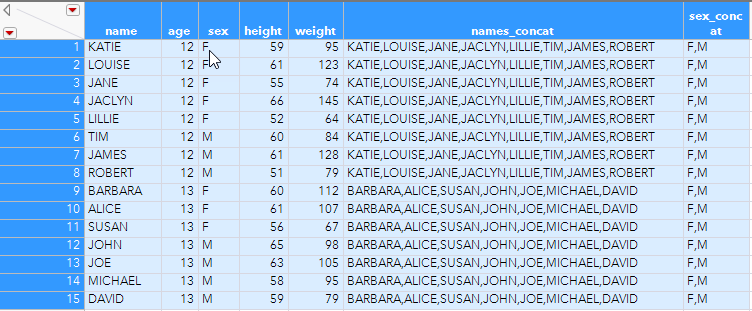

I've dug through and tried multiple approaches and I think I'm just missing something simple, but what I'm hoping is that there is a very straightforward way to do this using either subscription or something like
dt:name << get values(by(age)) and then either put that in a column or use it in a script.
I tried this as a formula column:
dt[Index( :first_row, :last_row ), {:name}]
And each subexpression provided the correct result to match your example
// fetch a list if character columns are involved.
// notice the matrix is reversing the order
dt[ 4::2, "name"]; // {"JACLYN", "JANE", "LOUISE"}
but I'm not able to get the actual list of names {"JACLYN", "JANE", "LOUISE"} to return in the column.
Thank you for any help,
Aron
- Mark as New
- Bookmark
- Subscribe
- Mute
- Subscribe to RSS Feed
- Get Direct Link
- Report Inappropriate Content
Re: How to get entire row values using JSL?
Apparently, all I needed to do was post and I instantly found an answer.
fr = Col Minimum( Row(), :age );
lr = Col Maximum( Row(), :age );
dt:name[Index( fr, lr )];
//returns {"KATIE", "LOUISE", "JANE", "JACLYN", "LILLIE", "TIM", "JAMES", "ROBERT"}
This is exactly what I was looking for.
Using the col min and max with row is pretty simple, so that works.
However, I am curious if it's possible to use a by(age) argument in the subscript directly, I've used it in Make Validation Column and it makes it so much easier to do.
Thank you,
Aron
Recommended Articles
- © 2026 JMP Statistical Discovery LLC. All Rights Reserved.
- Terms of Use
- Privacy Statement
- Contact Us