- JMP will suspend normal business operations for our Winter Holiday beginning on Wednesday, Dec. 24, 2025, at 5:00 p.m. ET (2:00 p.m. ET for JMP Accounts Receivable).
Regular business hours will resume at 9:00 a.m. EST on Friday, Jan. 2, 2026. - We’re retiring the File Exchange at the end of this year. The JMP Marketplace is now your destination for add-ins and extensions.
- Subscribe to RSS Feed
- Mark Topic as New
- Mark Topic as Read
- Float this Topic for Current User
- Bookmark
- Subscribe
- Mute
- Printer Friendly Page
Discussions
Solve problems, and share tips and tricks with other JMP users.- JMP User Community
- :
- Discussions
- :
- How to get Pareto/Histogram plot for failing parameters when using Process Capab...

- Mark as New
- Bookmark
- Subscribe
- Mute
- Subscribe to RSS Feed
- Get Direct Link
- Report Inappropriate Content
How to get Pareto/Histogram plot for failing parameters when using Process Capability platform?
I use the the example script below to select and color the out of spec values of each measured parameter in my test data set.
I want to create a pareto/histogram plot with measured parameter names (on x-axis) and number of fail occurrences (on y axis) per parameter and order the parameter names as decreasing with no of fails/parameter (i.e. to get a parameter fail pareto plot).
The first thing comes to mind is to get the number of selected/colored cells per parameter generated by the script below and then proceed from there. How to do this via JSL?
Process Capability(
	Process Variables( :NPN1, :PNP1, :PNP2 ),
	Moving Range Method( Average of Moving Ranges ),
	Overall Sigma Normalized Box Plots( 1 ),
	Color Out of Spec Values( 1 ),
	Select Out of Spec Values( 1 ),
	Goal Plot( 1 ),
	Capability Index Plot( 1 ),
	Process Performance Plot( 0 )
);
- Tags:
- windows
Accepted Solutions


- Mark as New
- Bookmark
- Subscribe
- Mute
- Subscribe to RSS Feed
- Get Direct Link
- Report Inappropriate Content
Re: How to get Pareto/Histogram plot for failing parameters when using Process Capability platform?
Using Process Capability might be easier as it provides Out of Spec Count and it can also color the cells
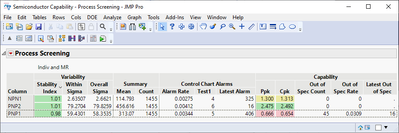
Edit:
Hide/Close platforms tables as needed
Names Default To Here(1);

dt = Open("$SAMPLE_DATA/Semiconductor Capability.jmp");

ps = dt << Process Screening(
	Process Variables(:NPN1, :PNP1, :PNP2),
	Control Chart Type("Indiv and MR"),
);
ps << Color Out of Spec Values(1); // this will also select rows and columns
dt << Clear Select << Clear Column Selection;

dt_ps = Report(ps)["Process Screening", Table Box(1)] << Make Combined Data Table;
// ps << Close Window;

gb_outofspec = dt_ps << Graph Builder(
	Size(528, 450),
	Show Control Panel(0),
	Variables(
		X(
			:Column,
			Order By(:Out of Spec Count, Descending, Order Statistic("Mean"))
		),
		Y(:Out of Spec Count)
	),
	Elements(Bar(X, Y, Legend(9), Label("Label by Value")))
);- Mark as New
- Bookmark
- Subscribe
- Mute
- Subscribe to RSS Feed
- Get Direct Link
- Report Inappropriate Content
Re: How to get Pareto/Histogram plot for failing parameters when using Process Capability platform?
Using Process Capability might be easier as it provides Out of Spec Count and it can also color the cells
Edit:
Hide/Close platforms tables as needed
Names Default To Here(1);

dt = Open("$SAMPLE_DATA/Semiconductor Capability.jmp");

ps = dt << Process Screening(
	Process Variables(:NPN1, :PNP1, :PNP2),
	Control Chart Type("Indiv and MR"),
);
ps << Color Out of Spec Values(1); // this will also select rows and columns
dt << Clear Select << Clear Column Selection;

dt_ps = Report(ps)["Process Screening", Table Box(1)] << Make Combined Data Table;
// ps << Close Window;

gb_outofspec = dt_ps << Graph Builder(
	Size(528, 450),
	Show Control Panel(0),
	Variables(
		X(
			:Column,
			Order By(:Out of Spec Count, Descending, Order Statistic("Mean"))
		),
		Y(:Out of Spec Count)
	),
	Elements(Bar(X, Y, Legend(9), Label("Label by Value")))
);
- Mark as New
- Bookmark
- Subscribe
- Mute
- Subscribe to RSS Feed
- Get Direct Link
- Report Inappropriate Content
Re: How to get Pareto/Histogram plot for failing parameters when using Process Capability platform?
Hi @Neo ,
I think going with @jthi 's suggestion to do a Process Screening might be a good way to go about getting a parameter fail pareto plot. From there, you can do a <<Make Into Data Table from the Process Screening Report, and as an example, you can do a Pareto Plot of the Out of Spec Count -- or whichever column is the one that is most interest to you.
The script below is pretty much just a direct save script to Scripting Window action at each step. A few extra things have been thrown in there, but this is essentially what you're interested in, at least as far as I understand your request.
Names Default to Here(1);

dt = Open("$SAMPLE_DATA/Semiconductor Capability.jmp");

ps = dt<<Process Screening(
	Process Variables( :NPN1, :PNP1, :PNP2, :NPN2, :PNP3 ),
	Control Chart Type( "Indiv and MR" )
);

rpt = New Window( "Semiconductor Capability - Process Screening",
	Data Table( "Semiconductor Capability" ) <<
	Process Screening(
		Process Variables( :NPN1, :PNP1, :PNP2, :NPN2, :PNP3 ),
		Control Chart Type( "Indiv and MR" )
	)
);

ps << Close Window;

pdt = rpt["Process Screening", Table Box( 1 )] << Make Into Data Table;

rpt << Close Window;

pp = pdt<<Pareto Plot( Cause( :Column ), Freq( :Out of Spec Count ) );
Hope this helps!,
DS
Recommended Articles
- © 2026 JMP Statistical Discovery LLC. All Rights Reserved.
- Terms of Use
- Privacy Statement
- Contact Us