- Image to Table JMP extension imports single or batch images as data tables. Useful to extract curves from pictures or convert image data to curve data to use in analyses like Functional Data Explorer. Download and install the extension.
- Subscribe to RSS Feed
- Mark Topic as New
- Mark Topic as Read
- Float this Topic for Current User
- Bookmark
- Subscribe
- Mute
- Printer Friendly Page
Discussions
Solve problems, and share tips and tricks with other JMP users.- User Community
- :
- Discussions
- :
- Re: How to get Col Sum of a row in a conditional statement?

- Mark as New
- Bookmark
- Subscribe
- Mute
- Subscribe to RSS Feed
- Get Direct Link
- Report Inappropriate Content
How to get Col Sum of a row in a conditional statement?
Hi all,
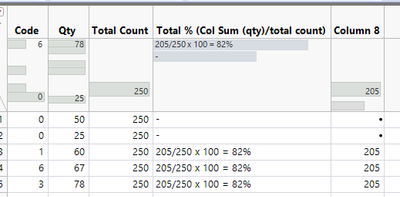
I have a column where I need to filter out some values to get the sum of columns (using Col Sum). Is it possible to get the col sum according to the condition? For example, every 0 code will be excluded from the computation:
| Code | Qty | Total Count | Total % (Col Sum (qty)/total count) |
| 0 | 50 | 250 | - |
| 0 | 25 | 250 | - |
| 1 | 60 | 250 | 205/250 x 100 = 82% |
| 6 | 67 | 250 | 205/250 x 100 = 82% |
| 3 | 78 | 250 | 205/250 x 100 = 82% |
I tried using an If statement, but the code with 0 values still gets included when using the Col Sum formula
Accepted Solutions


- Mark as New
- Bookmark
- Subscribe
- Mute
- Subscribe to RSS Feed
- Get Direct Link
- Report Inappropriate Content
Re: How to get Col Sum of a row in a conditional statement?
You need two if-statements, one to avoid writing values to Code = 0 rows and one to perform the calculation
If(Code != 0,
	Col Sum(If(:Code == 0, ., :Qty))
,
	.
);
- Mark as New
- Bookmark
- Subscribe
- Mute
- Subscribe to RSS Feed
- Get Direct Link
- Report Inappropriate Content
Re: How to get Col Sum of a row in a conditional statement?
You need two if-statements, one to avoid writing values to Code = 0 rows and one to perform the calculation
If(Code != 0,
	Col Sum(If(:Code == 0, ., :Qty))
,
	.
);

- Mark as New
- Bookmark
- Subscribe
- Mute
- Subscribe to RSS Feed
- Get Direct Link
- Report Inappropriate Content
Re: How to get Col Sum of a row in a conditional statement?
Hi @UserID16644
Conditional formula is a bit tricky in JMP.
As @jthi mentioned, you need 2 IFs.
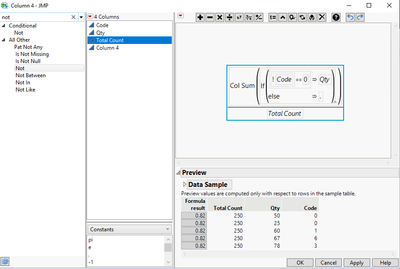
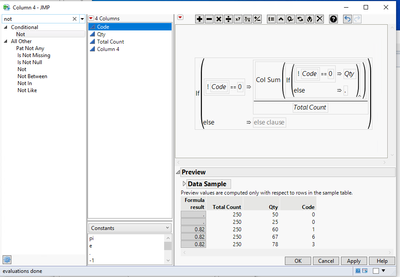
You can also add formula column as below;
-Add 1st IF = column sum if code not 0
-Add 2nd IF = display result only if code not 0
Result:
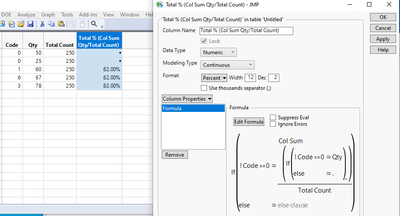
JSL Script (refer workflow builder / log)
Names Default To Here( 1 );

//Change column info: Total % (Col Sum Qty/Total Count)
Data Table( "dt1" ):Column 4 << Set Name( "Total % (Col Sum Qty/Total Count)" )
 << Set Formula(
	If( !:Code == 0,
		Col Sum( If( !:Code == 0, :Qty, . ) ) / :Total Count
	)
);

//Change column format: Total % (Col Sum Qty/Total Count)
Data Table( "dt1" ):"Total % (Col Sum Qty/Total Count)"n <<
Format( "Percent", 12, 2 );

- Mark as New
- Bookmark
- Subscribe
- Mute
- Subscribe to RSS Feed
- Get Direct Link
- Report Inappropriate Content
Re: How to get Col Sum of a row in a conditional statement?
Maybe I'm missing what you're asking, but this might do what you want with a simple Col Sum():
Col Sum( (:Code > 0) * :Qty, :Code > 0 )":Code > 0" becomes 0 or 1 depending on whether it's zero or not, multiplied times Qty gives you the number you're looking for, then grouping cases where :Code >0 separate from the Code == 0 cases.
Recommended Articles
- © 2026 JMP Statistical Discovery LLC. All Rights Reserved.
- Terms of Use
- Privacy Statement
- Contact Us