- JMP will suspend normal business operations for our Winter Holiday beginning on Wednesday, Dec. 24, 2025, at 5:00 p.m. ET (2:00 p.m. ET for JMP Accounts Receivable).
Regular business hours will resume at 9:00 a.m. EST on Friday, Jan. 2, 2026. - We’re retiring the File Exchange at the end of this year. The JMP Marketplace is now your destination for add-ins and extensions.
- Subscribe to RSS Feed
- Mark Topic as New
- Mark Topic as Read
- Float this Topic for Current User
- Bookmark
- Subscribe
- Mute
- Printer Friendly Page
Discussions
Solve problems, and share tips and tricks with other JMP users.- JMP User Community
- :
- Discussions
- :
- How to enter and pass data from List Box?

- Mark as New
- Bookmark
- Subscribe
- Mute
- Subscribe to RSS Feed
- Get Direct Link
- Report Inappropriate Content
How to enter and pass data from List Box?
Hello,
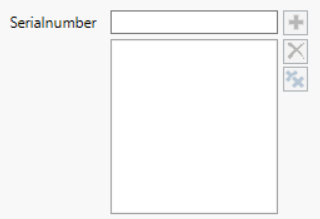
I would like to provide a list of parameters or variables from the window level (for example copied from excel) and pass this list (for example by clicking OK) further to create an another list for a SQL query. Can I do that with some type of List Box (something like in the picture below)? What other methods could be used to do that? Best regards.
Accepted Solutions


- Mark as New
- Bookmark
- Subscribe
- Mute
- Subscribe to RSS Feed
- Get Direct Link
- Report Inappropriate Content
Re: How to enter and pass data from List Box?
Below is an example. Create function (parsePaste in example) to handle the input and do modifications you want to: remove duplicates, replace row changes with something, remove duplicated separators... After pressing OK this will return one string, then you can modify the returned string to fit in to your SQL (Words() and Concat Items() as examples).
Names Default To Here(1);

parsePaste = function({tempStr}, {Default Local},
	tempStr = Regex(tempStr, "\r\n", ",", GLOBALREPLACE); //replace row changes with ,
	tempStr = Substitute(tempStr, ",,", ","); //replace double ,, with one ,
	tempStr = Regex(tempStr, ",$", "", GLOBALREPLACE); //remove , if last character
	return(tempStr);
);

win2 = New Window("Example", << Modal,
	V List Box(
		Text Box("Add Serialnumbers:"),
		teb = Text Edit Box("", << set width(200), << set nlines(3),
			<< Set Function(Function({this},
				this << set text(parsePaste(this << get text));
			))
		),
		H List Box(
			Button Box("OK", listStr = teb << get text),
			Button Box("Cancel")
		)
	)
);
show(listStr);
temp = Words(listStr, ",");
temp = "'" || Concat Items(temp, "','") ||"'";
show(temp);
- Mark as New
- Bookmark
- Subscribe
- Mute
- Subscribe to RSS Feed
- Get Direct Link
- Report Inappropriate Content
Re: How to enter and pass data from List Box?
Couple of questions/ideas to get you going:
- Do you want that user selects the interesting serial numbers from pre-created list? You could use list box
- Would you like for user to be able to copy-paste serial numbers from somewhere which will be converted to SQL-query? You could use Text Edit Box with a parsing function.
- Possibly both of above? I would most likely try to avoid this, as if the user is copy pasting values from somewhere, they can make the selection already there what they want to be included.
- Do you want to use modal?
Check Scripting Index for: Modal (how to build modal window), List Box, Text Edit Box, Concat Items (how to convert JMP list into string)
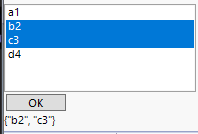
Quick example with List Box which will set text box value below OK button and print selected values as list to log when ok is pressed:
Names Default To Here(1);

serialList = {"a1", "b2", "c3", "d4"};
win2 = New Window("Example",
	V List Box(
		lb = List Box(serialList, width(200), nlines(6)),
		Button Box("OK", Show(lb << get selected); tb << Set Text(char(lb << get selected))),
		tb = Text Box("");
	)
);
- Mark as New
- Bookmark
- Subscribe
- Mute
- Subscribe to RSS Feed
- Get Direct Link
- Report Inappropriate Content
Re: How to enter and pass data from List Box?
Hello,
thank you for suggestions. I would like to be able to copy serial numbers from somewhere and then pass them further using parsing function, so the option 2 and together with modal window. I will try with Text Edit Box.
Best regards
- Mark as New
- Bookmark
- Subscribe
- Mute
- Subscribe to RSS Feed
- Get Direct Link
- Report Inappropriate Content
Re: How to enter and pass data from List Box?
Below is an example. Create function (parsePaste in example) to handle the input and do modifications you want to: remove duplicates, replace row changes with something, remove duplicated separators... After pressing OK this will return one string, then you can modify the returned string to fit in to your SQL (Words() and Concat Items() as examples).
Names Default To Here(1);

parsePaste = function({tempStr}, {Default Local},
	tempStr = Regex(tempStr, "\r\n", ",", GLOBALREPLACE); //replace row changes with ,
	tempStr = Substitute(tempStr, ",,", ","); //replace double ,, with one ,
	tempStr = Regex(tempStr, ",$", "", GLOBALREPLACE); //remove , if last character
	return(tempStr);
);

win2 = New Window("Example", << Modal,
	V List Box(
		Text Box("Add Serialnumbers:"),
		teb = Text Edit Box("", << set width(200), << set nlines(3),
			<< Set Function(Function({this},
				this << set text(parsePaste(this << get text));
			))
		),
		H List Box(
			Button Box("OK", listStr = teb << get text),
			Button Box("Cancel")
		)
	)
);
show(listStr);
temp = Words(listStr, ",");
temp = "'" || Concat Items(temp, "','") ||"'";
show(temp);
- Mark as New
- Bookmark
- Subscribe
- Mute
- Subscribe to RSS Feed
- Get Direct Link
- Report Inappropriate Content
Re: How to enter and pass data from List Box?
Hello, sorry for late response. This is exactly what I wanted to implement. Thank you very much. Best regards
Recommended Articles
- © 2026 JMP Statistical Discovery LLC. All Rights Reserved.
- Terms of Use
- Privacy Statement
- Contact Us