- Don’t miss your chance to experience Discovery Summit Europe at our best available rate! Early bird registration through 31 Oct.
- Graph Builder Toolbar streamlines interactive graphing. Creates shortcuts on Report and GraphBuilder Helpers toolbars. Download and install the extension.
- Subscribe to RSS Feed
- Mark Topic as New
- Mark Topic as Read
- Float this Topic for Current User
- Bookmark
- Subscribe
- Mute
- Printer Friendly Page
Discussions
Solve problems, and share tips and tricks with other JMP users.- User Community
- :
- Discussions
- :
- Re: How to disable JMP security warning

- Mark as New
- Bookmark
- Subscribe
- Mute
- Subscribe to RSS Feed
- Get Direct Link
- Report Inappropriate Content
How to disable JMP security warning
Hi,
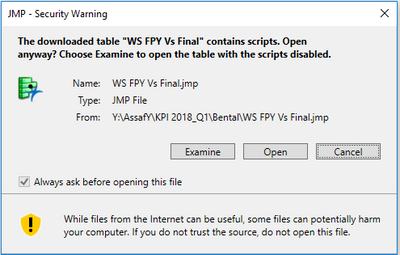
When I open files with scripts, I got "JMP security warning" with three options: Examine, Open and cancel (see attached).
The option for "always ask before opening this file" is disable.
How can I disable it and make the JMP to always open it w/o this popup?
Thanks in advance!
Assa


- Mark as New
- Bookmark
- Subscribe
- Mute
- Subscribe to RSS Feed
- Get Direct Link
- Report Inappropriate Content
Re: How to disable JMP security warning
Hi Thomas. Windows 11 still has the Internet Options utility, but for whatever reason, Microsoft has decided to hide it. I have updated the JMP Note to include instructions on how to find "Internet Options" on Windows 11.
Essentially, just open Settings and, in the search option at the top of Settings, search for internet options. Internet Options should show up.
You can find the link to the JMP Note HERE.
Please let us know if you need additional assistance.

- Mark as New
- Bookmark
- Subscribe
- Mute
- Subscribe to RSS Feed
- Get Direct Link
- Report Inappropriate Content
Re: How to disable JMP security warning
Read the suggestions in this thread, and as noted by others, my settings are largely governed by IT. I downloaded scripts from the very interesting presentation by Steve Hampton into my OneDrive. When I try to open them I get the security warning, which I cannot disable. When I paste the script into a new script and save it into the same folder, however, it opens fine. I do not find any differences between the original and the copy in the properties, see enclosed. So how come they behave differently?
Stay in the Flow With Custom Scripts and Toolbars (2022-US-30MP-1081) - JMP User Community


- Mark as New
- Bookmark
- Subscribe
- Mute
- Subscribe to RSS Feed
- Get Direct Link
- Report Inappropriate Content
Re: How to disable JMP security warning
Not sure about Win 11 or OneDrive, but the flag is exposed by the OS in Win 10 like this:
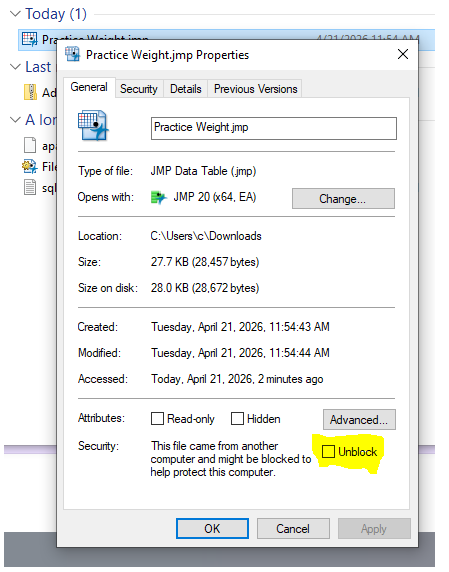
It seems odd to have to check it to unblock it, but the model is opt-in to something you might want to be careful about. JMP attempts to unblock it for you:
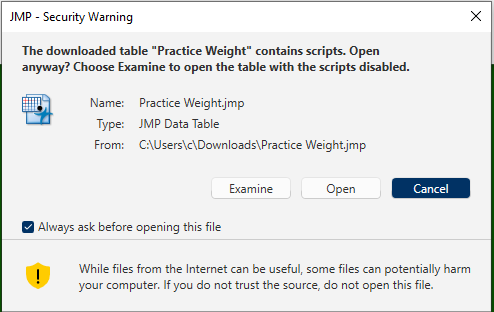
And the offer from the OS disappears.
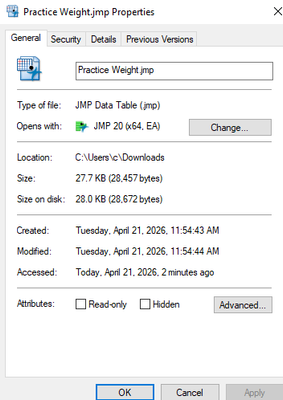
If JMP is not successful, I'll guess OneDrive is part of the issue.
The flag is set by the browser during the download when the browser notices the file is coming from a location that is not marked as trusted by your computer.
- « Previous
-
- 1
- 2
- Next »
Recommended Articles
- © 2026 JMP Statistical Discovery LLC. All Rights Reserved.
- Terms of Use
- Privacy Statement
- Contact Us