- Don’t miss your chance to experience Discovery Summit Europe at our best available rate! Early bird registration through 31 Oct.
- Graph Builder Toolbar streamlines interactive graphing. Creates shortcuts on Report and GraphBuilder Helpers toolbars. Download and install the extension.
- Subscribe to RSS Feed
- Mark Topic as New
- Mark Topic as Read
- Float this Topic for Current User
- Bookmark
- Subscribe
- Mute
- Printer Friendly Page
Discussions
Solve problems, and share tips and tricks with other JMP users.- User Community
- :
- Discussions
- :
- Re: How to define for loop with incremental date

- Mark as New
- Bookmark
- Subscribe
- Mute
- Subscribe to RSS Feed
- Get Direct Link
- Report Inappropriate Content
How to define for loop with incremental date
Hi!
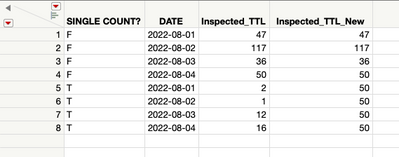
I am trying to adjust total inspection quantity per day based on the "Single Count?" column. Created a new inspection quantity column Inspected_TTL_New. If the input in this column is "F", Inspected_TTL should be same as Inspected_TTL_New. But if it is "T", Inspected_TTL_New column should be the Inspected_TTL quantity for "F" on the same day.
This is how far I got:
inspected_ttl_temp = 0;
For Each Row(
	If( :SINGLE COUNT? == "F",
		:Inspected_TTL_New = :Inspected_TTL;
		inspected_ttl_temp = :Inspected_TTL;
	,

	);
	If( :SINGLE COUNT? == "T",
		:Inspected_TTL_New = inspected_ttl_temp,

	);
);
This is what I'm trying to do:
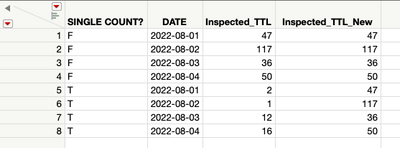
I tried to create a for loop below with incremental dates to capture the inspection quantity per each day but couldn't get it to work :\
nspected_ttl_temp = 0;
startdate = "2022-08-01";
For( i = "2022-08-01", i <= Max( :DATE ), i++,
	For Each Row(
		If( :SINGLE COUNT? == "F",
			:Inspected_TTL_New = :Inspected_TTL;
			inspected_ttl_temp = :Inspected_TTL;
		,

		);
		If( :SINGLE COUNT? == "T",
			:Inspected_TTL_New = inspected_ttl_temp,

		);
	)
);
Please help!!
Accepted Solutions

- Mark as New
- Bookmark
- Subscribe
- Mute
- Subscribe to RSS Feed
- Get Direct Link
- Report Inappropriate Content
Re: How to define for loop with incremental date
Hi
My understanding is you want to get the "Inspect_TTL "about "Single Count" F.
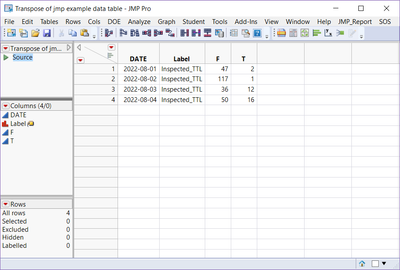
There is a easy way to do that just need transpose your data table.
Data Table( "jmp example data table" ) << Transpose(
	columns( :Inspected_TTL ),
	By( :DATE ),
	Label( :Name( "SINGLE COUNT?" ) ),
	Output Table( "Transpose of jmp example data table" )
);
Then you will get a new table like this. And the column F is the data.
Then Join the dt_tran to original dt.
Data Table( "jmp example data table" ) << Join(
	With( Data Table( "Transpose of jmp example data table" ) ),
	Select( :Name( "SINGLE COUNT?" ), :DATE, :Inspected_TTL, :Inspected_TTL_New ),
	SelectWith( :F ),
	By Matching Columns( :DATE = :DATE ),
	Drop multiples( 0, 0 ),
	Include Nonmatches( 0, 0 ),
	Preserve main table order( 1 )
);
final dt like this one.
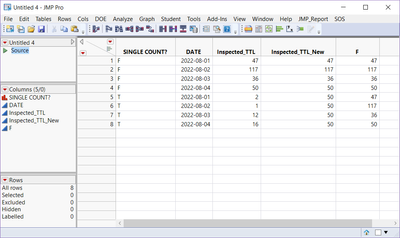
Hope this helps.
Have a good day!
- Mark as New
- Bookmark
- Subscribe
- Mute
- Subscribe to RSS Feed
- Get Direct Link
- Report Inappropriate Content
Re: How to define for loop with incremental date
Hi
My understanding is you want to get the "Inspect_TTL "about "Single Count" F.
There is a easy way to do that just need transpose your data table.
Data Table( "jmp example data table" ) << Transpose(
	columns( :Inspected_TTL ),
	By( :DATE ),
	Label( :Name( "SINGLE COUNT?" ) ),
	Output Table( "Transpose of jmp example data table" )
);
Then you will get a new table like this. And the column F is the data.
Then Join the dt_tran to original dt.
Data Table( "jmp example data table" ) << Join(
	With( Data Table( "Transpose of jmp example data table" ) ),
	Select( :Name( "SINGLE COUNT?" ), :DATE, :Inspected_TTL, :Inspected_TTL_New ),
	SelectWith( :F ),
	By Matching Columns( :DATE = :DATE ),
	Drop multiples( 0, 0 ),
	Include Nonmatches( 0, 0 ),
	Preserve main table order( 1 )
);
final dt like this one.
Hope this helps.
Have a good day!
- Mark as New
- Bookmark
- Subscribe
- Mute
- Subscribe to RSS Feed
- Get Direct Link
- Report Inappropriate Content
Re: How to define for loop with incremental date
Thank you!! This is working perfectly
Recommended Articles
- © 2026 JMP Statistical Discovery LLC. All Rights Reserved.
- Terms of Use
- Privacy Statement
- Contact Us