- Don’t miss your chance to experience Discovery Summit Europe at our best available rate! Early bird registration through 31 Oct.
- Graph Builder Toolbar streamlines interactive graphing. Creates shortcuts on Report and GraphBuilder Helpers toolbars. Download and install the extension.
- Subscribe to RSS Feed
- Mark Topic as New
- Mark Topic as Read
- Float this Topic for Current User
- Bookmark
- Subscribe
- Mute
- Printer Friendly Page
Discussions
Solve problems, and share tips and tricks with other JMP users.- User Community
- :
- Discussions
- :
- How to create a new script editor with a toolbar in JSL and paste the content of...

- Mark as New
- Bookmark
- Subscribe
- Mute
- Subscribe to RSS Feed
- Get Direct Link
- Report Inappropriate Content
How to create a new script editor with a toolbar in JSL and paste the content of the paste board into the script editor?
txt=Get Clipboard();
New Window( "Example", sb = Script Box( txt ) );
with a toolbar
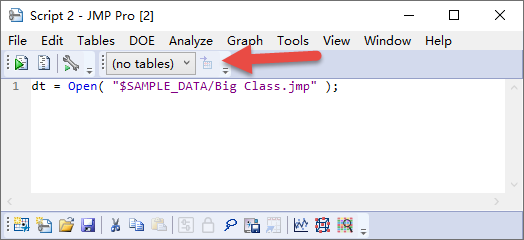
Thanks!
Accepted Solutions


- Mark as New
- Bookmark
- Subscribe
- Mute
- Subscribe to RSS Feed
- Get Direct Link
- Report Inappropriate Content
Re: How to create a new script editor with a toolbar in JSL and paste the content of the paste board into the script editor?
How do I... Make a Custom Toolbar Shortcut? Can I do it with a cat? Yes!
Using JMP > Customize Menus and Toolbars > Customize JMP Toolbars and Menus on Windows
Also I would suggest using script type new window if possible
Names Default To Here(1);

script = Get Clipboard();

ex = New Window("Script example", <<Type("Script"), script);
and if you wish to have the text in current script editor, I have to ask, why wouldn't you just paste it there? This can help with scripting the script editor if needed Scripting Guide > Display Trees > Scripting the Script Editor
- Mark as New
- Bookmark
- Subscribe
- Mute
- Subscribe to RSS Feed
- Get Direct Link
- Report Inappropriate Content
Re: How to create a new script editor with a toolbar in JSL and paste the content of the paste board into the script editor?
How do I... Make a Custom Toolbar Shortcut? Can I do it with a cat? Yes!
Using JMP > Customize Menus and Toolbars > Customize JMP Toolbars and Menus on Windows
Also I would suggest using script type new window if possible
Names Default To Here(1);

script = Get Clipboard();

ex = New Window("Script example", <<Type("Script"), script);
and if you wish to have the text in current script editor, I have to ask, why wouldn't you just paste it there? This can help with scripting the script editor if needed Scripting Guide > Display Trees > Scripting the Script Editor
Recommended Articles
- © 2026 JMP Statistical Discovery LLC. All Rights Reserved.
- Terms of Use
- Privacy Statement
- Contact Us