Turn on suggestions
Auto-suggest helps you quickly narrow down your search results by suggesting possible matches as you type.
- Don’t miss your chance to experience Discovery Summit Europe at our best available rate! Early bird registration through 31 Oct.
- Graph Builder Toolbar streamlines interactive graphing. Creates shortcuts on Report and GraphBuilder Helpers toolbars. Download and install the extension.
- JMP will suspend normal business operations for our Rest and Recharge Day on Friday, October 2, 2026.
Regular business hours will resume on Monday, October 5, 2026.
Options
- Subscribe to RSS Feed
- Mark Topic as New
- Mark Topic as Read
- Float this Topic for Current User
- Bookmark
- Subscribe
- Mute
- Printer Friendly Page
Discussions
Solve problems, and share tips and tricks with other JMP users.- User Community
- :
- Discussions
- :
- Re: How to change Color Theme for a given chart (Graph Builder) via JSL without ...

Level VII
- Mark as New
- Bookmark
- Subscribe
- Mute
- Subscribe to RSS Feed
- Get Direct Link
- Report Inappropriate Content
How to change Color Theme for a given chart (Graph Builder) via JSL without changing it globally via preferences?
Sep 11, 2023 12:26 PM
(2261 views)
I do not want to change the Color Theme in my JMP preferences as mentioned here https://www.jmp.com/support/help/en/17.2/index.shtml#page/jmp/create-color-themes-in-graphs.shtml. Instead I would like to plot a chart with a chosen color theme e.g. use "Strong and Pastel Mix" in place of "JMP default".
How to do this in JSL?
When it's too good to be true, it's neither
1 ACCEPTED SOLUTION
Accepted Solutions


Super User
Solution
- Mark as New
- Bookmark
- Subscribe
- Mute
- Subscribe to RSS Feed
- Get Direct Link
- Report Inappropriate Content
Re: How to change Color Theme for a given chart (Graph Builder) via JSL without changing it globally via preferences?
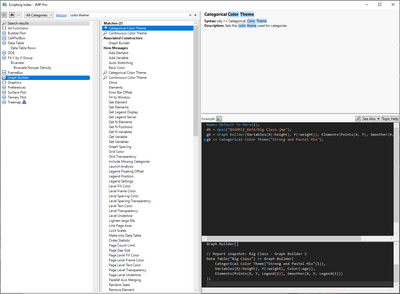
Search Scripting Index for Color Theme and select Graph Builder from left
-Jarmo
1 REPLY 1
Super User
Solution
- Mark as New
- Bookmark
- Subscribe
- Mute
- Subscribe to RSS Feed
- Get Direct Link
- Report Inappropriate Content
Re: How to change Color Theme for a given chart (Graph Builder) via JSL without changing it globally via preferences?
Search Scripting Index for Color Theme and select Graph Builder from left
-Jarmo
Recommended Articles
- © 2026 JMP Statistical Discovery LLC. All Rights Reserved.
- Terms of Use
- Privacy Statement
- Contact Us