Turn on suggestions
Auto-suggest helps you quickly narrow down your search results by suggesting possible matches as you type.
- Don’t miss your chance to experience Discovery Summit Europe at our best available rate! Early bird registration through 31 Oct.
- Image to Table JMP extension imports single or batch images as data tables. Useful to extract curves from pictures or convert image data to curve data to use in analyses like Functional Data Explorer. Download and install the extension.
Options
- Subscribe to RSS Feed
- Mark Topic as New
- Mark Topic as Read
- Float this Topic for Current User
- Bookmark
- Subscribe
- Mute
- Printer Friendly Page
Discussions
Solve problems, and share tips and tricks with other JMP users.- User Community
- :
- Discussions
- :
- How to change Color Theme for a given chart (Graph Builder) via JSL without chan...

Level VII
- Mark as New
- Bookmark
- Subscribe
- Mute
- Subscribe to RSS Feed
- Get Direct Link
- Report Inappropriate Content
How to change Color Theme for a given chart (Graph Builder) via JSL without changing it globally via preferences?
Sep 11, 2023 12:26 PM
(2311 views)
I do not want to change the Color Theme in my JMP preferences as mentioned here https://www.jmp.com/support/help/en/17.2/index.shtml#page/jmp/create-color-themes-in-graphs.shtml. Instead I would like to plot a chart with a chosen color theme e.g. use "Strong and Pastel Mix" in place of "JMP default".
How to do this in JSL?
When it's too good to be true, it's neither
1 ACCEPTED SOLUTION
Accepted Solutions


Super User
Solution
- Mark as New
- Bookmark
- Subscribe
- Mute
- Subscribe to RSS Feed
- Get Direct Link
- Report Inappropriate Content
Re: How to change Color Theme for a given chart (Graph Builder) via JSL without changing it globally via preferences?
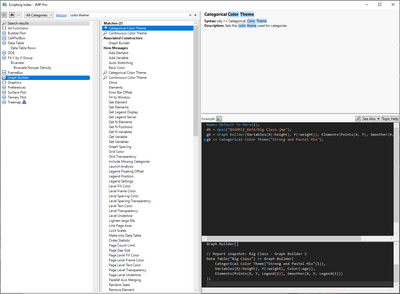
Search Scripting Index for Color Theme and select Graph Builder from left
-Jarmo
1 REPLY 1
Super User
Solution
- Mark as New
- Bookmark
- Subscribe
- Mute
- Subscribe to RSS Feed
- Get Direct Link
- Report Inappropriate Content
Re: How to change Color Theme for a given chart (Graph Builder) via JSL without changing it globally via preferences?
Search Scripting Index for Color Theme and select Graph Builder from left
-Jarmo
Recommended Articles
- © 2026 JMP Statistical Discovery LLC. All Rights Reserved.
- Terms of Use
- Privacy Statement
- Contact Us