- JMP will suspend normal business operations for our Winter Holiday beginning on Wednesday, Dec. 24, 2025, at 5:00 p.m. ET (2:00 p.m. ET for JMP Accounts Receivable).
Regular business hours will resume at 9:00 a.m. EST on Friday, Jan. 2, 2026. - We’re retiring the File Exchange at the end of this year. The JMP Marketplace is now your destination for add-ins and extensions.
- Subscribe to RSS Feed
- Mark Topic as New
- Mark Topic as Read
- Float this Topic for Current User
- Bookmark
- Subscribe
- Mute
- Printer Friendly Page
Discussions
Solve problems, and share tips and tricks with other JMP users.- JMP User Community
- :
- Discussions
- :
- How to build a dynamic JSON object

- Mark as New
- Bookmark
- Subscribe
- Mute
- Subscribe to RSS Feed
- Get Direct Link
- Report Inappropriate Content
How to build a dynamic JSON object
All,
I am wondering how to build a dynamic JSON object in JSL ?
request = New HTTP Request(
	url( "http://httpbin.org/post" ),
	Method( "POST" ),
	JSON( "\[{"username":"bob","address":"12345"}]\" )
);
Using the example from the scripting index, if I wantedt to vary the username from bob to say mark and address from 12345 to 12346 and I have 10 such calls, I would prefer building that as a dynamic object outside. I initially ventured down the path of building it as an Associative Array and then using the As JSON Expr() , however, that is resulting in an error. My approach in that case was:
MyAA = Associative Array();
MyAA["username"] = "bob" ;
MyAA["address"] = "12345" ;

request = New HTTP Request(
	url( "http://httpbin.org/post" ),
	Method( "POST" ),
	JSON( As Json Expr(MyAA))
);
Of course, this is not happening for this example, but the api I am trying to call on. However, when I pass hardcoded JSON as an input, the api call works as expected.

Any help is appreciated.
Uday
- Mark as New
- Bookmark
- Subscribe
- Mute
- Subscribe to RSS Feed
- Get Direct Link
- Report Inappropriate Content
Re: How to build a dynamic JSON object
@nascif_jmp and @bryan_boone ,
Thank you for your responses. Your responses helped me get somewhere, however I have a couple of questions:
1. Can you kindly provide an example of accepted JSON array format in JSL ? Is this accepted ?
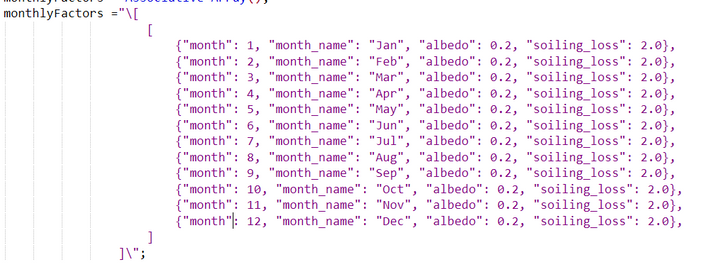
2. Does the scripting index or scripting guide cover the portions on JSON array or how to define an empty JSON object as nasicf has kindly shown ?
a. If yes, I would like to read that
b. If no, I would request that this be added to the documentation, because I couldn't find it anywhere
Uday


- Mark as New
- Bookmark
- Subscribe
- Mute
- Subscribe to RSS Feed
- Get Direct Link
- Report Inappropriate Content
Re: How to build a dynamic JSON object
At least the JSON Editor in Chrome doesn't think so.
Thanks
- Mark as New
- Bookmark
- Subscribe
- Mute
- Subscribe to RSS Feed
- Get Direct Link
- Report Inappropriate Content
Re: How to build a dynamic JSON object
Ah.
I had a transcribing error going from picture to text.
- Mark as New
- Bookmark
- Subscribe
- Mute
- Subscribe to RSS Feed
- Get Direct Link
- Report Inappropriate Content
Re: How to build a dynamic JSON object
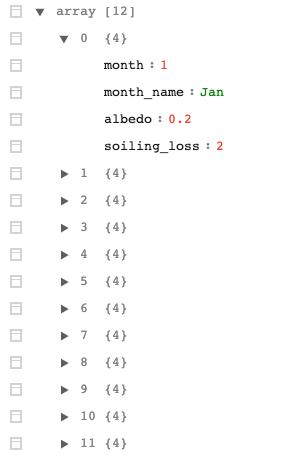
If I rewrite it like this using the chrome add in JSON Editor, I see a List of Associative Arrays
[
  {
    "month": 1,
    "month_name": "Jan",
    "albedo": 0.2,
    "soiling_loss": 2
  },
  {
    "month": 2,
    "month_name": "Feb",
    "albedo": 0.2,
    "soiling_loss": 2
  },
  {
    "month": 3,
    "month_name": "Mar",
    "albedo": 0.2,
    "soiling_loss": 2
  },
  {
    "month": 4,
    "month_name": "Apr",
    "albedo": 0.2,
    "soiling_loss": 2
  },
  {
    "month": 5,
    "month_name": "May",
    "albedo": 0.2,
    "soiling_loss": 2
  },
  {
    "month": 6,
    "month_name": "Jun",
    "albedo": 0.2,
    "soiling_loss": 2
  },
  {
    "month": 7,
    "month_name": "Jul",
    "albedo": 0.2,
    "soiling_loss": 2
  },
  {
    "month": 8,
    "month_name": "Aug",
    "albedo": 0.2,
    "soiling_loss": 2
  },
  {
    "month": 9,
    "month_name": "Sep",
    "albedo": 0.2,
    "soiling_loss": 2
  },
  {
    "month": 10,
    "month_name": "Oct",
    "albedo": 0.2,
    "soiling_loss": 2
  },
  {
    "month": 11,
    "month_name": "Nov",
    "albedo": 0.2,
    "soiling_loss": 2
  },
  {
    "month": 12,
    "month_name": "Dec",
    "albedo": 0.2,
    "soiling_loss": 2
  }
]

- Mark as New
- Bookmark
- Subscribe
- Mute
- Subscribe to RSS Feed
- Get Direct Link
- Report Inappropriate Content
Re: How to build a dynamic JSON object
innerList = {};
InsertInto(innerList, [ "month" => 1, "month_name" => "Jan", "albedo" => 0.2, "soiling_loss" => 2.0]);
InsertInto(innerList, [ "month" => 2, "month_name" => "Feb", "albedo" => 0.2, "soiling_loss" => 2.0]);
InsertInto(innerList, [ "month" => 3, "month_name" => "Mar", "albedo" => 0.2, "soiling_loss" => 2.0]);
monthlyFactors = {innerList};
je = As JSON Expr(EvalList(monthlyFactors));
Show(je);
I think the real issue is knowing the right API calls to the JSL list and associative arrays data structures, and their behavior as far as evaluating variables, returning a copy vs a live reference, and so on. The fact that they are being used to build a JSON object is incidental.
Having said that, with the new support for REST APIs from JMP I agree that having a session with a more detailed, end-to-end example would be helpful. I will pass this sugestion alone to our doc team. Thanks for the suggestion!
- Mark as New
- Bookmark
- Subscribe
- Mute
- Subscribe to RSS Feed
- Get Direct Link
- Report Inappropriate Content
Re: How to build a dynamic JSON object
And don't forget you can create JSON by just concatenating strings in the JSON format.
No Lists or Associative Arrays needed.
- Mark as New
- Bookmark
- Subscribe
- Mute
- Subscribe to RSS Feed
- Get Direct Link
- Report Inappropriate Content
Re: How to build a dynamic JSON object
monthlyFactors = { {
[ "month" => 1, "month_name" => "Jan", "albedo" => 0.2, "soiling_loss" => 2.0],
[ "month" => 2, "month_name" => "Feb", "albedo" => 0.2, "soiling_loss" => 2.0],
[ "month" => 3, "month_name" => "Mar", "albedo" => 0.2, "soiling_loss" => 2.0]
}};
je = As JSON Expr(monthlyFactors);
Show(je);
As a rule of thumb:
* JSON arrays map to JSL lists (not matrices or vectors, beware of the '[]' similarity);
* JSON dictionaries map to JSL associative arrays;
* Check for non-evaluated variable references;
* Check if data structure modifying calls actually change the target object (as opposed to returning a modified copy).
- « Previous
-
- 1
- 2
- Next »
Recommended Articles
- © 2026 JMP Statistical Discovery LLC. All Rights Reserved.
- Terms of Use
- Privacy Statement
- Contact Us