- Don’t miss your chance to experience Discovery Summit Europe at our best available rate! Early bird registration through 31 Oct.
- Graph Builder Toolbar streamlines interactive graphing. Creates shortcuts on Report and GraphBuilder Helpers toolbars. Download and install the extension.
- Subscribe to RSS Feed
- Mark Topic as New
- Mark Topic as Read
- Float this Topic for Current User
- Bookmark
- Subscribe
- Mute
- Printer Friendly Page
Discussions
Solve problems, and share tips and tricks with other JMP users.- User Community
- :
- Discussions
- :
- How to add user-defined mini-Guis to the right click new formula column menu?

- Mark as New
- Bookmark
- Subscribe
- Mute
- Subscribe to RSS Feed
- Get Direct Link
- Report Inappropriate Content
How to add user-defined mini-Guis to the right click new formula column menu?
If a user clicks on column/right click/new formula column/Transform/Scale Offset, a GUI pops up and ask the user for the parameters.
After pressing OK, a new column is generated with the respective rescale parameters:
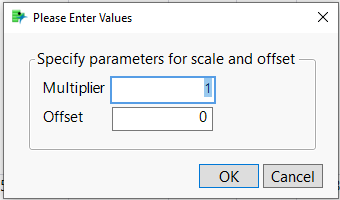
This is very useful.
I want to add a column/right click/new formula column/Transform/Modulo shortcut to calculate Modulo the same way.
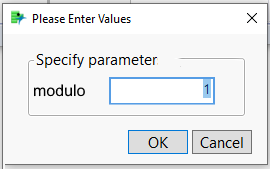
Unfortunately, I don't know how to do that.
In this post @ih suggested to generate a user defined function and use the
<<Transform Category( 1 )option to add the function to the new formula column menu.
What a cool trick - but I would have to generate individual functions for every number which I want to use as second argument of the modulo function.
Hm.
I hope there is a better solution to get as close as possible to the original idea ...


- Mark as New
- Bookmark
- Subscribe
- Mute
- Subscribe to RSS Feed
- Get Direct Link
- Report Inappropriate Content
Re: How to add user-defined mini-Guis to the right click new formula column menu?
Well @hogi I was hoping someone would know of a way to do this. If nobody else chimes in I would vote for a wish list item to make this possible!
- Mark as New
- Bookmark
- Subscribe
- Mute
- Subscribe to RSS Feed
- Get Direct Link
- Report Inappropriate Content
Re: How to add user-defined mini-Guis to the right click new formula column menu?
here is the wish:
New Formula Column menu: user-Defined mini GUIs
Recommended Articles
- © 2026 JMP Statistical Discovery LLC. All Rights Reserved.
- Terms of Use
- Privacy Statement
- Contact Us