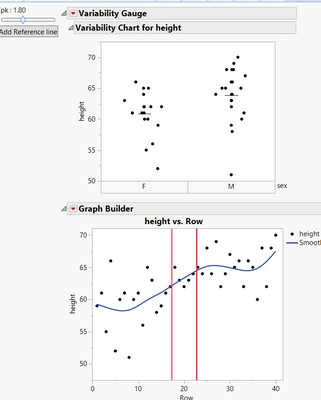
Hi,
How can I add label to the reference lines?
Here's my code:
Any advice?
Names Default To Here( 1 );

dt = Open( "$SAMPLE_DATA/Big Class.jmp" );
sliderValue = 1;

dothisonchange = Function( {val},
	tb << Set Text( "Cpk : " || Substr( Char( val ), 1, 4 ) )
);

Mean = 60;
std = 0.5;
New Window( "",

	H List Box(
		V List Box(
			tb = Text Box( "Value: " || Char( sliderValue ) ),
			sb = Slider Box(
				1,
				3,
				sliderValue,

				<<Set function(
					Function( {this},


						sliderValue = this << Get;
						LL = Mean - (sliderValue * 3 * std);
						UL = Mean + (sliderValue * 3 * std);
					//Set the slider and call the other function
						sb << Set( sliderValue );
						dothisonchange( sliderValue );
					);

				);
				LL = Mean - (sliderValue * 3 * 0.5);
				UL = Mean + (sliderValue * 3 * std);


				dothisonchange( sliderValue );
			),

			Button Box( "Add Reference line",
				gbfb1 = Report( gb )[Framebox( 1 )];

				gs1 = Expr(

					gbfb1 << AddGraphicsScript(

						Pen Color( "Red" );

						Pen Size( 2 );
						H Line( ::exx = LL );
						H Line( ::exy = UL );
					)
				);

				gs1;

			)
		),
		V List Box(
			gb = dt << Variability Chart( Y( :height ), X( :sex ), Show Range Bars( 0 ), Std Dev Chart( 0 ), Points Jittered( 1 ) );
			gb = dt << Graph Builder(

				Size( 373, 325 ),

				Show Control Panel( 0 ),

				Variables( X( Transform Column( "Row", Formula( Row() ) ) ), Y( :height ) )

			)


			;
		)
	)
);