cancel
Showing results for 
Show  only  | Search instead for 
Did you mean: 
  • Learn how to build custom Python data connectors and further customize JMP’s Data Connector Framework with the Python Data Connector Demo, available now in the JMP Marketplace!
  • See how to create experiments to support product design and ID useful product features. Register for June 12 webinar, 2pm US Eastern Time.

Discussions

Solve problems, and share tips and tricks with other JMP users.
Choose Language Hide Translation Bar
teresa
Level I

How may I see variable tabs in JSL Debugger

Hi folks,

I am trying to use JSL Debugger for first time and I could not control how to display botton page tabs, as Global, Local, Watch, ...

I do not know why, but in my window I see the one I leave here so I can't see Variable values

(even I do CRTL-SHIF- - to decrease view).

Could you help me?w.  Thank you

Teresa
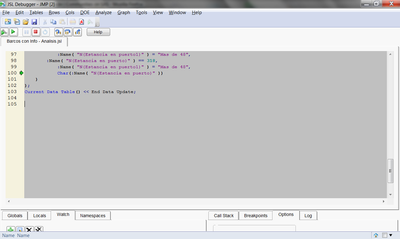
2454_pastedImage_5.png

1 REPLY 1
aniy
Level I

Re: How may I see variable tabs in JSL Debugger

OK, I just randomly tried this and it worked on Windows 7 Professional 64 bit, JMP 10.0.2 64-bit edition:

Hover your mouse around the bottom of the frame where you have your script on a gray background, hover until you find the location where your mouse pointer turns into a double sided arrow (as if it will let you change the size of that frame/screen). Right click at that location and you will see a dotted line around the gray area, then left click to resize it. It worked for me, now I can see the globals at the bottom. I am not sure if this is the intended way it should work, it is really finicky, it might be a bug...

Recommended Articles
