Turn on suggestions
Auto-suggest helps you quickly narrow down your search results by suggesting possible matches as you type.
- Don’t miss your chance to experience Discovery Summit Europe at our best available rate! Early bird registration through 31 Oct.
- Graph Builder Toolbar streamlines interactive graphing. Creates shortcuts on Report and GraphBuilder Helpers toolbars. Download and install the extension.
Options
- Subscribe to RSS Feed
- Mark Topic as New
- Mark Topic as Read
- Float this Topic for Current User
- Bookmark
- Subscribe
- Mute
- Printer Friendly Page
Discussions
Solve problems, and share tips and tricks with other JMP users.- User Community
- :
- Discussions
- :
- How do can find the number of non-null rows in the specified column?

Level VIII
- Mark as New
- Bookmark
- Subscribe
- Mute
- Subscribe to RSS Feed
- Get Direct Link
- Report Inappropriate Content
How do can find the number of non-null rows in the specified column?
Created:
Jun 16, 2020 05:08 AM
| Last Modified: Jun 9, 2023 4:29 PM
(7031 views)
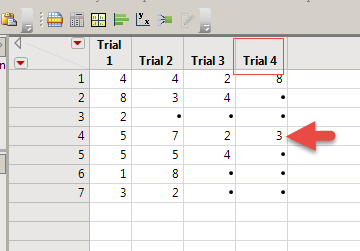
For example:
dt = Open( "$SAMPLE_DATA/Data\Missing Data Pattern.jmp" );
the number of non-null rows in the "Trial 3" column of this table is 5,
and the number of non-null rows in the "Trial 4" column is 4.
- Tags:
- Mass Customization
1 ACCEPTED SOLUTION
Accepted Solutions

Level VII
Solution
- Mark as New
- Bookmark
- Subscribe
- Mute
- Subscribe to RSS Feed
- Get Direct Link
- Report Inappropriate Content
Re: How do can find the number of non-null rows in the specified column?
probably this script would do it?
Names default to here(1);

dt = Open( "$SAMPLE_DATA\Missing Data Pattern.jmp" );

x=column(dt, "Trial 4") << get values();
// y =sum(!is missing(x));
// show(x, y);

y = !is missing(x);
rows = transpose(1::n items(y));
show(max(y :*  rows));
Georg
7 REPLIES 7
Level VIII
- Mark as New
- Bookmark
- Subscribe
- Mute
- Subscribe to RSS Feed
- Get Direct Link
- Report Inappropriate Content
Re: How do can find the number of non-null rows in the specified column?
I don't know how to express it in this formula, right?
Contains(:[Index(1,N Row(dt))],,-1)Thanks!
Level VII
- Mark as New
- Bookmark
- Subscribe
- Mute
- Subscribe to RSS Feed
- Get Direct Link
- Report Inappropriate Content
Re: How do can find the number of non-null rows in the specified column?
There are many ways, one May be this one:
Names default to here(1);
dt = Open( "$SAMPLE_DATA\Missing Data Pattern.jmp" );

x=column(dt, "Trial 4") << get values();
y =sum(!is missing(x));
show(x, y);
Georg
Level VIII
- Mark as New
- Bookmark
- Subscribe
- Mute
- Subscribe to RSS Feed
- Get Direct Link
- Report Inappropriate Content
Re: How do can find the number of non-null rows in the specified column?
Thanks!
I'm not being precise here.
It should be:
The row number of the last non-null value in the "Trial 3" column is 5,
The row number of the last non-null value in the "Trial 4" column is 4.
Level VIII
- Mark as New
- Bookmark
- Subscribe
- Mute
- Subscribe to RSS Feed
- Get Direct Link
- Report Inappropriate Content
Re: How do can find the number of non-null rows in the specified column?
It's equivalent to VBA
Cells(Rows.Count, 4).End(3).Row
Cells(Rows.Count, 4).End(3).Row
Level VIII
- Mark as New
- Bookmark
- Subscribe
- Mute
- Subscribe to RSS Feed
- Get Direct Link
- Report Inappropriate Content
Re: How do can find the number of non-null rows in the specified column?
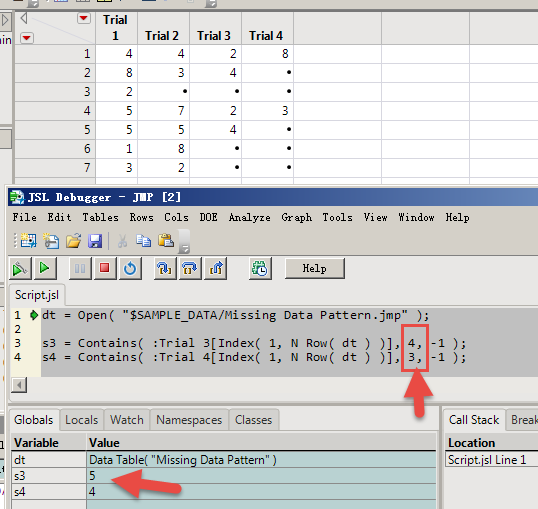
I just don't know how to change this particular value into a generic variable form.
Level VII
Solution
- Mark as New
- Bookmark
- Subscribe
- Mute
- Subscribe to RSS Feed
- Get Direct Link
- Report Inappropriate Content
Re: How do can find the number of non-null rows in the specified column?
probably this script would do it?
Names default to here(1);

dt = Open( "$SAMPLE_DATA\Missing Data Pattern.jmp" );

x=column(dt, "Trial 4") << get values();
// y =sum(!is missing(x));
// show(x, y);

y = !is missing(x);
rows = transpose(1::n items(y));
show(max(y :*  rows));
Georg
Level VIII
- Mark as New
- Bookmark
- Subscribe
- Mute
- Subscribe to RSS Feed
- Get Direct Link
- Report Inappropriate Content
Re: How do can find the number of non-null rows in the specified column?
Created:
Jun 16, 2020 06:47 AM
| Last Modified: Jun 16, 2020 5:50 AM
(6962 views)
| Posted in reply to message from Georg 06-16-2020
Thank Georg!
s4 = Max(
    !Is Missing( Column( 4 ) << get values() ) :* Transpose(
        1 :: N Items( !Is Missing( Column( 4 ) << get values() ) )
    )
);Recommended Articles
- © 2026 JMP Statistical Discovery LLC. All Rights Reserved.
- Terms of Use
- Privacy Statement
- Contact Us