- JMP will suspend normal business operations for our Winter Holiday beginning on Wednesday, Dec. 24, 2025, at 5:00 p.m. ET (2:00 p.m. ET for JMP Accounts Receivable).
Regular business hours will resume at 9:00 a.m. EST on Friday, Jan. 2, 2026. - We’re retiring the File Exchange at the end of this year. The JMP Marketplace is now your destination for add-ins and extensions.
- Subscribe to RSS Feed
- Mark Topic as New
- Mark Topic as Read
- Float this Topic for Current User
- Bookmark
- Subscribe
- Mute
- Printer Friendly Page
Discussions
Solve problems, and share tips and tricks with other JMP users.- JMP User Community
- :
- Discussions
- :
- How do I sort my dates in order?

- Mark as New
- Bookmark
- Subscribe
- Mute
- Subscribe to RSS Feed
- Get Direct Link
- Report Inappropriate Content
How do I sort my dates in order?
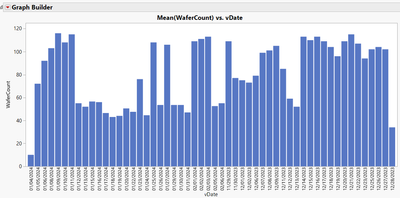
Attached is my data table. You can see that my dates in the x-axis in my chart is not in order. How do I write a script to sort the date column before I build the chart? Notice that my date column in the table is in char.
Accepted Solutions


- Mark as New
- Bookmark
- Subscribe
- Mute
- Subscribe to RSS Feed
- Get Direct Link
- Report Inappropriate Content
Re: How do I sort my dates in order?
JMP will create the JSL version of how to do the conversion, after you go through it interactively.
Here is the JSL taken from the log, after I converted the column interactively
// Change column info: vDate
Data Table( "table1" ):vDate << Data Type(
	Numeric,
	Format( "m/d/y", 10 ),
	Input Format( "m/d/y" )
) << Delete Formula << Set Modeling Type( "Continuous" ) << Set Field Width( 12 );You


- Mark as New
- Bookmark
- Subscribe
- Mute
- Subscribe to RSS Feed
- Get Direct Link
- Report Inappropriate Content
Re: How do I sort my dates in order?
This is a common problem when you are new to JMP. Dates should be stored as a number. Numbers are right-justified in the data table. Your date column is stored as a character string, which you can tell because it is left-justified. JMP orders character strings alphabetically. I added a column to convert your date to numeric. Open up the column info on the new Date field so you can see how this conversion is made. It could have been done on the original date column, but I thought it would be harder for you to see.
- Mark as New
- Bookmark
- Subscribe
- Mute
- Subscribe to RSS Feed
- Get Direct Link
- Report Inappropriate Content
Re: How do I sort my dates in order?
Hello Dan,
I know how to do it in JMP. But how do you write a script in JSL to convert the vDate column from char to numeric date?
- Mark as New
- Bookmark
- Subscribe
- Mute
- Subscribe to RSS Feed
- Get Direct Link
- Report Inappropriate Content
Re: How do I sort my dates in order?
The vDate column needs to be converted to a JMP Date value.
- Double click on the vdate column header to open the Col Info column
- Click on Remove Formula
- Change the Data Type to Numeric
- Change the Modeling Type to Continuous
- Click on the down arrow for the Format and select Date=>m/d/y
- Click on OK
Your column should now be in a JMP date format. You can now use Tables=>Sort to sort the data table.
- Mark as New
- Bookmark
- Subscribe
- Mute
- Subscribe to RSS Feed
- Get Direct Link
- Report Inappropriate Content
Re: How do I sort my dates in order?
Hello Jim,
I know how to do it in JMP. But how do you write a script in JSL to convert the vDate column from char to numeric date?
- Mark as New
- Bookmark
- Subscribe
- Mute
- Subscribe to RSS Feed
- Get Direct Link
- Report Inappropriate Content
Re: How do I sort my dates in order?
JMP will create the JSL version of how to do the conversion, after you go through it interactively.
Here is the JSL taken from the log, after I converted the column interactively
// Change column info: vDate
Data Table( "table1" ):vDate << Data Type(
	Numeric,
	Format( "m/d/y", 10 ),
	Input Format( "m/d/y" )
) << Delete Formula << Set Modeling Type( "Continuous" ) << Set Field Width( 12 );You
- Mark as New
- Bookmark
- Subscribe
- Mute
- Subscribe to RSS Feed
- Get Direct Link
- Report Inappropriate Content
Re: How do I sort my dates in order?
Hi Jim,
A big thank you, it worked for me!
Recommended Articles
- © 2025 JMP Statistical Discovery LLC. All Rights Reserved.
- Terms of Use
- Privacy Statement
- Contact Us