- JMP will suspend normal business operations for our Winter Holiday beginning on Wednesday, Dec. 24, 2025, at 5:00 p.m. ET (2:00 p.m. ET for JMP Accounts Receivable).
Regular business hours will resume at 9:00 a.m. EST on Friday, Jan. 2, 2026. - We’re retiring the File Exchange at the end of this year. The JMP Marketplace is now your destination for add-ins and extensions.
- Subscribe to RSS Feed
- Mark Topic as New
- Mark Topic as Read
- Float this Topic for Current User
- Bookmark
- Subscribe
- Mute
- Printer Friendly Page
Discussions
Solve problems, and share tips and tricks with other JMP users.- JMP User Community
- :
- Discussions
- :
- How do I save histogram count data?

- Mark as New
- Bookmark
- Subscribe
- Mute
- Subscribe to RSS Feed
- Get Direct Link
- Report Inappropriate Content
How do I save histogram count data?
I have a data set with count vs time monitored during several days see attachment. In graph builder histograms for several days are shown for time intervals of 6 minutes. How can I save the daily histogram counts for each interval in a data table?
Accepted Solutions


- Mark as New
- Bookmark
- Subscribe
- Mute
- Subscribe to RSS Feed
- Get Direct Link
- Report Inappropriate Content
Re: How do I save histogram count data?
Hi Frank,
No problem, I unmarked my post as a solution.
I understand better your situation, and it shouldn't be too difficult to do it with binning :
- Right-click in your column time, "New Formula Column", "Distributional", "Custom Binning".
- There, click on the red triangle next to "Cutpoints" and click on "Fill using Equal Width Bins..."
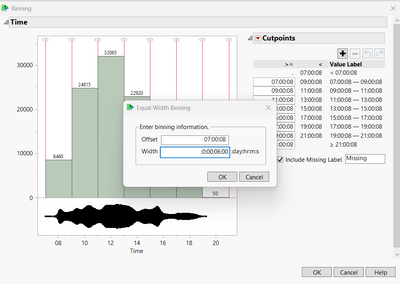
- Specify your offset and Width (every 6 mintues):
- Click on OK ; a new column "Custom Binning [Time]" has appeared.
- Right click on this new column, "New Formula Column", and then "GroupBy". You can also do this on your "Label" column (day) if you want a count for every 6 minutes for each day. Without this second column as groupby variable, the sum will only be done for each timeframe, no matter the day.
- Then, right-click on the column "Count", "New Formula Column", "Aggregate" and then "Sum". This will create a sum column of "Count" for every 6 minutes and by Day if you have chosen the two Groupby variables (Sum[Count][Custom Binning[Time],Label]) and the JSL formula is
Col Sum( :Count, :"Custom Binning[Time]"n, :Label )
If you have only selected the 6 minutes timeframe for your sum formula column, the JSL formula will be :
Col Sum( :Count, :"Custom Binning[Time]"n )
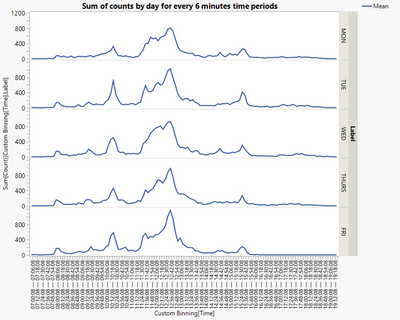
I hope I did understand better your question and that this answer will solve your question.
I attached the datatable with calculated column and graphs.
"It is not unusual for a well-designed experiment to analyze itself" (Box, Hunter and Hunter)

- Mark as New
- Bookmark
- Subscribe
- Mute
- Subscribe to RSS Feed
- Get Direct Link
- Report Inappropriate Content
Re: How do I save histogram count data?
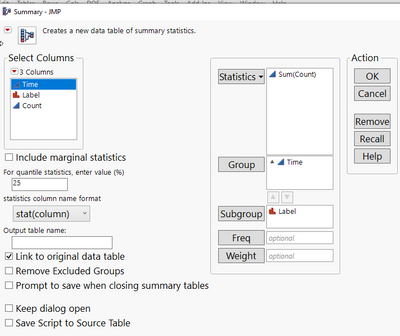
you could use the Summary Platform to sum the counts for each time and day:
If you take time as it is, there is just a single entry per time step and day, therefore, it doesn't matter if you use mean, sum or median.
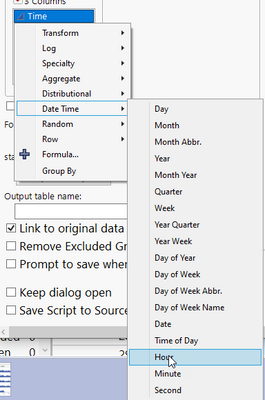
By right clicking on time, you could change the aggregation - to e.g. to calculate the counts vs. hours. Then Sum will make more sense.
Data Table( "HISTOGRAM DATA" ) << Summary(
	Group( :Time ),
	Sum( :Count ),
	Subgroup( :Label )
);- Mark as New
- Bookmark
- Subscribe
- Mute
- Subscribe to RSS Feed
- Get Direct Link
- Report Inappropriate Content
Re: How do I save histogram count data?
Hi @frankderuyck,
If I understand well your case (doing a sum of column count by day), here might be several options to do this, here are two :
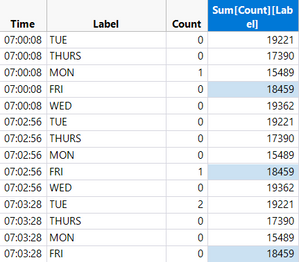
- Formula column : You can create a formula column of the sum of counts by day. To do it so, right-click on "Label", "New Formula Column", and then "GroupBy". Then, right-click on the column "Count", "New Formula Column", "Aggregate" and then "Sum". This will create a sum column of "Count" by "Day" (Sum[Count][Label]) and the JSL formula is
Col Sum(:Count, :Label)
- Table Summary : You can also create a summary table, to aggregate the sum of count by day. To do so, go into "Tables", then "Summary", use your "Label" as group variable, your "Count" and statistics Sum as "Statistics" variable, and click OK. you'll have a small table aggregating the values of count by day :
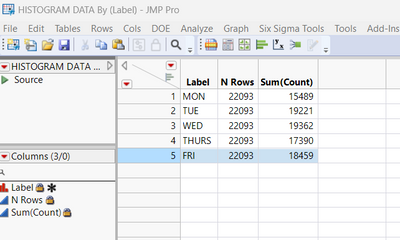
JSL code to create this table is :
// Data table summary

Data Table( "HISTOGRAM DATA" ) << Summary(
	Group( :Label ),
	Sum( :Count ),
	Freq( "None" ),
	Weight( "None" )
);
I hope I did understand well your goal and that this response will help you,
"It is not unusual for a well-designed experiment to analyze itself" (Box, Hunter and Hunter)
- Mark as New
- Bookmark
- Subscribe
- Mute
- Subscribe to RSS Feed
- Get Direct Link
- Report Inappropriate Content
Re: How do I save histogram count data?
Hi Victor, sorry I clicked accidentally on solution.. think there is a misunderstanding in my question; you gave me a solution for counts per day.
Let me clarify my question: for each day I want to tabulate the #counts in time intervals of 6 minutes; this is what the histograms in graph builder attached to the data table represent.

- Mark as New
- Bookmark
- Subscribe
- Mute
- Subscribe to RSS Feed
- Get Direct Link
- Report Inappropriate Content
Re: How do I save histogram count data?
Create binned column for Time (Cols/utilities/Make binning column) and use equal width bins of 6minutes
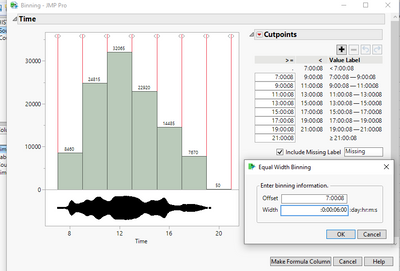
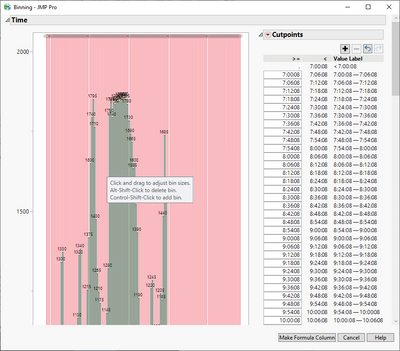
Then you can create Summary table based on that new column or use Col Sum formula and use that column as grouping with Label
Col Sum(:Count, :Label, :Time Binned)- Mark as New
- Bookmark
- Subscribe
- Mute
- Subscribe to RSS Feed
- Get Direct Link
- Report Inappropriate Content
Re: How do I save histogram count data?
Hi Frank,
No problem, I unmarked my post as a solution.
I understand better your situation, and it shouldn't be too difficult to do it with binning :
- Right-click in your column time, "New Formula Column", "Distributional", "Custom Binning".
- There, click on the red triangle next to "Cutpoints" and click on "Fill using Equal Width Bins..."
- Specify your offset and Width (every 6 mintues):
- Click on OK ; a new column "Custom Binning [Time]" has appeared.
- Right click on this new column, "New Formula Column", and then "GroupBy". You can also do this on your "Label" column (day) if you want a count for every 6 minutes for each day. Without this second column as groupby variable, the sum will only be done for each timeframe, no matter the day.
- Then, right-click on the column "Count", "New Formula Column", "Aggregate" and then "Sum". This will create a sum column of "Count" for every 6 minutes and by Day if you have chosen the two Groupby variables (Sum[Count][Custom Binning[Time],Label]) and the JSL formula is
Col Sum( :Count, :"Custom Binning[Time]"n, :Label )
If you have only selected the 6 minutes timeframe for your sum formula column, the JSL formula will be :
Col Sum( :Count, :"Custom Binning[Time]"n )
I hope I did understand better your question and that this answer will solve your question.
I attached the datatable with calculated column and graphs.
"It is not unusual for a well-designed experiment to analyze itself" (Box, Hunter and Hunter)
- Mark as New
- Bookmark
- Subscribe
- Mute
- Subscribe to RSS Feed
- Get Direct Link
- Report Inappropriate Content
Re: How do I save histogram count data?
Great, thanks a lot Victor!
- Mark as New
- Bookmark
- Subscribe
- Mute
- Subscribe to RSS Feed
- Get Direct Link
- Report Inappropriate Content
Re: How do I save histogram count data?
Now I can go to FDE and creat daily time spectra!
Recommended Articles
- © 2025 JMP Statistical Discovery LLC. All Rights Reserved.
- Terms of Use
- Privacy Statement
- Contact Us