- JMP will suspend normal business operations for our Winter Holiday beginning on Wednesday, Dec. 24, 2025, at 5:00 p.m. ET (2:00 p.m. ET for JMP Accounts Receivable).
Regular business hours will resume at 9:00 a.m. EST on Friday, Jan. 2, 2026. - We’re retiring the File Exchange at the end of this year. The JMP Marketplace is now your destination for add-ins and extensions.
- Subscribe to RSS Feed
- Mark Topic as New
- Mark Topic as Read
- Float this Topic for Current User
- Bookmark
- Subscribe
- Mute
- Printer Friendly Page
Discussions
Solve problems, and share tips and tricks with other JMP users.- JMP User Community
- :
- Discussions
- :
- How do I make a Customize Menu_Toolbars for ANALYZE

- Mark as New
- Bookmark
- Subscribe
- Mute
- Subscribe to RSS Feed
- Get Direct Link
- Report Inappropriate Content
How do I make a Customize Menu_Toolbars for ANALYZE
Greetings to all experience and experts.
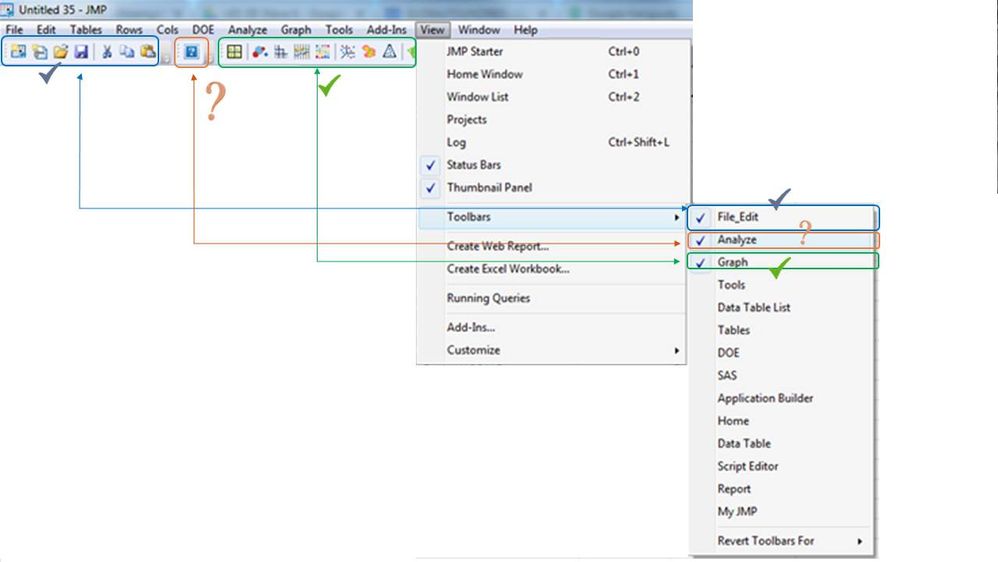
I am using JMP13 now, am facing a simple issue when try addding ANALYZE in the toolbars. It somehow appear as question mark icon. I attach a screen shot with brief description hoping to get your advices on how to solve this issue. Thank you.
Accepted Solutions


- Mark as New
- Bookmark
- Subscribe
- Mute
- Subscribe to RSS Feed
- Get Direct Link
- Report Inappropriate Content
Re: How do I make a Customize Menu_Toolbars for ANALYZE
Hi everyone - this thread is a couple of years old, but i happened upon it and tried this scenario. I can confirm that this issue is fixed in recent versions of JMP, back to JMP 14 and later. Anyone who finds this thread should be aware of that.
Regards,
Audrey Shull
JMP Development

- Mark as New
- Bookmark
- Subscribe
- Mute
- Subscribe to RSS Feed
- Get Direct Link
- Report Inappropriate Content
Re: How do I make a Customize Menu_Toolbars for ANALYZE

- Mark as New
- Bookmark
- Subscribe
- Mute
- Subscribe to RSS Feed
- Get Direct Link
- Report Inappropriate Content
Re: How do I make a Customize Menu_Toolbars for ANALYZE
I have a similar problem in that my Analyze/Quality and Process/Variation / Attribute Gauge Chart icon will not show up in the toolbar. I've been playing with some settings and found a few things.
I have not been able to reproduce the exact problem you have but I have been able to toggle the Analyze Toolbars with the following options which may be worth investigating.
- First is File-Preferences-Menus. This preference gives options to turn on and off some advanced menus.
- I have found that when I deselect/uncheck "Design of Experiments" a question mark "?" shows up in the Analyze toolbar with the tool tip of "Specialized DOE Models". If I try to click it I get an error, "Command "Specialized DOE Models" could not be executed. It's opposite of the expectation since you'd expect it to show up (and work) when you select it. Probably a bug, but that is how I have been able to get the check mark to come and go.
- I have also found that when I select/check "Quality Engineering" I get the "Control Chart Builder" icon to show up in my Analyze toolbar. When I deselct/uncheck "Quality Engineering" the "Control Chart Builder" icon goes away and I lose the "Quality and Process" options in the Analyze menu item. This one works as expected but it isn't the toolbar I want to see.
- Second is the JMP Menu Editor. Right click in the tool bar - Customize - Menus and toolbars.
- This shows the menu and toolbar available. If I open the Toolbars - Analyze drop down I get a list matching what I see on my toolbar. I have not been able to get anything to happen in this editor, except to break my addin toolbar when I copied the Variability / Attribute Gauge Chart from the menu section down to the toolbar section. But when I removed it, the toolbar came back in the default setup
Good Luck,
Dave
- Mark as New
- Bookmark
- Subscribe
- Mute
- Subscribe to RSS Feed
- Get Direct Link
- Report Inappropriate Content
Re: How do I make a Customize Menu_Toolbars for ANALYZE
Hi everyone - this thread is a couple of years old, but i happened upon it and tried this scenario. I can confirm that this issue is fixed in recent versions of JMP, back to JMP 14 and later. Anyone who finds this thread should be aware of that.
Regards,
Audrey Shull
JMP Development
Recommended Articles
- © 2026 JMP Statistical Discovery LLC. All Rights Reserved.
- Terms of Use
- Privacy Statement
- Contact Us