- JMP will suspend normal business operations for our Winter Holiday beginning on Wednesday, Dec. 24, 2025, at 5:00 p.m. ET (2:00 p.m. ET for JMP Accounts Receivable).
Regular business hours will resume at 9:00 a.m. EST on Friday, Jan. 2, 2026. - We’re retiring the File Exchange at the end of this year. The JMP Marketplace is now your destination for add-ins and extensions.
- Subscribe to RSS Feed
- Mark Topic as New
- Mark Topic as Read
- Float this Topic for Current User
- Bookmark
- Subscribe
- Mute
- Printer Friendly Page
Discussions
Solve problems, and share tips and tricks with other JMP users.- JMP User Community
- :
- Discussions
- :
- How do I implement an excel like VLOOKUP using JSL?

- Mark as New
- Bookmark
- Subscribe
- Mute
- Subscribe to RSS Feed
- Get Direct Link
- Report Inappropriate Content
How do I implement an excel like VLOOKUP using JSL?
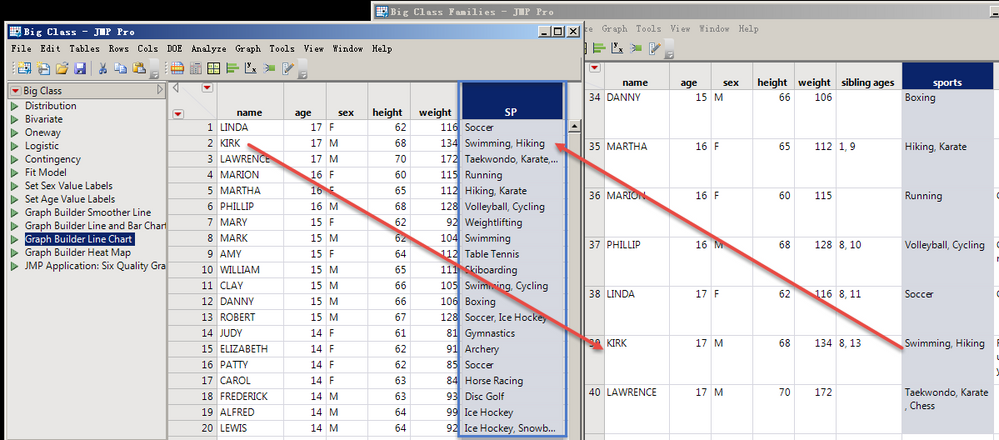
How to find the students' sports names in the "big class families.jmp" table according to the students' names in the "Big Class.jmp" table.
and add columns in the "Big Class.jmp" table to display.Thank you very much!
d2 = Open( "$SAMPLE_DATA/big class families.jmp" );
d1 = Open( "$SAMPLE_DATA/Big Class.jmp" );
Accepted Solutions


- Mark as New
- Bookmark
- Subscribe
- Mute
- Subscribe to RSS Feed
- Get Direct Link
- Report Inappropriate Content
Re: How do I implement an excel like VLOOKUP using JSL?
Update() by matching columns works well for this task. Either manually (Tables Menu) or by script.
Example:
d2 = Open("$SAMPLE_DATA/big class families.jmp");
d1 = Open("$SAMPLE_DATA/Big Class.jmp");
d1 << Update(
    With(d2),
    Match Columns(:name = :name),
    Add Columns from Update table(:sports)
);
- Mark as New
- Bookmark
- Subscribe
- Mute
- Subscribe to RSS Feed
- Get Direct Link
- Report Inappropriate Content
Re: How do I implement an excel like VLOOKUP using JSL?
Update() by matching columns works well for this task. Either manually (Tables Menu) or by script.
Example:
d2 = Open("$SAMPLE_DATA/big class families.jmp");
d1 = Open("$SAMPLE_DATA/Big Class.jmp");
d1 << Update(
    With(d2),
    Match Columns(:name = :name),
    Add Columns from Update table(:sports)
);
- Mark as New
- Bookmark
- Subscribe
- Mute
- Subscribe to RSS Feed
- Get Direct Link
- Report Inappropriate Content
Re: How do I implement an excel like VLOOKUP using JSL?
- Mark as New
- Bookmark
- Subscribe
- Mute
- Subscribe to RSS Feed
- Get Direct Link
- Report Inappropriate Content
Re: How do I implement an excel like VLOOKUP using JSL?
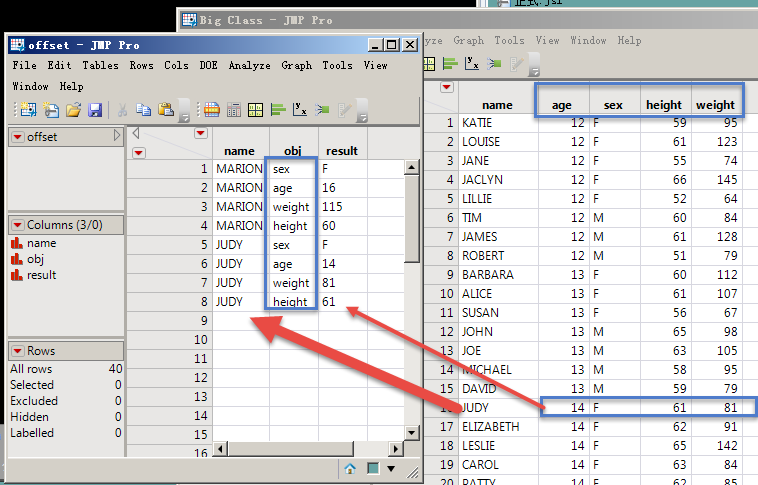
Please continue your guidance:how to extract the value by matching both names simultaneously, like the offset function in excel.Thank you very much!
d1 = Open("$SAMPLE_DATA/Big Class.jmp");
d2 = New Table( "offset",
Add Rows( 8 ),
New Column( "name",
Character,
"Nominal",
Set Values( {"MARION", "MARION","MARION","MARION", "JUDY", "JUDY", "JUDY", "JUDY"} )
),
New Column( "obj",
Character,
"Nominal",
Set Values( {"sex", "age", "weight", "height", "sex", "age", "weight", "height"} )
)
);
- Mark as New
- Bookmark
- Subscribe
- Mute
- Subscribe to RSS Feed
- Get Direct Link
- Report Inappropriate Content
Re: How do I implement an excel like VLOOKUP using JSL?
It looks like you want to stack columns. Explore the Stack() command. However, in your example you have stacked columns of different data types (Character and numeric), which will not work unless data types are harmonized first.
d1 = Open("$SAMPLE_DATA/Big Class.jmp");
For(i = 1, i <= N Col(d1), i++,
    Column(d1, i) << data type("Character")
);
d1 << Stack(Columns(:age, :sex, :height, :weight));
- Mark as New
- Bookmark
- Subscribe
- Mute
- Subscribe to RSS Feed
- Get Direct Link
- Report Inappropriate Content
Re: How do I implement an excel like VLOOKUP using JSL?
But what if I only needed code to extract the data for the eight line names I gave?Want to learn one more way.
It's bothering you,thank you!
- Mark as New
- Bookmark
- Subscribe
- Mute
- Subscribe to RSS Feed
- Get Direct Link
- Report Inappropriate Content
Re: How do I implement an excel like VLOOKUP using JSL?
There are several ways. One is to simply delete unwanted rows from the stacked table.
d1 = Open("$SAMPLE_DATA/Big Class.jmp");
d2 = d1 << Stack(Columns(:age, :sex, :height, :weight));
d2 << delete rows(d2 << get rows where(:name != "MARION" & :name != "JUDY"));
Or just make a subset. The example below is without stacking (in JMP, it's rarely a good idea to mix widely different variables in the same column).
d1 = Open("$SAMPLE_DATA/Big Class.jmp");
d1 << Subset(rows(d1 << get rows where(:name == "MARION" | :name == "JUDY")));
- Mark as New
- Bookmark
- Subscribe
- Mute
- Subscribe to RSS Feed
- Get Direct Link
- Report Inappropriate Content
Re: How do I implement an excel like VLOOKUP using JSL?
Recommended Articles
- © 2025 JMP Statistical Discovery LLC. All Rights Reserved.
- Terms of Use
- Privacy Statement
- Contact Us