- Don’t miss your chance to experience Discovery Summit Europe at our best available rate! Early bird registration through 31 Oct.
- Graph Builder Toolbar streamlines interactive graphing. Creates shortcuts on Report and GraphBuilder Helpers toolbars. Download and install the extension.
- Subscribe to RSS Feed
- Mark Topic as New
- Mark Topic as Read
- Float this Topic for Current User
- Bookmark
- Subscribe
- Mute
- Printer Friendly Page
Discussions
Solve problems, and share tips and tricks with other JMP users.- User Community
- :
- Discussions
- :
- Re: How do I get the default "minimum Size Split" in a decision tree using JSL?

- Mark as New
- Bookmark
- Subscribe
- Mute
- Subscribe to RSS Feed
- Get Direct Link
- Report Inappropriate Content
How do I get the default "minimum Size Split" in a decision tree using JSL?
Hello, everyone!
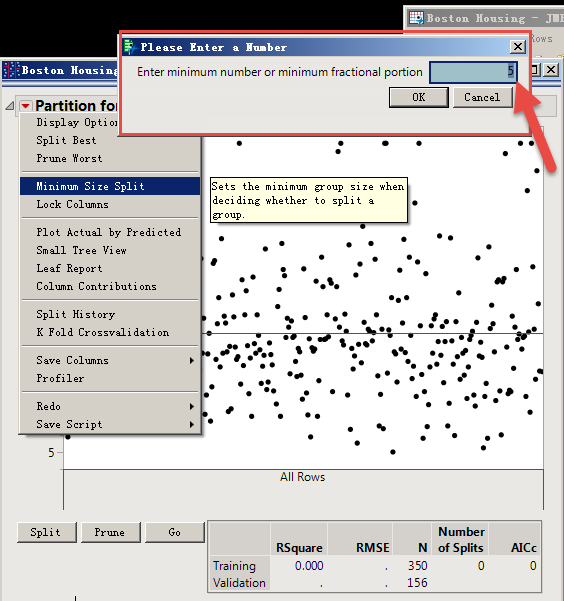
I want to use JSL get the default "minimum Size Split" in a decision tree .
Thanks you!
Accepted Solutions


- Mark as New
- Bookmark
- Subscribe
- Mute
- Subscribe to RSS Feed
- Get Direct Link
- Report Inappropriate Content
Re: How do I get the default "minimum Size Split" in a decision tree using JSL?
It seems that internally when the Minimum Size Split in preferences is unchecked ( <<Off ) the default that appears in the options is 5. If the user's Platform Preferences for Partition is set the set value will be used for both the prompt window you displayed as well as the application, unless it is changed.
If you do not want the user's preferences, specify Partition(Y(), X(), Ignore Platform Preferences(1) );
If you ignore platform preferences, you will need to modify the script below and assume the default minimum size is 5.
Here is a script to capture if the user set the preference from the Preferences UI or Partition UI.
Names Default To Here( 1 );
dt = Open( "$SAMPLE_DATA/Iris.jmp" );
obj = Partition(
	Y( :Species ),
	X( :Sepal length, :Sepal width, :Petal length, :Petal width ),
	Informative Missing( 1 ),
	Minimum Size Split(3)
);
obj << split best(2);

//since you are letting the user do this, grab the window and get the script
scrp = (obj << get script);  //if the minimum split size was set, can parse it from the script.
for(i=1, i<=narg(scrp), i++,
	 _tt = Arg(scrp, i);
	 if(Head Name(_tt) == "Minimum Size Split",
		_sz = Arg(_tt,1);
		Break();
	 )
);


_ppsz= Arg(Arg(get platform preferences(Partition(Minimum Size Split)), 1), 1);

if(Arg(_ppsz,1) == 0 & Is Missing(_sz), _sz=5,
    Arg(_ppsz,1) >0  & Is Missing(_sz), _sz=Arg(_ppsz,1)
  );
show(_sz);
- Mark as New
- Bookmark
- Subscribe
- Mute
- Subscribe to RSS Feed
- Get Direct Link
- Report Inappropriate Content
Re: How do I get the default "minimum Size Split" in a decision tree using JSL?
It seems that internally when the Minimum Size Split in preferences is unchecked ( <<Off ) the default that appears in the options is 5. If the user's Platform Preferences for Partition is set the set value will be used for both the prompt window you displayed as well as the application, unless it is changed.
If you do not want the user's preferences, specify Partition(Y(), X(), Ignore Platform Preferences(1) );
If you ignore platform preferences, you will need to modify the script below and assume the default minimum size is 5.
Here is a script to capture if the user set the preference from the Preferences UI or Partition UI.
Names Default To Here( 1 );
dt = Open( "$SAMPLE_DATA/Iris.jmp" );
obj = Partition(
	Y( :Species ),
	X( :Sepal length, :Sepal width, :Petal length, :Petal width ),
	Informative Missing( 1 ),
	Minimum Size Split(3)
);
obj << split best(2);

//since you are letting the user do this, grab the window and get the script
scrp = (obj << get script);  //if the minimum split size was set, can parse it from the script.
for(i=1, i<=narg(scrp), i++,
	 _tt = Arg(scrp, i);
	 if(Head Name(_tt) == "Minimum Size Split",
		_sz = Arg(_tt,1);
		Break();
	 )
);


_ppsz= Arg(Arg(get platform preferences(Partition(Minimum Size Split)), 1), 1);

if(Arg(_ppsz,1) == 0 & Is Missing(_sz), _sz=5,
    Arg(_ppsz,1) >0  & Is Missing(_sz), _sz=Arg(_ppsz,1)
  );
show(_sz);
- Mark as New
- Bookmark
- Subscribe
- Mute
- Subscribe to RSS Feed
- Get Direct Link
- Report Inappropriate Content
Re: How do I get the default "minimum Size Split" in a decision tree using JSL?
You're very precise!
Recommended Articles
- © 2026 JMP Statistical Discovery LLC. All Rights Reserved.
- Terms of Use
- Privacy Statement
- Contact Us