- Don’t miss your chance to experience Discovery Summit Europe at our best available rate! Early bird registration through 31 Oct.
- Graph Builder Toolbar streamlines interactive graphing. Creates shortcuts on Report and GraphBuilder Helpers toolbars. Download and install the extension.
- Subscribe to RSS Feed
- Mark Topic as New
- Mark Topic as Read
- Float this Topic for Current User
- Bookmark
- Subscribe
- Mute
- Printer Friendly Page
Discussions
Solve problems, and share tips and tricks with other JMP users.- User Community
- :
- Discussions
- :
- How do I get confidence intervals to appear on the Non-parametric>Spearman coeff...

- Mark as New
- Bookmark
- Subscribe
- Mute
- Subscribe to RSS Feed
- Get Direct Link
- Report Inappropriate Content
How do I get confidence intervals to appear on the Non-parametric>Spearman coefficient table (in multivariate plataform)?
The confidence intervals appear along with coefficients and p-value in the pairwise correlations table (multivariate platform), but not in the Nonparametric-Spearman's table (multivariate platform). How can we get the confidence intervals for Spearman coefficients?
Thanks in advance,
Helena G.
Accepted Solutions


- Mark as New
- Bookmark
- Subscribe
- Mute
- Subscribe to RSS Feed
- Get Direct Link
- Report Inappropriate Content
Re: How do I get confidence intervals to appear on the Non-parametric>Spearman coefficient table (in multivariate plataform)?
I'm not aware of a tutorial on this topic, but I can show the steps below (note that this also works with the platforms from the list posted above as well, it's not limited to Multivariate):
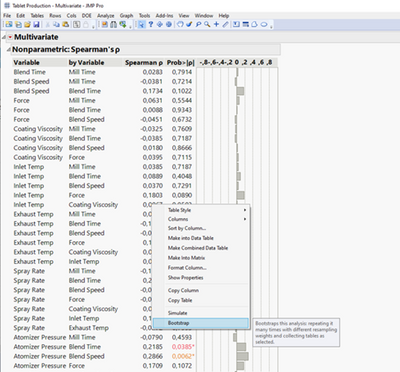
1) Right-click on column of interest and select "Bootstrap":
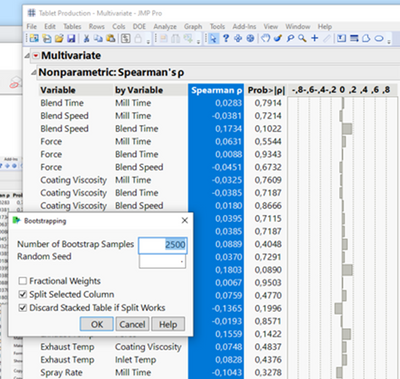
2) Change defaults in pop-up if desired, or press "OK" to use default settings:
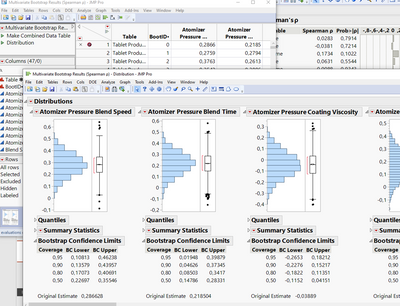
3) Wait for bootstrapping to finish and run "Distribution" script in resulting table to see Bootstrap Confidence Intervals:
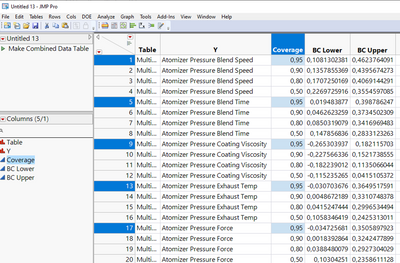
4) Right-click on confidence intervals and select "Make Combined Data Table" to export intervals into a table for further analysis:
- Mark as New
- Bookmark
- Subscribe
- Mute
- Subscribe to RSS Feed
- Get Direct Link
- Report Inappropriate Content
Re: How do I get confidence intervals to appear on the Non-parametric>Spearman coefficient table (in multivariate plataform)?
Could Bootsrapping be a solution?
- Mark as New
- Bookmark
- Subscribe
- Mute
- Subscribe to RSS Feed
- Get Direct Link
- Report Inappropriate Content
Re: How do I get confidence intervals to appear on the Non-parametric>Spearman coefficient table (in multivariate plataform)?
Hello,
Thank you for the answer. I am not quite sure if it helps with my analysis goal.
I would like to get the confidence intervals for Spearman coefficients, as it is possible to obtain to Pairwise correlations, in order to compare the amplitude of the confidence intervals for both coefficients (Pearson and Spearman). Is it possible in anyway in this platform?
Than you!
- Mark as New
- Bookmark
- Subscribe
- Mute
- Subscribe to RSS Feed
- Get Direct Link
- Report Inappropriate Content
Re: How do I get confidence intervals to appear on the Non-parametric>Spearman coefficient table (in multivariate plataform)?
Hi,
Unless I'm simply not seeing it, Multivariate doesn't appear to offer an option to show the Spearman confidence intervals. Bootstrapping in JMP Pro offers a way to get confidence intervals for platforms that don't calculate them. Multivariate is one of the platforms that supports bootstrapping.
- Mark as New
- Bookmark
- Subscribe
- Mute
- Subscribe to RSS Feed
- Get Direct Link
- Report Inappropriate Content
Re: How do I get confidence intervals to appear on the Non-parametric>Spearman coefficient table (in multivariate plataform)?
Hi, thank you for this help.
Could you share more details or a tutorial on how to obtain those confidence intervals for Spearman confidence intervals by bootstrapping using Multivariate plataform?
- Mark as New
- Bookmark
- Subscribe
- Mute
- Subscribe to RSS Feed
- Get Direct Link
- Report Inappropriate Content
Re: How do I get confidence intervals to appear on the Non-parametric>Spearman coefficient table (in multivariate plataform)?
I'm not aware of a tutorial on this topic, but I can show the steps below (note that this also works with the platforms from the list posted above as well, it's not limited to Multivariate):
1) Right-click on column of interest and select "Bootstrap":
2) Change defaults in pop-up if desired, or press "OK" to use default settings:
3) Wait for bootstrapping to finish and run "Distribution" script in resulting table to see Bootstrap Confidence Intervals:
4) Right-click on confidence intervals and select "Make Combined Data Table" to export intervals into a table for further analysis:
Recommended Articles
- © 2026 JMP Statistical Discovery LLC. All Rights Reserved.
- Terms of Use
- Privacy Statement
- Contact Us