cancel
Showing results for 
Show  only  | Search instead for 
Did you mean: 
  • DownloadSemiconductor Toolkit: Tools to create wafer maps, add wafer geometry to graphics, explore die defects & compare wafers.
  • Discovery Summit 2026: Early User Edition - September 23-24.Register. It's free.
  • Use JMP Clinical with CDISC-compliant data. Review studies, ID safety and efficacy signals & communicate findings with interactive graphics. Register to see how. Aug. 27, 2 pm US ET.

Discussions

Solve problems, and share tips and tricks with other JMP users.
Choose Language Hide Translation Bar
Machine23
Level I

How do I get Street Map Service to align up with my data

I have some latitude and longitude data that I place in graph builder.  When I select Simple Earth and Detailed Earth as a background map the data aligns perfectly.  When I select Street Map Service the data is not aligned with map.  Not sure what I can do to get this fixed.  Sometimes it seems to work, and sometimes it does not.
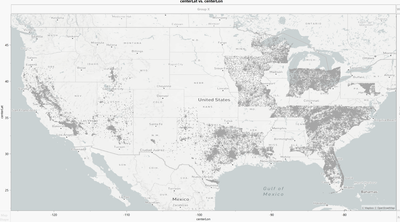
 

Machine23_0-1677605827193.pngMachine23_0-1677605827193.png


1 REPLY 1
Phil_Kay
Staff

Re: How do I get Street Map Service to align up with my data

I see the same issue when I try to use Street Map. NASA Server appears to be okay. I suggest that you ask technical support to look into this: [email protected].

Recommended Articles