- JMP Statement Regarding Critical PHP Remote Code Execution Vulnerabilities (CVE-2026-109618, CVE-2026-109619)
- Don’t miss your chance to experience Discovery Summit Europe at our best available rate! Early bird registration through 31 Oct.
- Graph Builder Toolbar streamlines interactive graphing. Creates shortcuts on Report and GraphBuilder Helpers toolbars. Download and install the extension.
- Subscribe to RSS Feed
- Mark Topic as New
- Mark Topic as Read
- Float this Topic for Current User
- Bookmark
- Subscribe
- Mute
- Printer Friendly Page
Discussions
Solve problems, and share tips and tricks with other JMP users.- User Community
- :
- Discussions
- :
- Re: How do I copy columns with formulas from one data table into another data ta...

- Mark as New
- Bookmark
- Subscribe
- Mute
- Subscribe to RSS Feed
- Get Direct Link
- Report Inappropriate Content
How do I copy columns with formulas from one data table into another data table, while preserving the formulas?
Accepted Solutions

- Mark as New
- Bookmark
- Subscribe
- Mute
- Subscribe to RSS Feed
- Get Direct Link
- Report Inappropriate Content
Re: How do I copy columns with formulas from one data table into another data table, while preserving the formulas?

- Mark as New
- Bookmark
- Subscribe
- Mute
- Subscribe to RSS Feed
- Get Direct Link
- Report Inappropriate Content
Re: How do I copy columns with formulas from one data table into another data table, while preserving the formulas?
via Copy columns / paste columns:
- Mark as New
- Bookmark
- Subscribe
- Mute
- Subscribe to RSS Feed
- Get Direct Link
- Report Inappropriate Content
Re: How do I copy columns with formulas from one data table into another data table, while preserving the formulas?
Hi Hogi, thanks for the response. That appears to work. I was using the cut/paste options in the Edit menu, but it appears right clicking on the column gives additional, and different, cut/paste options. Thanks!
- Mark as New
- Bookmark
- Subscribe
- Mute
- Subscribe to RSS Feed
- Get Direct Link
- Report Inappropriate Content
Re: How do I copy columns with formulas from one data table into another data table, while preserving the formulas?
No worries, we all started somewhere.
There are multiple ways to copy columns, and there may be documentation detailing which function should be used for each approach:
- with and without the name/header
- with and without data
- with and without properties, like the formula.
Is there a better way to batch copy multiple columns ?
Copy/Paste columns from the header menu is my favorite one - it copies the column with the name, with the properties, and when you press CTRL+A before you copy the column: even with the data (caution: copy is fast, paste can be very slow!).
It's such a helpful function, but it wasn't there from the beginning:
Copy Script For Selected Column(s) to Clipboard
... and it got better and better over the time.
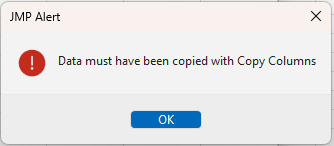
The latest improvement: JMP19 checks if the script on the clipboard is actually a column script; otherwise, it returns an error message.
More tricks like this? Just have a look at CTRL/Alt/Shift + click/select/double click/right click .
You don't need to know about all the Easter eggs listed there – simply ignore the ones you don't need.
Pick your favorite ones and enjoy the efficiency boost for JMP!
Recommended Articles
- © 2026 JMP Statistical Discovery LLC. All Rights Reserved.
- Terms of Use
- Privacy Statement
- Contact Us