- JMP will suspend normal business operations for our Winter Holiday beginning on Wednesday, Dec. 24, 2025, at 5:00 p.m. ET (2:00 p.m. ET for JMP Accounts Receivable).
Regular business hours will resume at 9:00 a.m. EST on Friday, Jan. 2, 2026. - We’re retiring the File Exchange at the end of this year. The JMP Marketplace is now your destination for add-ins and extensions.
- Subscribe to RSS Feed
- Mark Topic as New
- Mark Topic as Read
- Float this Topic for Current User
- Bookmark
- Subscribe
- Mute
- Printer Friendly Page
Discussions
Solve problems, and share tips and tricks with other JMP users.- JMP User Community
- :
- Discussions
- :
- How do I change a dot to number zero

- Mark as New
- Bookmark
- Subscribe
- Mute
- Subscribe to RSS Feed
- Get Direct Link
- Report Inappropriate Content
How do I change a dot to number zero
Hello,
I am adding two columns and it works.
However, there are some cells that have a "dot" (not zero) on the two columns that make the formula not work.
Is there away to change the dots to the number zero by not manually change them one by one?
Thank you,
Canh
Accepted Solutions


- Mark as New
- Bookmark
- Subscribe
- Mute
- Subscribe to RSS Feed
- Get Direct Link
- Report Inappropriate Content
Re: How do I change a dot to number zero
With scripting you can find some solutions from following links:
This one goes a bit deeper with speed Should you Loop through a data table or use Recode, or use Get Rows Where to change values in a data...
You can also do it directly from data table:
- Place 0 to clipboard by copying it from somewhere
- Left click on one of the dots (missing value) on one column to select the value
- Right click on the dot and choose Select Matching cells
- Press Ctrl + V (or right click and choose Paste)
- Repeat for other columns
Edit:
I would most likely go with script like this but not sure if I would recommend it if you don't yet have understanding of Loc() function and Data table subscripting
Names Default To Here(1);
dt = Current Data Table();
For(i = 1, i <= N Cols(dt), i++,
	Column(dt,i)[Loc((dt)[0,i], .)]=0;
);


- Mark as New
- Bookmark
- Subscribe
- Mute
- Subscribe to RSS Feed
- Get Direct Link
- Report Inappropriate Content
Re: How do I change a dot to number zero
I think there may be another way.
The issue is what happens when you add a number and a missing value. One school of thought is that the result should be missing. That is what happens when you use the formula X + Y. Another school of thought is that you should treat the missing as a zero. That is what the SUM function does.
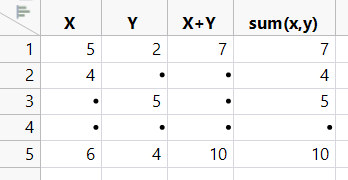
I have attached this data table so that you can see the formulas.
- Mark as New
- Bookmark
- Subscribe
- Mute
- Subscribe to RSS Feed
- Get Direct Link
- Report Inappropriate Content
Re: How do I change a dot to number zero
With scripting you can find some solutions from following links:
This one goes a bit deeper with speed Should you Loop through a data table or use Recode, or use Get Rows Where to change values in a data...
You can also do it directly from data table:
- Place 0 to clipboard by copying it from somewhere
- Left click on one of the dots (missing value) on one column to select the value
- Right click on the dot and choose Select Matching cells
- Press Ctrl + V (or right click and choose Paste)
- Repeat for other columns
Edit:
I would most likely go with script like this but not sure if I would recommend it if you don't yet have understanding of Loc() function and Data table subscripting
Names Default To Here(1);
dt = Current Data Table();
For(i = 1, i <= N Cols(dt), i++,
	Column(dt,i)[Loc((dt)[0,i], .)]=0;
);
- Mark as New
- Bookmark
- Subscribe
- Mute
- Subscribe to RSS Feed
- Get Direct Link
- Report Inappropriate Content
Re: How do I change a dot to number zero
Also are you sure you want to replace the missing values with zeros? They will behave differently in JMP. You could possibly also modify the formula to "ignore" or work with the missing values
- Mark as New
- Bookmark
- Subscribe
- Mute
- Subscribe to RSS Feed
- Get Direct Link
- Report Inappropriate Content
Re: How do I change a dot to number zero

- Mark as New
- Bookmark
- Subscribe
- Mute
- Subscribe to RSS Feed
- Get Direct Link
- Report Inappropriate Content
Re: How do I change a dot to number zero
My suggestion is that you change the formula to handle the missing values. In JMP, the dot "." is what is displayed for a numeric column when there is no value for the cell. Making the cell value a zero can have negative affects. Currently, with the missing values in place, if you calculate the mean of that column, the cells with missing values will be excluded from the calculation. If the cells are changed to zeros, the value of zero will be included in the calculation which will alter the calculation. Here is a simple script to change the missing values to zeros.
for each row(
  If( isMissing(:the target column ) == 1, :the target column = 0 )
);
If you could provide the formula you are calculating that the missing values is making the formula not work, I will take a look at it and modify it to deal with the missing values.
- Mark as New
- Bookmark
- Subscribe
- Mute
- Subscribe to RSS Feed
- Get Direct Link
- Report Inappropriate Content
Re: How do I change a dot to number zero
I think there may be another way.
The issue is what happens when you add a number and a missing value. One school of thought is that the result should be missing. That is what happens when you use the formula X + Y. Another school of thought is that you should treat the missing as a zero. That is what the SUM function does.
I have attached this data table so that you can see the formulas.
- Mark as New
- Bookmark
- Subscribe
- Mute
- Subscribe to RSS Feed
- Get Direct Link
- Report Inappropriate Content
Re: How do I change a dot to number zero
Hi Dan,
Thanks for your help and for distinguishing the two concepts of "school of thought".
Your simple example file makes sense and it is easy to understand. I found this is just simple but so powerful!
Yes, I will do the sum (x,y) instead of x+y for this.
The "SUM formula" solves the problem and I don't need to do many extra steps to convert missing values to zero, column to column and it is time consuming.
It is a big help! Great to know that JMP covers both concepts of "school of thought"
Have a great day and thanks again.
Recommended Articles
- © 2026 JMP Statistical Discovery LLC. All Rights Reserved.
- Terms of Use
- Privacy Statement
- Contact Us