- Don’t miss your chance to experience Discovery Summit Europe at our best available rate! Early bird registration through 31 Oct.
- Graph Builder Toolbar streamlines interactive graphing. Creates shortcuts on Report and GraphBuilder Helpers toolbars. Download and install the extension.
- Subscribe to RSS Feed
- Mark Topic as New
- Mark Topic as Read
- Float this Topic for Current User
- Bookmark
- Subscribe
- Mute
- Printer Friendly Page
Discussions
Solve problems, and share tips and tricks with other JMP users.- User Community
- :
- Discussions
- :
- Re: Horizontal plotting two tables to one journal

- Mark as New
- Bookmark
- Subscribe
- Mute
- Subscribe to RSS Feed
- Get Direct Link
- Report Inappropriate Content
Horizontal plotting two tables to one journal
Hello again,
I have two different tables and I just want to put them on the same journal/HTML horizontal.
is there a script command for doing such?
I tried to use the bellow (which I found in this forum) but the tables came out vertically:nw2 = New Window("horizontal tables", hlb = H List Box()); For(i = 1, i <= N Table(), i++, hlb << Append(Data Table(i) << new data box); //Active tables side by side Data Table(i) << journal; // Journal; tables inactive, for browsing data only );
Accepted Solutions


- Mark as New
- Bookmark
- Subscribe
- Mute
- Subscribe to RSS Feed
- Get Direct Link
- Report Inappropriate Content
Re: Horizontal plotting two tables to one journal
Here is how I would approach the issue.
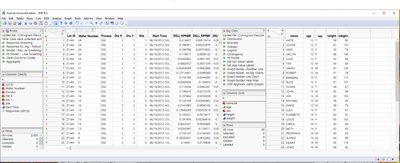
//nw1 = New Window("vertical tables");

nw2 = New Window( "horizontal tables", <<journal, hlb = H List Box() );

For( i = 1, i <= N Table(), i++,

//hlb << Append(Data Table(i) << new data box); //Active tables on top of eachother

	hlb << Append( Data Table( i ) << new data box ); //Active tables side by side

	//Data Table(i) << journal; // Journal; tables inactive, for browsing data only

);
- Mark as New
- Bookmark
- Subscribe
- Mute
- Subscribe to RSS Feed
- Get Direct Link
- Report Inappropriate Content
Re: Horizontal plotting two tables to one journal
Here is how I would approach the issue.
//nw1 = New Window("vertical tables");

nw2 = New Window( "horizontal tables", <<journal, hlb = H List Box() );

For( i = 1, i <= N Table(), i++,

//hlb << Append(Data Table(i) << new data box); //Active tables on top of eachother

	hlb << Append( Data Table( i ) << new data box ); //Active tables side by side

	//Data Table(i) << journal; // Journal; tables inactive, for browsing data only

);
- Mark as New
- Bookmark
- Subscribe
- Mute
- Subscribe to RSS Feed
- Get Direct Link
- Report Inappropriate Content
Re: Horizontal plotting two tables to one journal
Thanks! that worked great.
Is there a way to insert space between the two tables or is it too much for JMP?
- Mark as New
- Bookmark
- Subscribe
- Mute
- Subscribe to RSS Feed
- Get Direct Link
- Report Inappropriate Content
Re: Horizontal plotting two tables to one journal
JMP has very powerful capabilities in modification and/or the creation of new output displays. For your new request, one only has to add a Spacer Box between the outputs that are being appended.
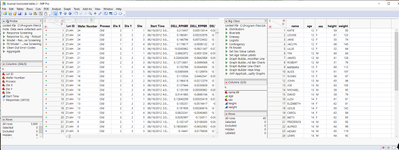
//nw1 = New Window("vertical tables");

nw2 = New Window( "horizontal tables", <<journal, hlb = H List Box() );

For( i = 1, i <= N Table(), i++,

//hlb << Append(Data Table(i) << new data box); //Active tables on top of eachother

	hlb << Append( Data Table( i ) << new data box ); //Active tables side by side

	hlb << Append(  Spacer Box( Size( 25, 1) ) );

	//Data Table(i) << journal; // Journal; tables inactive, for browsing data only

);Recommended Articles
- © 2026 JMP Statistical Discovery LLC. All Rights Reserved.
- Terms of Use
- Privacy Statement
- Contact Us