- JMP will suspend normal business operations for our Winter Holiday beginning on Wednesday, Dec. 24, 2025, at 5:00 p.m. ET (2:00 p.m. ET for JMP Accounts Receivable).
Regular business hours will resume at 9:00 a.m. EST on Friday, Jan. 2, 2026. - We’re retiring the File Exchange at the end of this year. The JMP Marketplace is now your destination for add-ins and extensions.
- Subscribe to RSS Feed
- Mark Topic as New
- Mark Topic as Read
- Float this Topic for Current User
- Bookmark
- Subscribe
- Mute
- Printer Friendly Page
Discussions
Solve problems, and share tips and tricks with other JMP users.- JMP User Community
- :
- Discussions
- :
- Hiding overlapping labels

- Mark as New
- Bookmark
- Subscribe
- Mute
- Subscribe to RSS Feed
- Get Direct Link
- Report Inappropriate Content
Hiding overlapping labels
How do I script in JSL the preference that I don't want to hide overlapping labels, please? If possible I'd like the preference to relate only to a specific chart I've created within the Graph Builder, but I'll settle for a general preference if isn't possible.
I've found the reference to "Hide Overlapping Labels" within the Preferences section of the Scripting Index, but the example doesn't seem to work. I note that the example actually says:
Preferences[1] << Set( Hide Overlap Labels( 0 ) );and I'm guessing this is probably a typo, but correcting it to
Preferences[1] << Set( Hide Overlapping Labels( 0 ) );
show preferences();
doesn't seem to work either, although the preference does now appear in the list, and the relevant check box has changed its setting when "Preferences" is invoked from the File menu. Clicking on the "Apply" button of the Preferences window seems to force the required change to be acted upon, but I'm trying to do this from a script.
Many thanks.
Accepted Solutions
- Mark as New
- Bookmark
- Subscribe
- Mute
- Subscribe to RSS Feed
- Get Direct Link
- Report Inappropriate Content
Re: Hiding overlapping labels
Hi - I've realised what the problem was: either syntax works, but the chart needs to be redisplayed (e.g. "gb << reshow") after amending the preference for the change actually to take effect. Having said that, it looks as though resetting Hide Overlapping Labels( 1 ) after forcing all of the labels to be displayed doesn't actually do anything unless the chart is resized (even if the size is exactly the same as originally) - but that can be easily accommodated by doing it via a little function like this:
	OverlappingLabels = function({myChart, YesNo}, {default local},
		// myChart is the chart I'm modifying; YesNo is either 0 or 1;
		preferences( Hide Overlapping Labels(YesNo));
		sizeList = (myChart << get size);
		myChart << Size( sizeList[1], sizeList[2] )
	);
Many thanks.


- Mark as New
- Bookmark
- Subscribe
- Mute
- Subscribe to RSS Feed
- Get Direct Link
- Report Inappropriate Content
Re: Hiding overlapping labels
I have always used this JSL syntax to change a preference.
preferences( Hide Overlapping Labels(0|1) );
- Mark as New
- Bookmark
- Subscribe
- Mute
- Subscribe to RSS Feed
- Get Direct Link
- Report Inappropriate Content
Re: Hiding overlapping labels
Hi - I've realised what the problem was: either syntax works, but the chart needs to be redisplayed (e.g. "gb << reshow") after amending the preference for the change actually to take effect. Having said that, it looks as though resetting Hide Overlapping Labels( 1 ) after forcing all of the labels to be displayed doesn't actually do anything unless the chart is resized (even if the size is exactly the same as originally) - but that can be easily accommodated by doing it via a little function like this:
	OverlappingLabels = function({myChart, YesNo}, {default local},
		// myChart is the chart I'm modifying; YesNo is either 0 or 1;
		preferences( Hide Overlapping Labels(YesNo));
		sizeList = (myChart << get size);
		myChart << Size( sizeList[1], sizeList[2] )
	);
Many thanks.

- Mark as New
- Bookmark
- Subscribe
- Mute
- Subscribe to RSS Feed
- Get Direct Link
- Report Inappropriate Content
Re: Hiding overlapping labels
Somehow it isn't working in JMP 15 even when you run it from Scripting Index:
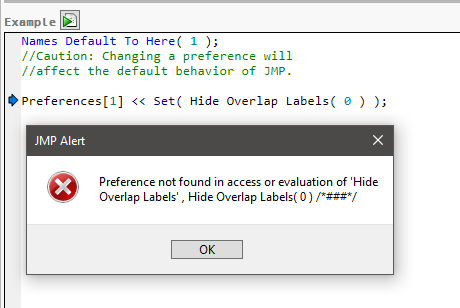
What am I doing wrong?
- Mark as New
- Bookmark
- Subscribe
- Mute
- Subscribe to RSS Feed
- Get Direct Link
- Report Inappropriate Content
Re: Hiding overlapping labels
And still I don't see any effect on my charts.
Recommended Articles
- © 2025 JMP Statistical Discovery LLC. All Rights Reserved.
- Terms of Use
- Privacy Statement
- Contact Us