Turn on suggestions
Auto-suggest helps you quickly narrow down your search results by suggesting possible matches as you type.
- JMP will suspend normal business operations for our Winter Holiday beginning on Wednesday, Dec. 24, 2025, at 5:00 p.m. ET (2:00 p.m. ET for JMP Accounts Receivable).
Regular business hours will resume at 9:00 a.m. EST on Friday, Jan. 2, 2026. - We’re retiring the File Exchange at the end of this year. The JMP Marketplace is now your destination for add-ins and extensions.
Options
- Subscribe to RSS Feed
- Mark Topic as New
- Mark Topic as Read
- Float this Topic for Current User
- Bookmark
- Subscribe
- Mute
- Printer Friendly Page
Discussions
Solve problems, and share tips and tricks with other JMP users.- JMP User Community
- :
- Discussions
- :
- Graph builder - reverse Y scale (only)?

Level XIII
- Mark as New
- Bookmark
- Subscribe
- Mute
- Subscribe to RSS Feed
- Get Direct Link
- Report Inappropriate Content
Graph builder - reverse Y scale (only)?
Created:
Apr 16, 2024 01:38 PM
| Last Modified: Apr 16, 2024 10:39 AM
(1680 views)
How can I reverse the Y scale in Graph Builder when using Shape files?
Unfortunately,
Graph Builder(
	Size( 545, 458 ),
	Summary Statistic( "Median" ),
	Graph Spacing( 4 ),
	Variables( Color( :"Y-Pos"n ), Shape( :Shape_Name ) ),
	Elements( Map Shapes( ) ),
	SendToReport(
		Dispatch( {}, "", ScaleBox( 2 ), {Reversed Scale} )
	)
)
doesN't have an effect - and with 
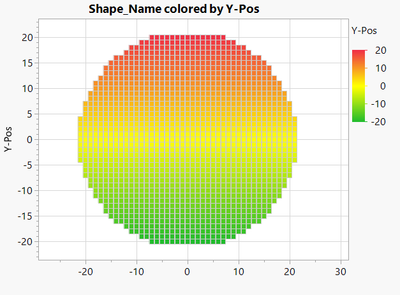
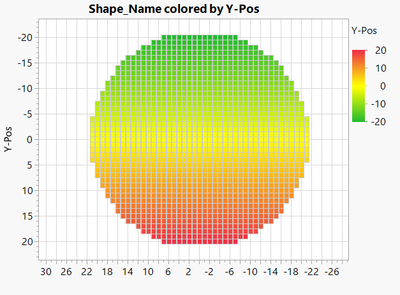
3 REPLIES 3


Super User
- Mark as New
- Bookmark
- Subscribe
- Mute
- Subscribe to RSS Feed
- Get Direct Link
- Report Inappropriate Content
Re: Graph builder - reverse Y scale (only)?
Do the reversing in your shape file an not in graph builder (build it already reversed)
-Jarmo
Level XIII
- Mark as New
- Bookmark
- Subscribe
- Mute
- Subscribe to RSS Feed
- Get Direct Link
- Report Inappropriate Content
Re: Graph builder - reverse Y scale (only)?
I don't think that it will help.
I want "-20" to appear on the Y axis below 20.
But "-20" on the x axis should stay on the left.
Editing the shape fill won't affect the appearance of the plot.
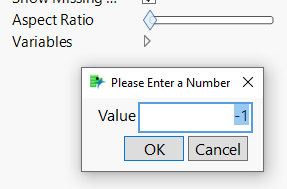
I just tried to use a negative aspect ratio - without success.
Level XIII
- Mark as New
- Bookmark
- Subscribe
- Mute
- Subscribe to RSS Feed
- Get Direct Link
- Report Inappropriate Content
Re: Graph builder - reverse Y scale (only)?
I submitted a wish to enhance the functionality of Graph Builder.
Maybe others will find the idea useful:
Graph builder + Shapes -> option to flip the map
Recommended Articles
- © 2025 JMP Statistical Discovery LLC. All Rights Reserved.
- Terms of Use
- Privacy Statement
- Contact Us