Turn on suggestions
Auto-suggest helps you quickly narrow down your search results by suggesting possible matches as you type.
- Don’t miss your chance to experience Discovery Summit Europe at our best available rate! Early bird registration through 31 Oct.
- Image to Table JMP extension imports single or batch images as data tables. Useful to extract curves from pictures or convert image data to curve data to use in analyses like Functional Data Explorer. Download and install the extension.
Options
- Subscribe to RSS Feed
- Mark Topic as New
- Mark Topic as Read
- Float this Topic for Current User
- Bookmark
- Subscribe
- Mute
- Printer Friendly Page
Discussions
Solve problems, and share tips and tricks with other JMP users.- User Community
- :
- Discussions
- :
- Graph builder - reverse Y scale (only)?

Level XIII
- Mark as New
- Bookmark
- Subscribe
- Mute
- Subscribe to RSS Feed
- Get Direct Link
- Report Inappropriate Content
Graph builder - reverse Y scale (only)?
Created:
Apr 16, 2024 01:38 PM
| Last Modified: Apr 16, 2024 10:39 AM
(2656 views)
How can I reverse the Y scale in Graph Builder when using Shape files?
Unfortunately,
Graph Builder(
	Size( 545, 458 ),
	Summary Statistic( "Median" ),
	Graph Spacing( 4 ),
	Variables( Color( :"Y-Pos"n ), Shape( :Shape_Name ) ),
	Elements( Map Shapes( ) ),
	SendToReport(
		Dispatch( {}, "", ScaleBox( 2 ), {Reversed Scale} )
	)
)
doesN't have an effect - and with 
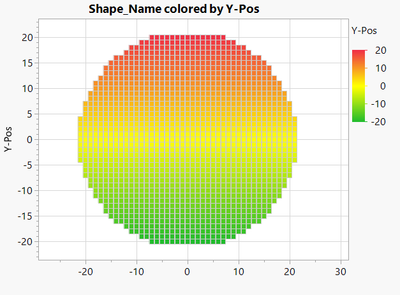
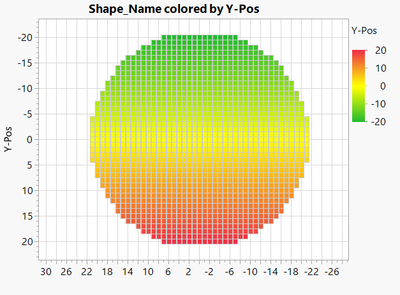
3 REPLIES 3


Super User
- Mark as New
- Bookmark
- Subscribe
- Mute
- Subscribe to RSS Feed
- Get Direct Link
- Report Inappropriate Content
Re: Graph builder - reverse Y scale (only)?
Do the reversing in your shape file an not in graph builder (build it already reversed)
-Jarmo
Level XIII
- Mark as New
- Bookmark
- Subscribe
- Mute
- Subscribe to RSS Feed
- Get Direct Link
- Report Inappropriate Content
Re: Graph builder - reverse Y scale (only)?
I don't think that it will help.
I want "-20" to appear on the Y axis below 20.
But "-20" on the x axis should stay on the left.
Editing the shape fill won't affect the appearance of the plot.
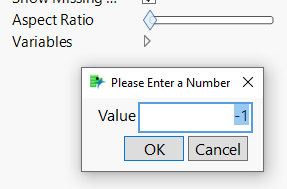
I just tried to use a negative aspect ratio - without success.
Level XIII
- Mark as New
- Bookmark
- Subscribe
- Mute
- Subscribe to RSS Feed
- Get Direct Link
- Report Inappropriate Content
Re: Graph builder - reverse Y scale (only)?
I submitted a wish to enhance the functionality of Graph Builder.
Maybe others will find the idea useful:
Graph builder + Shapes -> option to flip the map
Recommended Articles
- © 2026 JMP Statistical Discovery LLC. All Rights Reserved.
- Terms of Use
- Privacy Statement
- Contact Us