- Don’t miss your chance to experience Discovery Summit Europe at our best available rate! Early bird registration through 31 Oct.
- Graph Builder Toolbar streamlines interactive graphing. Creates shortcuts on Report and GraphBuilder Helpers toolbars. Download and install the extension.
- Subscribe to RSS Feed
- Mark Topic as New
- Mark Topic as Read
- Float this Topic for Current User
- Bookmark
- Subscribe
- Mute
- Printer Friendly Page
Discussions
Solve problems, and share tips and tricks with other JMP users.- User Community
- :
- Discussions
- :
- Re: Graph builder: points and mean on the same graph

- Mark as New
- Bookmark
- Subscribe
- Mute
- Subscribe to RSS Feed
- Get Direct Link
- Report Inappropriate Content
Graph builder: points and mean on the same graph
OK, first my boss wanted box plots, now it is too much, and instead I need to add the mean and std error bars... But JMP (14.0.0 64 bit windows 10) only wants to show one or the other:
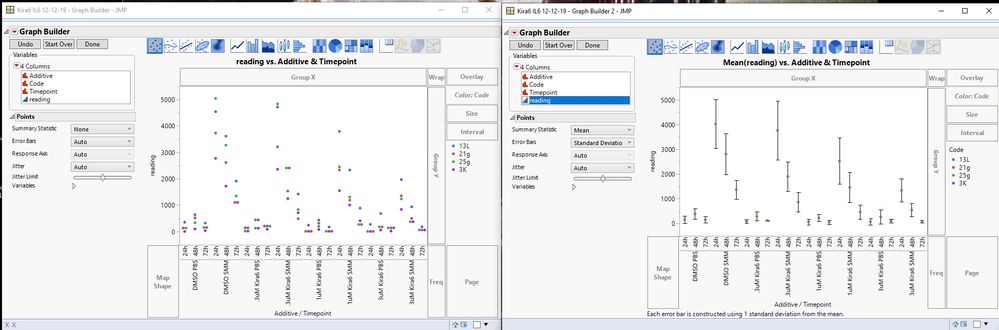
How can I make JMP show both, with the mean point and std dev or std error bars overlayed With the points (other than combining them in photoshop or learning 'Graphpad Prism')?
Accepted Solutions


- Mark as New
- Bookmark
- Subscribe
- Mute
- Subscribe to RSS Feed
- Get Direct Link
- Report Inappropriate Content
Re: Graph builder: points and mean on the same graph
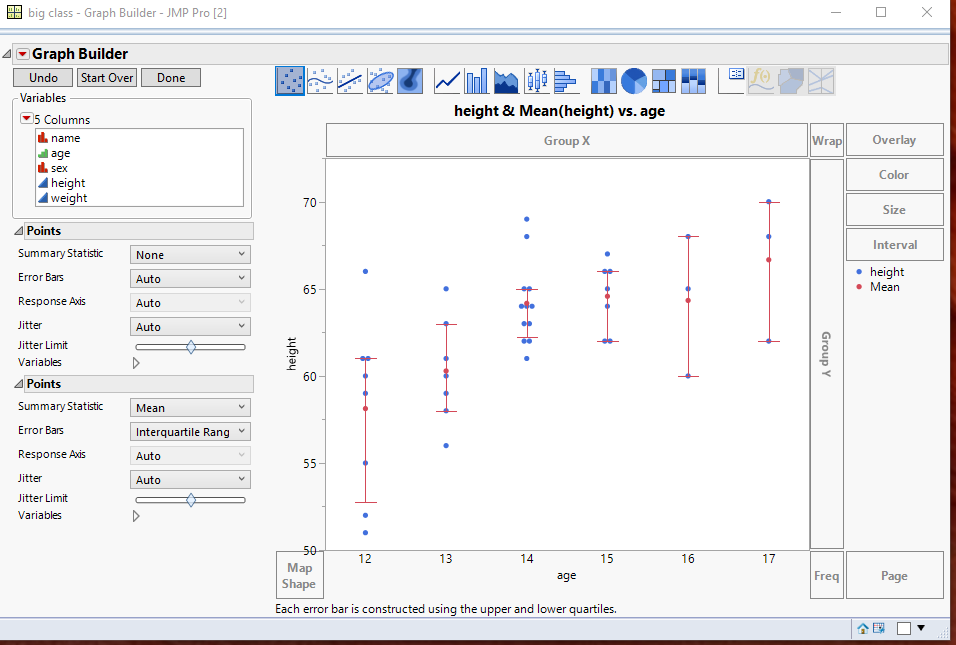
Assuming you have a chart with just your data points being displayed,, all you have to do, is to right click on the graph, and add a second instance of Points, and set them to the mean and error bars.
- Mark as New
- Bookmark
- Subscribe
- Mute
- Subscribe to RSS Feed
- Get Direct Link
- Report Inappropriate Content
Re: Graph builder: points and mean on the same graph
Assuming you have a chart with just your data points being displayed,, all you have to do, is to right click on the graph, and add a second instance of Points, and set them to the mean and error bars.
- Mark as New
- Bookmark
- Subscribe
- Mute
- Subscribe to RSS Feed
- Get Direct Link
- Report Inappropriate Content
Re: Graph builder: points and mean on the same graph
Recommended Articles
- © 2026 JMP Statistical Discovery LLC. All Rights Reserved.
- Terms of Use
- Privacy Statement
- Contact Us