Turn on suggestions
Auto-suggest helps you quickly narrow down your search results by suggesting possible matches as you type.
- Don’t miss your chance to experience Discovery Summit Europe at our best available rate! Early bird registration through 31 Oct.
- Graph Builder Toolbar streamlines interactive graphing. Creates shortcuts on Report and GraphBuilder Helpers toolbars. Download and install the extension.
Options
- Subscribe to RSS Feed
- Mark Topic as New
- Mark Topic as Read
- Float this Topic for Current User
- Bookmark
- Subscribe
- Mute
- Printer Friendly Page
Discussions
Solve problems, and share tips and tricks with other JMP users.- User Community
- :
- Discussions
- :
- Re: Graph Builder: Heatmap Label By Value - How do I control the number of decim...

Level IV
- Mark as New
- Bookmark
- Subscribe
- Mute
- Subscribe to RSS Feed
- Get Direct Link
- Report Inappropriate Content
Graph Builder: Heatmap Label By Value - How do I control the number of decimal points?
Sep 21, 2018 09:57 AM
(8084 views)
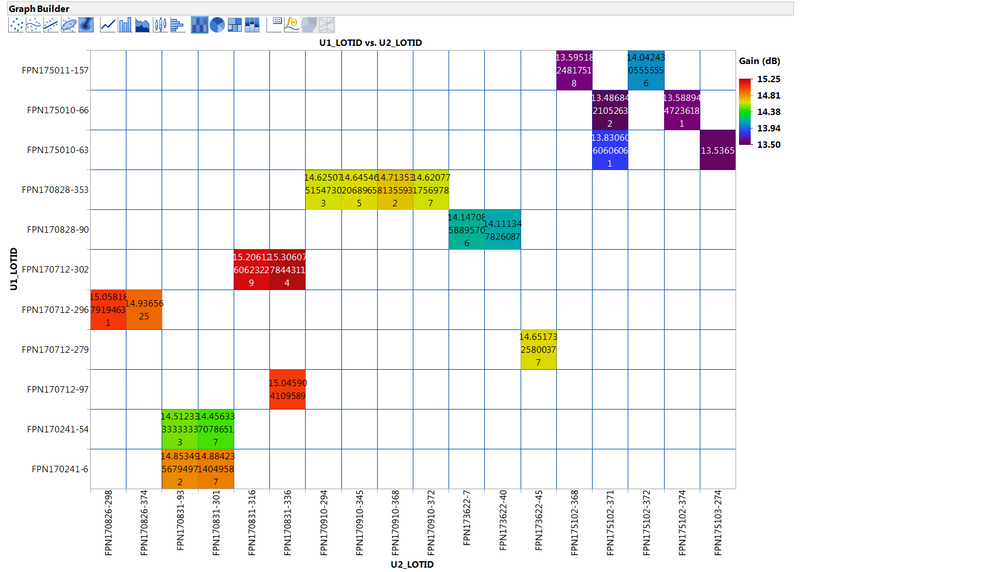
In Graph Builder I am using a heat map to show the average gain for different combinations of wafers. I have set Label By Value, to get the mean gain value added to the plot for each combination, but I see no way to limit the number of decimal points in the calculated value (changing the number of decimal places for the :Gain column does not affect the label). If possible, I would also like to be able to make the labels bold, but I might be able to work that out through a temporary change to the Font settings.
2 REPLIES 2


Super User (Alumni)
- Mark as New
- Bookmark
- Subscribe
- Mute
- Subscribe to RSS Feed
- Get Direct Link
- Report Inappropriate Content
Re: Graph Builder: Heatmap Label By Value - How do I control the number of decimal points?
Created:
Sep 26, 2018 04:20 PM
| Last Modified: Sep 26, 2018 1:21 PM
(8046 views)
| Posted in reply to message from MarkDayton 09-21-2018
Possible workaround: create a column with the means (rounded as desired) and use these values as labels. In Graph Builder, use Label by Row.
Current Data Table() << New Column("heatmap means",
    Numeric,
    "Continuous",
    Formula(Round(Col Mean(:Gain, :U1_LOTID, :U2_LOTID), 1)),
    <<label
);
Level IV
- Mark as New
- Bookmark
- Subscribe
- Mute
- Subscribe to RSS Feed
- Get Direct Link
- Report Inappropriate Content
Re: Graph Builder: Heatmap Label By Value - How do I control the number of decimal points?
Thanks
Recommended Articles
- © 2026 JMP Statistical Discovery LLC. All Rights Reserved.
- Terms of Use
- Privacy Statement
- Contact Us