Turn on suggestions
Auto-suggest helps you quickly narrow down your search results by suggesting possible matches as you type.
- Don’t miss your chance to experience Discovery Summit Europe at our best available rate! Early bird registration through 31 Oct.
- Graph Builder Toolbar streamlines interactive graphing. Creates shortcuts on Report and GraphBuilder Helpers toolbars. Download and install the extension.
Options
- Subscribe to RSS Feed
- Mark Topic as New
- Mark Topic as Read
- Float this Topic for Current User
- Bookmark
- Subscribe
- Mute
- Printer Friendly Page
Discussions
Solve problems, and share tips and tricks with other JMP users.- User Community
- :
- Discussions
- :
- Re: Graph Builder: Bar style stacked - How to set color theme?

Level III
- Mark as New
- Bookmark
- Subscribe
- Mute
- Subscribe to RSS Feed
- Get Direct Link
- Report Inappropriate Content
Graph Builder: Bar style stacked - How to set color theme?
Nov 6, 2019 11:22 AM
(8991 views)
1 ACCEPTED SOLUTION
Accepted Solutions


Super User
Solution
- Mark as New
- Bookmark
- Subscribe
- Mute
- Subscribe to RSS Feed
- Get Direct Link
- Report Inappropriate Content
Re: Graph Builder: Bar style stacked - How to set color theme?
Hi @PS_Ato,
There are a couple ways you can do it.
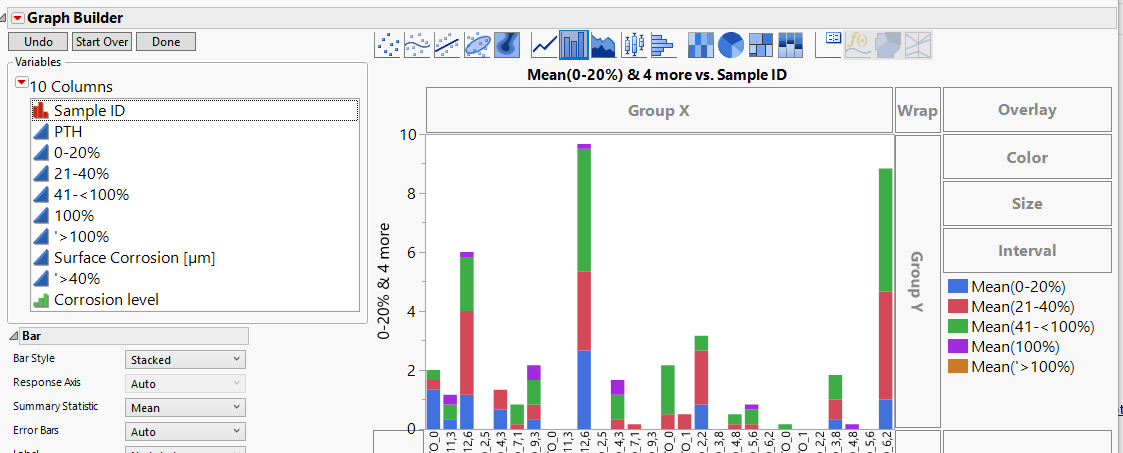
- Go File > Preferences > Graphs > Categorical Color Theme (you can then change from JMP Default to whatever you want). This changes the setting globally.
- Right click the color in the legend of your Graph Builder, then select Fill Pattern and choose a new color. This changes it just for the instance of Graph Builder that your running (and if you save the script to the data table), but not globally.
Hope this helps!,
DS
2 REPLIES 2
Level III
- Mark as New
- Bookmark
- Subscribe
- Mute
- Subscribe to RSS Feed
- Get Direct Link
- Report Inappropriate Content
Re: Graph Builder: Bar style stacked - How to set color theme?
Super User
Solution
- Mark as New
- Bookmark
- Subscribe
- Mute
- Subscribe to RSS Feed
- Get Direct Link
- Report Inappropriate Content
Re: Graph Builder: Bar style stacked - How to set color theme?
Hi @PS_Ato,
There are a couple ways you can do it.
- Go File > Preferences > Graphs > Categorical Color Theme (you can then change from JMP Default to whatever you want). This changes the setting globally.
- Right click the color in the legend of your Graph Builder, then select Fill Pattern and choose a new color. This changes it just for the instance of Graph Builder that your running (and if you save the script to the data table), but not globally.
Hope this helps!,
DS
Recommended Articles
- © 2026 JMP Statistical Discovery LLC. All Rights Reserved.
- Terms of Use
- Privacy Statement
- Contact Us