- JMP will suspend normal business operations for our Winter Holiday beginning on Wednesday, Dec. 24, 2025, at 5:00 p.m. ET (2:00 p.m. ET for JMP Accounts Receivable).
Regular business hours will resume at 9:00 a.m. EST on Friday, Jan. 2, 2026. - We’re retiring the File Exchange at the end of this year. The JMP Marketplace is now your destination for add-ins and extensions.
- Subscribe to RSS Feed
- Mark Topic as New
- Mark Topic as Read
- Float this Topic for Current User
- Bookmark
- Subscribe
- Mute
- Printer Friendly Page
Discussions
Solve problems, and share tips and tricks with other JMP users.- JMP User Community
- :
- Discussions
- :
- Global Zip codes. Best done in JMP or SAS?

- Mark as New
- Bookmark
- Subscribe
- Mute
- Subscribe to RSS Feed
- Get Direct Link
- Report Inappropriate Content
Global Zip codes. Best done in JMP or SAS?
ISO has standards for zipcodes around the world. Is this feature available in JMP, SAS or Both.
I guess since this is a JMP forum, I should limit this to JMP.
Here's the ISO standard, https://en.wikipedia.org/wiki/ISO_3166-2
China I need to map. China has prefectures but they have these subvisions at the local level.
Also, is there a way to list both chinese simpllified, chinese traditional, romanized or all?
Thanks in advance.
- Tags:
- windows


- Mark as New
- Bookmark
- Subscribe
- Mute
- Subscribe to RSS Feed
- Get Direct Link
- Report Inappropriate Content
Re: Global Zip codes. Best done in JMP or SAS?
https://www.iso.org/glossary-for-iso-3166.html
seems to be a good explainer for
https://www.iso.org/iso-3166-country-codes.html
which seems to offer a way to get some information about standard names for large regions.
I don't think it offers anything for what I'd call zip codes in the US. I believe it goes to the state level, probably not to the county or city level.
Depending what you are trying to do, you might find these interesting
https://www.maptiler.com/news/2016/10/osmnames-place-names-data-geocoder/
https://github.com/OSMNames/OSMNames
Also: boundaries and place names change. One or more additional counties appeared in the US during the 1980s, when SAS/Graph was producing county level maps for the first time. It was an eye-opener. https://www.census.gov/programs-surveys/geography/technical-documentation/county-changes.1980.html . It is impossible to stay completely up-to-date. https://xkcd.com/1688/
A reminder about ZIP codes in the US is in
- Mark as New
- Bookmark
- Subscribe
- Mute
- Subscribe to RSS Feed
- Get Direct Link
- Report Inappropriate Content
Re: Global Zip codes. Best done in JMP or SAS?
My question is whether this is integrated into JMP so I can display it in graphs. I can do this in excel now but not all areas.
Do you need me to list some examples with picture? I have files now for oblasts in Ukraine.
- Mark as New
- Bookmark
- Subscribe
- Mute
- Subscribe to RSS Feed
- Get Direct Link
- Report Inappropriate Content
Re: Global Zip codes. Best done in JMP or SAS?
Pictures might help, and maybe an indication of what you've tried so far, and what you are trying to accomplish.
JMP 16 has a few maps built in (so do earlier versions of JMP.) I did this with a big class graph by right->click add a map and right-click->customize (to thicken+color the line and clip the simple earth bitmap to the border.)
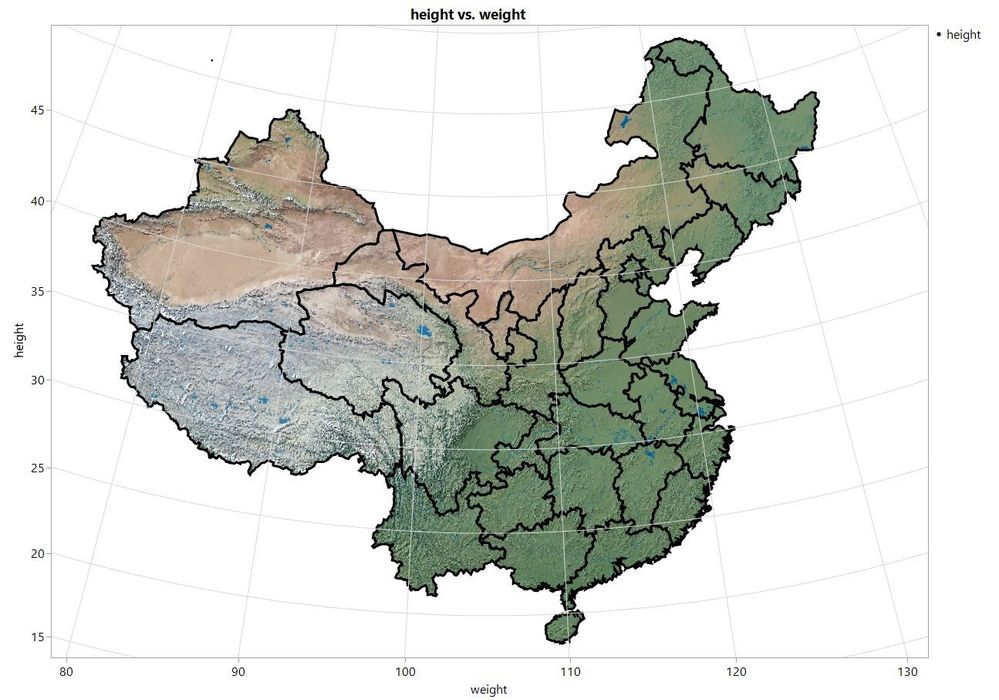
dt=open("$sample_data/big class.jmp");
dt<<Graph Builder(
	Size( 1190, 900 ),
	Show Control Panel( 0 ),
	Variables( X( :weight ), Y( :height ) ),
	Elements( Points( X, Y, Legend( 3 ) ) ),
	SendToReport(
		Dispatch(
			{},
			"weight",
			ScaleBox,
			{Scale( "Geodesic" ), Min( 78.9121725050727 ), Max( 131.391068563684 ),
			Inc( 10 ), Minor Ticks( 1 )}
		),
		Dispatch(
			{},
			"height",
			ScaleBox,
			{Scale( "Geodesic" ), Min( 17.4684154783393 ), Max( 55.4083033940635 ),
			Inc( 5 ), Minor Ticks( 0 )}
		),
		Dispatch(
			{},
			"Graph Builder",
			FrameBox,
			{Background Map(
				Images( "Simple Earth" ),
				Boundaries( "Mainland China Provinces" )
			), Marker Size( 1 ), Marker Drawing Mode( "Normal" ),
			Grid Line Order( 3 ), Reference Line Order( 4 ),
			DispatchSeg(
				MapSeg( 1 ),
				{Clip Shape( Boundaries( "Mainland China Provinces" ) )}
			), DispatchSeg( Shape Seg( 1 ), {Color( "Black" ), Line Width( 3 )} )}
		)
	)
);
If these are not the boundaries you need, you can use SHP files to make them. I've not been through the process, but others have: https://www.google.com/search?q=jmp+shp+file shows several hits.
You might also look at the street map overlay and see if that does what you need.
- Mark as New
- Bookmark
- Subscribe
- Mute
- Subscribe to RSS Feed
- Get Direct Link
- Report Inappropriate Content
Re: Global Zip codes. Best done in JMP or SAS?
@Craige_Hales @Craig
This looks good but let me show you what I've done or tried in Excel and we'll start there. I didn't use lat/long though.
I work on JMP the next few days so I'll compare and post back.
- Mark as New
- Bookmark
- Subscribe
- Mute
- Subscribe to RSS Feed
- Get Direct Link
- Report Inappropriate Content
Re: Global Zip codes. Best done in JMP or SAS?
I recreated some of it tonight but I have to do it better. Excel has the ability to pull the shapefiles. I don't have to load them. I give the ISO code and they plot them.
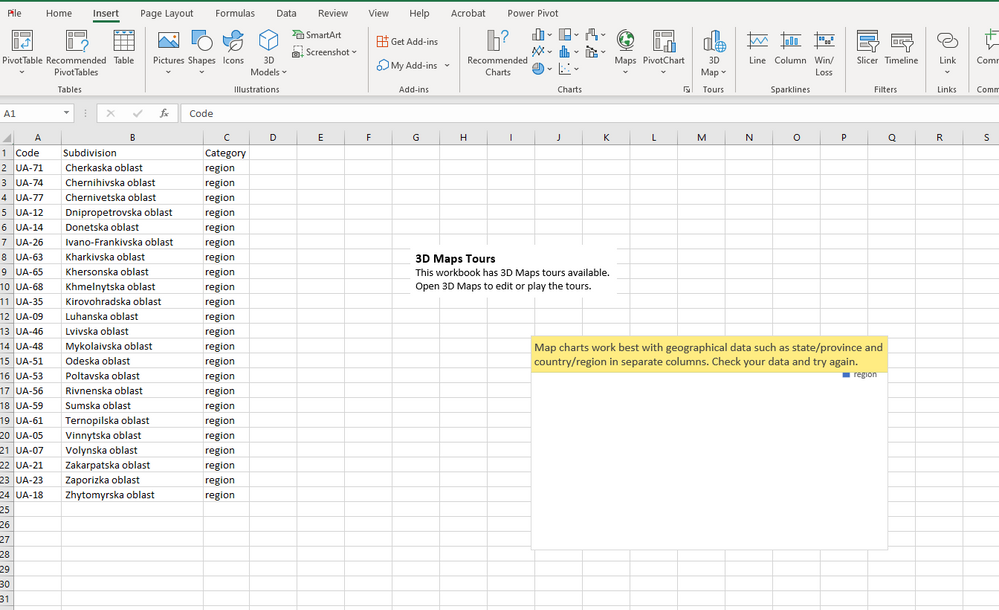
- Mark as New
- Bookmark
- Subscribe
- Mute
- Subscribe to RSS Feed
- Get Direct Link
- Report Inappropriate Content
Re: Global Zip codes. Best done in JMP or SAS?
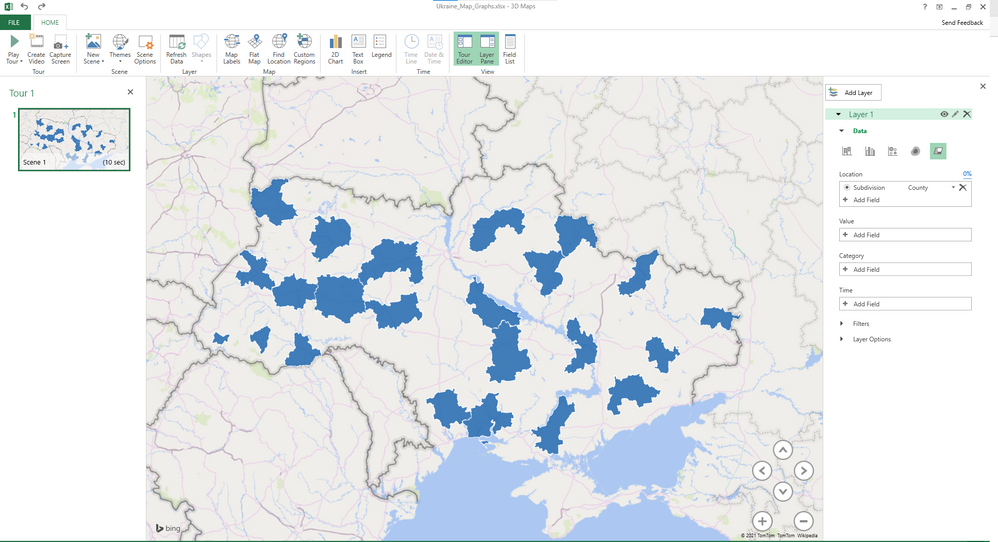
Recommended Articles
- © 2026 JMP Statistical Discovery LLC. All Rights Reserved.
- Terms of Use
- Privacy Statement
- Contact Us