- Don’t miss your chance to experience Discovery Summit Europe at our best available rate! Early bird registration through 31 Oct.
- Graph Builder Toolbar streamlines interactive graphing. Creates shortcuts on Report and GraphBuilder Helpers toolbars. Download and install the extension.
- Subscribe to RSS Feed
- Mark Topic as New
- Mark Topic as Read
- Float this Topic for Current User
- Bookmark
- Subscribe
- Mute
- Printer Friendly Page
Discussions
Solve problems, and share tips and tricks with other JMP users.- User Community
- :
- Discussions
- :
- Re: Formula for normalizing data to control mean

- Mark as New
- Bookmark
- Subscribe
- Mute
- Subscribe to RSS Feed
- Get Direct Link
- Report Inappropriate Content
Formula for normalizing data to control mean
Here's the very simple situation I have:
Column A: Continuous data on treatment levels in an experiment. 0 = controls
Column B: Continuous data that is the response metric to the treatment.
Column C: Formula that calculates response metric from Column B normalized (i.e. divided by) the mean of the responses in the controls (rows where Column A=0).
How do I write the formula in Column C to do this normalization of Column B to the control mean?
I think it will involve creating a local variable that uses the Col Mean function conditional to the Rows in Column A that are = 0.
I don't know how to make that conditional work for the multiple rows that need to be selected for calculation of the mean of the controls.
I know that the Col Mean function calculates the mean of all the data in Column B, and that using a By variable can calculate means for each value of Column A. But, I want to calculate a single mean for the values of Column B where Column A are = 0 and use that single mean as an argument in Column C for calculating an equation (Column C=Column B/Mean of Column B where Column A=0) in every row of the table.
I'm using JMP 16.
Accepted Solutions
- Mark as New
- Bookmark
- Subscribe
- Mute
- Subscribe to RSS Feed
- Get Direct Link
- Report Inappropriate Content
Re: Formula for normalizing data to control mean
Thanks jthi, I took your example and wrote the formula equation for Column 3 so the normalization, it all happens in that column as follows,
:Column 2 / Col Mean( If( :Column 1 == 0, :Column 2, . ) )
I didn't need to create a local variable. The Col Mean function apparently does that in the background.
I appreciate your insight! Thanks!
Vince


- Mark as New
- Bookmark
- Subscribe
- Mute
- Subscribe to RSS Feed
- Get Direct Link
- Report Inappropriate Content
Re: Formula for normalizing data to control mean
One option is to use If statement inside the Col Mean
Col Mean(If(:Column 1 == 0, :Column 2, .))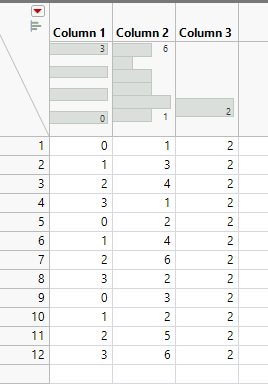
If Column A has first row as 0 you can also use As Constant() to calculate the mean
As Constant(Col Mean(:Column 2, :Column 1))I have attached example table with both mean calculations. You can of course just take the mean calculation and use that then in single column which will calculate your final data.
- Mark as New
- Bookmark
- Subscribe
- Mute
- Subscribe to RSS Feed
- Get Direct Link
- Report Inappropriate Content
Re: Formula for normalizing data to control mean
Thanks jthi, I took your example and wrote the formula equation for Column 3 so the normalization, it all happens in that column as follows,
:Column 2 / Col Mean( If( :Column 1 == 0, :Column 2, . ) )
I didn't need to create a local variable. The Col Mean function apparently does that in the background.
I appreciate your insight! Thanks!
Vince
Recommended Articles
- © 2026 JMP Statistical Discovery LLC. All Rights Reserved.
- Terms of Use
- Privacy Statement
- Contact Us