- Don’t miss your chance to experience Discovery Summit Europe at our best available rate! Early bird registration through 31 Oct.
- Graph Builder Toolbar streamlines interactive graphing. Creates shortcuts on Report and GraphBuilder Helpers toolbars. Download and install the extension.
- Subscribe to RSS Feed
- Mark Topic as New
- Mark Topic as Read
- Float this Topic for Current User
- Bookmark
- Subscribe
- Mute
- Printer Friendly Page
Discussions
Solve problems, and share tips and tricks with other JMP users.- User Community
- :
- Discussions
- :
- Re: Exporting "Recent Files" for migration to new computer

- Mark as New
- Bookmark
- Subscribe
- Mute
- Subscribe to RSS Feed
- Get Direct Link
- Report Inappropriate Content
Exporting "Recent Files" for migration to new computer
Hello, I have a user that got a new computer but is upset because her "recent files" when she opens JMP is empty. I still have access to her old computer. Is there a way to export and import these files? I did a google search and there was mention of exporting a registry entry but I could not find the SAS Institute Inc. folder they mentioned in that discussion...
Migrating to new system // List of pinned files
Thanks for any help!
-Wes


- Mark as New
- Bookmark
- Subscribe
- Mute
- Subscribe to RSS Feed
- Get Direct Link
- Report Inappropriate Content
Re: Exporting "Recent Files" for migration to new computer
I used this in the FileSnapper addin, the location worked for me on JMP 14 and 15 and probably 16 when released.
temp=runprogram(executable("reg"),options({"query","\["HKCU\Software\SAS Institute Inc.\JMP\Recent\Files"]\"}),readfunction("text"));I think you can make regedit export that node on the old computer and import it on the new one. You won't need the JSL, just the HKCU bit.

- Mark as New
- Bookmark
- Subscribe
- Mute
- Subscribe to RSS Feed
- Get Direct Link
- Report Inappropriate Content
Re: Exporting "Recent Files" for migration to new computer
1、How to use JMP SOFTWARE JSL to read the contents of the registry branch :HKEY_USERS\SOFTWARE\SAS Institute Inc.\JMP\Recent\Files
wsh = Create Object("WScript.Shell");
reg_path = "HKEY_USERS\SOFTWARE\SAS Institute Inc.\JMP\Recent\Files";
Try(
    reg_values = wsh:RegRead(reg_path);
    If( Is String( reg_values ),
        Show( reg_values );
    ,
        For( i = 1, i <= N Items( reg_values ), i++,
            Print( Char( i ) || ": " || reg_values[i] );
        );
    );
);//??
2、And how JSL with JMP software implements regedit.exe to import the specified registry file into the registry.
Thanks Experts!


- Mark as New
- Bookmark
- Subscribe
- Mute
- Subscribe to RSS Feed
- Get Direct Link
- Report Inappropriate Content
Re: Exporting "Recent Files" for migration to new computer
JMP shares the Recent Files list across JMP versions and they are stored per-user under this key:
Computer\HKEY_CURRENT_USER\SOFTWARE\SAS Institute Inc.\JMP\Recent\Files
Here is a picture from my machine. Be sure you check the registry when logged in as her userid since they are stored in HKEY_CURRENT_USER and the userid matters.
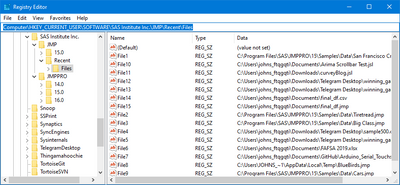
So you ought to be able to login to the old PC as her userid, run regedit and rigt-click Export on the "Files" folder (if you can find it). And have her import the file into her new machine.
John

- Mark as New
- Bookmark
- Subscribe
- Mute
- Subscribe to RSS Feed
- Get Direct Link
- Report Inappropriate Content
Re: Exporting "Recent Files" for migration to new computer
Is this true? When I upgraded to JMP v18 all of the recent and pinned files were lost, and I was back to a clean slate. Going back to JMP v17, they're lost there too. I wonder if something in JMP v18 corrupted the recent files list.
- Mark as New
- Bookmark
- Subscribe
- Mute
- Subscribe to RSS Feed
- Get Direct Link
- Report Inappropriate Content
Re: Exporting "Recent Files" for migration to new computer
I did find the Recent Files in the Windows registry, and exporting/importing the key did the trick, restoring the list of recent and pinned files.
Recommended Articles
- © 2026 JMP Statistical Discovery LLC. All Rights Reserved.
- Terms of Use
- Privacy Statement
- Contact Us