- Don’t miss your chance to experience Discovery Summit Europe at our best available rate! Early bird registration through 31 Oct.
- Graph Builder Toolbar streamlines interactive graphing. Creates shortcuts on Report and GraphBuilder Helpers toolbars. Download and install the extension.
- Subscribe to RSS Feed
- Mark Topic as New
- Mark Topic as Read
- Float this Topic for Current User
- Bookmark
- Subscribe
- Mute
- Printer Friendly Page
Discussions
Solve problems, and share tips and tricks with other JMP users.- User Community
- :
- Discussions
- :
- Re: Equivalence Test for Means: Adjust Confidence Intervals for the Differences?

- Mark as New
- Bookmark
- Subscribe
- Mute
- Subscribe to RSS Feed
- Get Direct Link
- Report Inappropriate Content
Equivalence Test for Means: Adjust Confidence Intervals for the Differences?
Hello together,
I'm new to jmp17 and tried to do a TOST Test.
In Fit Y by X, I selected Equivalence Test --> Means.
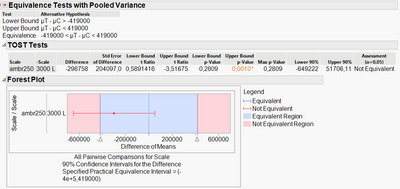
Regarding the Forest Plot I wondered if the 90% Confidence Intervals for the Difference is the error bar in the plot and if there is a way to adjust the confidence interval?
Thanks!
Accepted Solutions


- Mark as New
- Bookmark
- Subscribe
- Mute
- Subscribe to RSS Feed
- Get Direct Link
- Report Inappropriate Content
Re: Equivalence Test for Means: Adjust Confidence Intervals for the Differences?
Hi @CoxPanther919,
Welcome in the Community ! :)
Yes, the error bar represents the 90% confidence interval of the TOST you have realized.
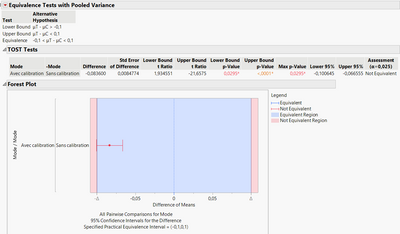
Since you're doing a Two One-Sided Test, each one-sided test will use the alpha you have specified in the launch window (0,05 by default, so confidence level = 0,95), but you're doing two comparisons in a TOST : one for superior value, one for inferior value, so your "global" confidence for the TOST is 0,95 to the power of 2 (2 tests or comparisons done) = 0,90.
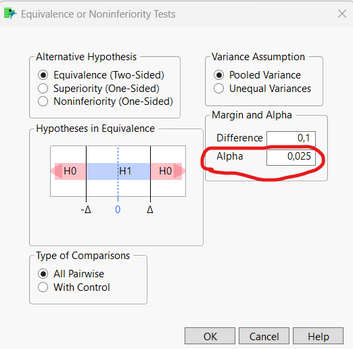
If you would like to have a 95% interval confidence, you will have to specify an alpha value of 0,025 (or say otherwise, confidence level of 0,975 for each test) : 0,975^2 = 0,95.
One practical example here :
Result :
I hope I understood your question and that this answer will help you,
"It is not unusual for a well-designed experiment to analyze itself" (Box, Hunter and Hunter)


- Mark as New
- Bookmark
- Subscribe
- Mute
- Subscribe to RSS Feed
- Get Direct Link
- Report Inappropriate Content
Re: Equivalence Test for Means: Adjust Confidence Intervals for the Differences?
In the dialog, when you enter the "difference" value, you can also enter the alpha-level. This will control the confidence interval width.
- Mark as New
- Bookmark
- Subscribe
- Mute
- Subscribe to RSS Feed
- Get Direct Link
- Report Inappropriate Content
Re: Equivalence Test for Means: Adjust Confidence Intervals for the Differences?
Hi @CoxPanther919,
Welcome in the Community ! :)
Yes, the error bar represents the 90% confidence interval of the TOST you have realized.
Since you're doing a Two One-Sided Test, each one-sided test will use the alpha you have specified in the launch window (0,05 by default, so confidence level = 0,95), but you're doing two comparisons in a TOST : one for superior value, one for inferior value, so your "global" confidence for the TOST is 0,95 to the power of 2 (2 tests or comparisons done) = 0,90.
If you would like to have a 95% interval confidence, you will have to specify an alpha value of 0,025 (or say otherwise, confidence level of 0,975 for each test) : 0,975^2 = 0,95.
One practical example here :
Result :
I hope I understood your question and that this answer will help you,
"It is not unusual for a well-designed experiment to analyze itself" (Box, Hunter and Hunter)
- Mark as New
- Bookmark
- Subscribe
- Mute
- Subscribe to RSS Feed
- Get Direct Link
- Report Inappropriate Content
Re: Equivalence Test for Means: Adjust Confidence Intervals for the Differences?
Recommended Articles
- © 2026 JMP Statistical Discovery LLC. All Rights Reserved.
- Terms of Use
- Privacy Statement
- Contact Us