- Don’t miss your chance to experience Discovery Summit Europe at our best available rate! Early bird registration through 31 Oct.
- Graph Builder Toolbar streamlines interactive graphing. Creates shortcuts on Report and GraphBuilder Helpers toolbars. Download and install the extension.
- Subscribe to RSS Feed
- Mark Topic as New
- Mark Topic as Read
- Float this Topic for Current User
- Bookmark
- Subscribe
- Mute
- Printer Friendly Page
Discussions
Solve problems, and share tips and tricks with other JMP users.- User Community
- :
- Discussions
- :
- Re: Enable button box after pressing enter at a Number edit box

- Mark as New
- Bookmark
- Subscribe
- Mute
- Subscribe to RSS Feed
- Get Direct Link
- Report Inappropriate Content
Enable button box after pressing enter at a Number edit box
I have the following window:
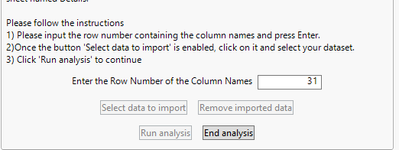
What I am trying to do is to enable the 'Select data to import' button after pressing enter at the Number Edit window above.
docId = "xxxxxx";
WidthDescripWin = 500;
init_value =31;


win = New Window("Landing page for study evaluation add-in",
	<<On close(EndAddin()),
	<< Padding( {Left( 10 ), Top( 10 ), Right( 10 ), Bottom( 10 )} ),

	// Construction of landing page. From here data is imported and analysis initiated
	H Center Box(promptTitle = Text Box("Compat study evaluation")),
	Spacer Box(Size(10,10)),
	//H Center Box(promptV = Text Box("Add-in version: " || substitute(char(format(addin_version, "Fixed Dec", 1)),",","."))),
	H Center Box(promptV = Text Box("Add-in version: 0.2" )),
	H Center Box(promptDoc = Text Box("Documentation report: " || char(docId))),
	Spacer Box(Size(10,10)),
	Panel Box("Description of Add-in:",
		Text Box("This add-in has been created to ease and standardize the statistical analysis of data coming from" ||
			" compatibility studies. The general structure of compatiblity studies is an comparison of parameter developments" ||
			" for samples impacted by a given influence of interest and corresponding reference samples.", <<set width(WidthDescripWin))
	),
	Spacer Box(Size(10,10)),
	Panel Box( "Data selection for analysis. Please follow the instructions:",
		Text Box("The data file is expected to be a standard pull from *****. Thus the file should have a sheet named" ||
				" Details. \!N   \!NPlease follow the instructions\!N1) Please input the row number containing the column names"||
				" and press Enter.\!N2)Once the button 'Select data to import' is enabled, click on it and select your dataset." ||
				" \!N3) Click 'Run analysis' to continue", <<set width(WidthDescripWin)
		),
		Spacer Box(Size(10,10)),
        H Center Box(Lineup Box( NCol(2),
			Text Box("Enter the Row Number of the Column Names"),
                    row_no = Number Edit Box(init_value, << Set Function(Function({this}, init_value = this << get; enter_row_start();)));


			),
		),
        Spacer Box(Size(10,10)),
		H Center Box(
            H List Box(
			    bboxImp = button box( "Select data to import", importData()), // Importing data
			    Spacer Box(Size(10,10)),
			    bboxRe = button box( "Remove imported data", importRedo()), // Allow for reimport data
		    ),
        ),
	Spacer Box(Size(10,10)),
	H Center Box(
        H List Box(
		    bboxAn = button box("Run analysis", compatStudyEval()), // Perform analysis
		    Spacer Box(Size(10,10)),
		    bboxEnd = button box("End analysis", endAddin()) // Close landing page for add-in
	    ),
    ),


  ),

);

// Change font in landing page window
promptTitle << Font("Times New Roman", 14, "Bold");
promptV << Font("Times New Roman", 10, "Bold");
promptDoc << Font("Times New Roman", 10, "Bold");

bboxRe << enable(0);
bboxAn << enable(0);
bboxImp << enable(0);


// ----------------------------------------
// ----- STEP 3: FUNCTION DEFINITIONS -----
// ----------------------------------------


enter_row_start = Function({},

	bboxImp << enable(1);

);
the way that I am trying to do that without success is using the following piece of code:
where the enter_row_start() function just has the enable command.
Is it possible to do that?
what am I doing wrong?


- Mark as New
- Bookmark
- Subscribe
- Mute
- Subscribe to RSS Feed
- Get Direct Link
- Report Inappropriate Content
Re: Enable button box after pressing enter at a Number edit box
Include this expression in the function you defined for the number column box.
bboxImp << Enable( 1 );

- Mark as New
- Bookmark
- Subscribe
- Mute
- Subscribe to RSS Feed
- Get Direct Link
- Report Inappropriate Content
Re: Enable button box after pressing enter at a Number edit box
I believe that Mark was referring to the "Number Edit Box" not a "Number Column Box".

- Mark as New
- Bookmark
- Subscribe
- Mute
- Subscribe to RSS Feed
- Get Direct Link
- Report Inappropriate Content
Re: Enable button box after pressing enter at a Number edit box
You are on the right track. You just need to check the value of the number edit box as part of the function. Here is a simple example that you can apply to your script. The function below will also disable the button if the number edit box goes back to a missing value.
names default to here( 1 );

nw = new window( "Test Window",
	panel box( "Instructions",
		text box( "1. Input number \!r2. Press Enter \!r3. Press Run Analysis" )
	),
	panel box( "Data Entry",
		h list box(
			text box( "enter a number and hit Enter on your keyboard" ),
			NEB = number edit box( ., << set function(
				function( { thisBox },
					if(
						!is missing( thisBox << get ), bb1 << enable(1),
						is missing( thisBox << get ), bb1 << enable(0)
					)
				)
			))
		)
	),
	panel box( "Actions",
		h list box(
			bb1 = button box( "Run Analysis" ),
			button box( "End Analysis" )
		)
	)
);

bb1 << enable( 0 )Recommended Articles
- © 2026 JMP Statistical Discovery LLC. All Rights Reserved.
- Terms of Use
- Privacy Statement
- Contact Us