- Discovery Summit 2026: Early User Edition - September 23-24.Register. It's free.
- Graph Builder Toolbar streamlines interactive graphing. Creates shortcuts on Report and GraphBuilder Helpers toolbars. Download and install the extension.
- Subscribe to RSS Feed
- Mark Topic as New
- Mark Topic as Read
- Float this Topic for Current User
- Bookmark
- Subscribe
- Mute
- Printer Friendly Page
Discussions
Solve problems, and share tips and tricks with other JMP users.- User Community
- :
- Discussions
- :
- Re: Disable "Update Table" script?

- Mark as New
- Bookmark
- Subscribe
- Mute
- Subscribe to RSS Feed
- Get Direct Link
- Report Inappropriate Content
Disable "Update Table" script?
After importing an Excel file, JMP adds a "Source" and an "Update Table" Script:
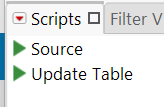
'Update Table' sounds like a script that can be used to update the JMP data table.
After spending some hours working with a JMP data table, adding and grouping columns, and adding column properties...
... and having tried the 'Update Table' script, you will notice that all these changes are lost during the update.
For added columns, there is a warning message (see below); the other settings will be lost without warning.
Experienced users know that 'Update Table' can be risky.
However, they have to worry about new, inexperienced colleagues!
Please be careful with 'Concatenate' – as well as adding data from the data grid, it also adds table scripts to the main table.
This means that an 'Update Table' script could suddenly appear in a shared table, which users may be eager to try out.
Fortunately, there is an alert that might prevent the user from updating the table.
Using "Create New Table" as the default is also a good idea. :)

Is there an option to stop JMP from adding the "Update Table" script?
Accepted Solutions
- Mark as New
- Bookmark
- Subscribe
- Mute
- Subscribe to RSS Feed
- Get Direct Link
- Report Inappropriate Content
Re: Disable "Update Table" script?
Thank you for the info.
here is the wish:
Option to disable creation of "Update Table" Script


- Mark as New
- Bookmark
- Subscribe
- Mute
- Subscribe to RSS Feed
- Get Direct Link
- Report Inappropriate Content
Re: Disable "Update Table" script?
Hi @hogi ,
There is no native way (without post import scripts) to remove the update table button - if you like it might be worth putting a Wish List item in.
Thanks,
Ben
- Mark as New
- Bookmark
- Subscribe
- Mute
- Subscribe to RSS Feed
- Get Direct Link
- Report Inappropriate Content
Re: Disable "Update Table" script?
Thank you for the info.
here is the wish:
Option to disable creation of "Update Table" Script
- Mark as New
- Bookmark
- Subscribe
- Mute
- Subscribe to RSS Feed
- Get Direct Link
- Report Inappropriate Content
Re: Disable "Update Table" script?
previous community post highlighting the issue:
JMP 18 new Update Table script overwrites table / @Ake
Recommended Articles
- © 2026 JMP Statistical Discovery LLC. All Rights Reserved.
- Terms of Use
- Privacy Statement
- Contact Us