- JMP will suspend normal business operations for our Winter Holiday beginning on Wednesday, Dec. 24, 2025, at 5:00 p.m. ET (2:00 p.m. ET for JMP Accounts Receivable).
Regular business hours will resume at 9:00 a.m. EST on Friday, Jan. 2, 2026. - We’re retiring the File Exchange at the end of this year. The JMP Marketplace is now your destination for add-ins and extensions.
- Subscribe to RSS Feed
- Mark Topic as New
- Mark Topic as Read
- Float this Topic for Current User
- Bookmark
- Subscribe
- Mute
- Printer Friendly Page
Discussions
Solve problems, and share tips and tricks with other JMP users.- JMP User Community
- :
- Discussions
- :
- Different icons for JMP Files

- Mark as New
- Bookmark
- Subscribe
- Mute
- Subscribe to RSS Feed
- Get Direct Link
- Report Inappropriate Content
Different icons for JMP Files
Hi Guys,
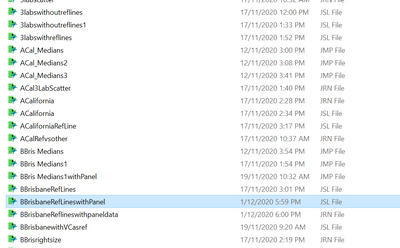
I recently had someone work on my computer, previously all the different JMP files, such as Scripts, Journals and Data tables had different icons when they were sitting in my working folder, since the work was done all these have the same icon and are very hard to identify unless i look at the extension, and everytime l click on one it reopens JMP, so i may reopen JMP several times in one session, please see the attached photo. Does anyone have a work around??
Thanks
Mick
Accepted Solutions


- Mark as New
- Bookmark
- Subscribe
- Mute
- Subscribe to RSS Feed
- Get Direct Link
- Report Inappropriate Content
Re: Different icons for JMP Files
It sounds crazy but reinstalling JMP might be the easiest solution to get the icons back, or you could set windows explorer to always show file extensions. A web search for 'windows 10 change icon for file type' gives you details to fix icons without reinstalling JMP (looks like a pain), or a search for 'windows 10 always show file extensions' should show file extensions, which I prefer anyway.

- Mark as New
- Bookmark
- Subscribe
- Mute
- Subscribe to RSS Feed
- Get Direct Link
- Report Inappropriate Content
Re: Different icons for JMP Files
I just had this happen to me on my Window 10 computer. After following @ih advice to google "windows 10 change icon for file type" I ran across the video I've copied below. I successfully restored my .jsl and .jrn icons using this approach. But, you have to be willing to edit the registry. It's up to you whether you are comfortable doing that or not. Be careful if you do that....not recommending this approach, but rather making it available if you wish to take that risk.
(115) How To Restore Your Default File icon - YouTube


- Mark as New
- Bookmark
- Subscribe
- Mute
- Subscribe to RSS Feed
- Get Direct Link
- Report Inappropriate Content
Re: Different icons for JMP Files
File=>Preferences=>Window's Specific
And then clicking on the Reset Associations button close to the bottom of the window
- Mark as New
- Bookmark
- Subscribe
- Mute
- Subscribe to RSS Feed
- Get Direct Link
- Report Inappropriate Content
Re: Different icons for JMP Files
Thanks Jim,
No luck with that suggestions
- Mark as New
- Bookmark
- Subscribe
- Mute
- Subscribe to RSS Feed
- Get Direct Link
- Report Inappropriate Content
Re: Different icons for JMP Files
It sounds crazy but reinstalling JMP might be the easiest solution to get the icons back, or you could set windows explorer to always show file extensions. A web search for 'windows 10 change icon for file type' gives you details to fix icons without reinstalling JMP (looks like a pain), or a search for 'windows 10 always show file extensions' should show file extensions, which I prefer anyway.
- Mark as New
- Bookmark
- Subscribe
- Mute
- Subscribe to RSS Feed
- Get Direct Link
- Report Inappropriate Content
Re: Different icons for JMP Files
apprecaite your advice, thanks very much, it does sound a bit crazy but will give it a go
- Mark as New
- Bookmark
- Subscribe
- Mute
- Subscribe to RSS Feed
- Get Direct Link
- Report Inappropriate Content
Re: Different icons for JMP Files
I just had this happen to me on my Window 10 computer. After following @ih advice to google "windows 10 change icon for file type" I ran across the video I've copied below. I successfully restored my .jsl and .jrn icons using this approach. But, you have to be willing to edit the registry. It's up to you whether you are comfortable doing that or not. Be careful if you do that....not recommending this approach, but rather making it available if you wish to take that risk.
(115) How To Restore Your Default File icon - YouTube
- Mark as New
- Bookmark
- Subscribe
- Mute
- Subscribe to RSS Feed
- Get Direct Link
- Report Inappropriate Content
Re: Different icons for JMP Files
Thank you for taking the time to reply.
Recommended Articles
- © 2025 JMP Statistical Discovery LLC. All Rights Reserved.
- Terms of Use
- Privacy Statement
- Contact Us