- JMP will suspend normal business operations for our Winter Holiday beginning on Wednesday, Dec. 24, 2025, at 5:00 p.m. ET (2:00 p.m. ET for JMP Accounts Receivable).
Regular business hours will resume at 9:00 a.m. EST on Friday, Jan. 2, 2026. - We’re retiring the File Exchange at the end of this year. The JMP Marketplace is now your destination for add-ins and extensions.
- Subscribe to RSS Feed
- Mark Topic as New
- Mark Topic as Read
- Float this Topic for Current User
- Bookmark
- Subscribe
- Mute
- Printer Friendly Page
Discussions
Solve problems, and share tips and tricks with other JMP users.- JMP User Community
- :
- Discussions
- :
- Data points on a variability plot to display X-axis values instead of Y-axis and...

- Mark as New
- Bookmark
- Subscribe
- Mute
- Subscribe to RSS Feed
- Get Direct Link
- Report Inappropriate Content
Data points on a variability plot to display X-axis values instead of Y-axis and Row-number?
Hi,
I am plotting a variability plot and reporting as an interactive html. When I hover over the datapoints on the variability plot I see a peek into the Row-number and the corresponding Y-axis value. Is there a way to show the X-axis value in the peek window as well? I don't mind removing the row-number or the Y-axis value if necessary. Thanks.
-Prithvee
Accepted Solutions


- Mark as New
- Bookmark
- Subscribe
- Mute
- Subscribe to RSS Feed
- Get Direct Link
- Report Inappropriate Content
Re: Data points on a variability plot to display X-axis values instead of Y-axis and Row-number?
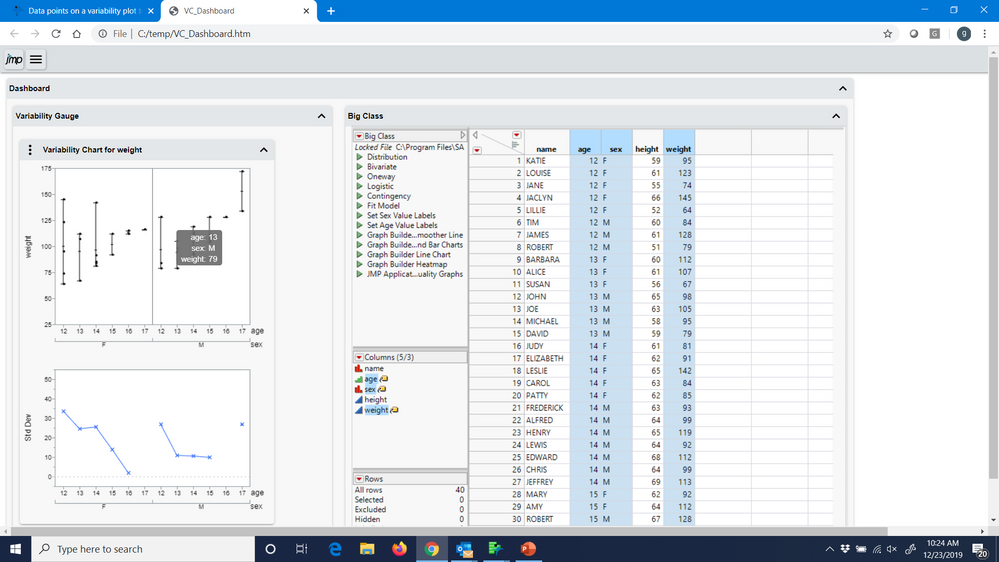
Are you aware of JMP labels. Below is a screenshot of a saved interactive html. It has a variability chart and the table combined, but it works as well for only the varaibility chart. The table shows that I highlighted 3 columns that were used to create the chart. Those columns were seleted and using one of the Columns pull down menus, selected Label. Note I could add more variables not used to create the var chart. When I hover over a point I see the values of labeled columns. I think Labels address your question. If not, please provide more details.
- Mark as New
- Bookmark
- Subscribe
- Mute
- Subscribe to RSS Feed
- Get Direct Link
- Report Inappropriate Content
Re: Data points on a variability plot to display X-axis values instead of Y-axis and Row-number?
@Ross_Metusalem, Oops, you are faster than I.
@psundar6, Ross and my response provided the same advice.


- Mark as New
- Bookmark
- Subscribe
- Mute
- Subscribe to RSS Feed
- Get Direct Link
- Report Inappropriate Content
Re: Data points on a variability plot to display X-axis values instead of Y-axis and Row-number?
Hi Prithvee,
Head back to the data table, right click on the column corresponding to your x-axis variable and select Label/Unlabel. (You can also find the Label/Unlabel command under the Cols menu.) This will tell JMP to display this column's values in any hover labels in graphs. The column should now have a yellow tag icon next to it in the data table's columns pane, and you should now see the corresponding values in the hover label in your variability chart.
Ross
JMP Academic Ambassador
- Mark as New
- Bookmark
- Subscribe
- Mute
- Subscribe to RSS Feed
- Get Direct Link
- Report Inappropriate Content
Re: Data points on a variability plot to display X-axis values instead of Y-axis and Row-number?
Are you aware of JMP labels. Below is a screenshot of a saved interactive html. It has a variability chart and the table combined, but it works as well for only the varaibility chart. The table shows that I highlighted 3 columns that were used to create the chart. Those columns were seleted and using one of the Columns pull down menus, selected Label. Note I could add more variables not used to create the var chart. When I hover over a point I see the values of labeled columns. I think Labels address your question. If not, please provide more details.
- Mark as New
- Bookmark
- Subscribe
- Mute
- Subscribe to RSS Feed
- Get Direct Link
- Report Inappropriate Content
Re: Data points on a variability plot to display X-axis values instead of Y-axis and Row-number?
@Ross_Metusalem, Oops, you are faster than I.
@psundar6, Ross and my response provided the same advice.
- Mark as New
- Bookmark
- Subscribe
- Mute
- Subscribe to RSS Feed
- Get Direct Link
- Report Inappropriate Content
Re: Data points on a variability plot to display X-axis values instead of Y-axis and Row-number?
- Mark as New
- Bookmark
- Subscribe
- Mute
- Subscribe to RSS Feed
- Get Direct Link
- Report Inappropriate Content
Re: Data points on a variability plot to display X-axis values instead of Y-axis and Row-number?
Recommended Articles
- © 2026 JMP Statistical Discovery LLC. All Rights Reserved.
- Terms of Use
- Privacy Statement
- Contact Us