Turn on suggestions
Auto-suggest helps you quickly narrow down your search results by suggesting possible matches as you type.
- Due to the recently reported Microsoft outage, users may be temporarily unable to access My JMP or experience a delay receiving their verification codes. If you have previously installed JMP on your computer, this outage should not impact your ability to access the software. My JMP services will be restored as soon as Microsoft resolves this issue.
- Image to Table JMP extension imports single or batch images as data tables. Useful to extract curves from pictures or convert image data to curve data to use in analyses like Functional Data Explorer. Download and install the extension.
Options
- Subscribe to RSS Feed
- Mark Topic as New
- Mark Topic as Read
- Float this Topic for Current User
- Bookmark
- Subscribe
- Mute
- Printer Friendly Page
Discussions
Solve problems, and share tips and tricks with other JMP users.- User Community
- :
- Discussions
- :
- Data Table View with open File structure

Level III
- Mark as New
- Bookmark
- Subscribe
- Mute
- Subscribe to RSS Feed
- Get Direct Link
- Report Inappropriate Content
Data Table View with open File structure
Created:
Aug 17, 2021 02:33 AM
| Last Modified: Jun 10, 2023 4:35 PM
(2425 views)
Hi,
since some updates I have the most left Area in the Data Table view. I do not know how this is named, hence I cannot look up how to switch it off permanently.
Can anybody help?
Thanks Peter
1 ACCEPTED SOLUTION
Accepted Solutions


Super User
Solution
- Mark as New
- Bookmark
- Subscribe
- Mute
- Subscribe to RSS Feed
- Get Direct Link
- Report Inappropriate Content
Re: Data Table View with open File structure
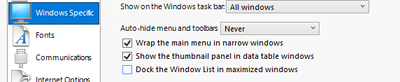
Looks like Window List. I think you have this option enabled (Dock the Window List in maximized windows):

-Jarmo
1 REPLY 1
Super User
Solution
- Mark as New
- Bookmark
- Subscribe
- Mute
- Subscribe to RSS Feed
- Get Direct Link
- Report Inappropriate Content
Re: Data Table View with open File structure
Looks like Window List. I think you have this option enabled (Dock the Window List in maximized windows):
-Jarmo
Recommended Articles
- © 2026 JMP Statistical Discovery LLC. All Rights Reserved.
- Terms of Use
- Privacy Statement
- Contact Us