- JMP will suspend normal business operations for our Winter Holiday beginning on Wednesday, Dec. 24, 2025, at 5:00 p.m. ET (2:00 p.m. ET for JMP Accounts Receivable).
Regular business hours will resume at 9:00 a.m. EST on Friday, Jan. 2, 2026. - We’re retiring the File Exchange at the end of this year. The JMP Marketplace is now your destination for add-ins and extensions.
- Subscribe to RSS Feed
- Mark Topic as New
- Mark Topic as Read
- Float this Topic for Current User
- Bookmark
- Subscribe
- Mute
- Printer Friendly Page
Discussions
Solve problems, and share tips and tricks with other JMP users.- JMP User Community
- :
- Discussions
- :
- Dashboard

- Mark as New
- Bookmark
- Subscribe
- Mute
- Subscribe to RSS Feed
- Get Direct Link
- Report Inappropriate Content
Dashboard
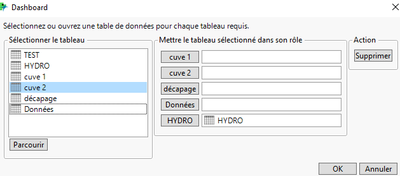
2 - Quand je lance le script et que je fais la correspondance entre les tables, un interface « aperçu du Dashboard » intervient. Dans le meilleur des cas, comment pourrais-je supprimer/passer cette étape pour avoir directement accès au Dashboard final ?


- Mark as New
- Bookmark
- Subscribe
- Mute
- Subscribe to RSS Feed
- Get Direct Link
- Report Inappropriate Content
Re: Dashboard
Do you have JMP 17? If so, you might consider using the Workflow Builder to create your dashboard, as it will remember column names/assignments.
- Mark as New
- Bookmark
- Subscribe
- Mute
- Subscribe to RSS Feed
- Get Direct Link
- Report Inappropriate Content
Re: Dashboard
Oui j'utilise JMP 17, le script pour mon Dashboard marche correctement. Cependant, j'aimerai juste pouvoir l'améliorer sans devoir tout recommencer à zéro.

- Mark as New
- Bookmark
- Subscribe
- Mute
- Subscribe to RSS Feed
- Get Direct Link
- Report Inappropriate Content
Re: Dashboard
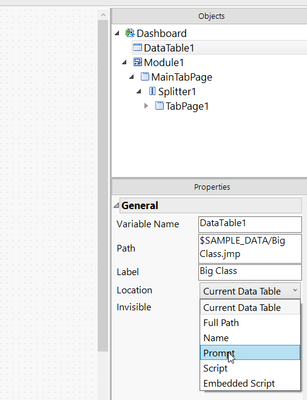
Did you check the Database settings - Perhaps "Location" is set to Prompt?
- Mark as New
- Bookmark
- Subscribe
- Mute
- Subscribe to RSS Feed
- Get Direct Link
- Report Inappropriate Content
Re: Dashboard
Toutes les options de "Location" ne fonctionnent pas, j'ai toujours le même problème.

- Mark as New
- Bookmark
- Subscribe
- Mute
- Subscribe to RSS Feed
- Get Direct Link
- Report Inappropriate Content
Re: Dashboard
@hcarr01 - Can you clarify which options do not work as expected? Some will require additional steps - for example if the Location is set to `Script`, the table will need to be opened / created in the JSL defined in the Application. To edit scripts in a Dashboard you will need to turn off Dashboard Mode.
If you want the tables to simply open from the location defined in the Path property, you can use the `Full Path` option. This is the behavior when opening a .jmpapp file for editing. The Location field is used when running a JMP App/Dashboard to allow for the app to run on different tables.
- Mark as New
- Bookmark
- Subscribe
- Mute
- Subscribe to RSS Feed
- Get Direct Link
- Report Inappropriate Content
Re: Dashboard
J'ai essayé les différentes options, notamment "Full Path" comme vous l'indiquez :

En utilisant cette option, mon script ne trouve plus la table "cuve 1" dans mes table de données, comme vous pouvez le voir ci-dessous :
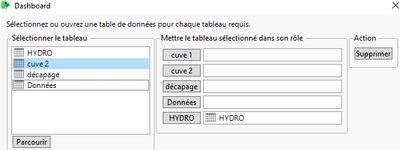
J'ai ce problème pour toutes les différentes options sauf pour "Embedded Script"

- Mark as New
- Bookmark
- Subscribe
- Mute
- Subscribe to RSS Feed
- Get Direct Link
- Report Inappropriate Content
Re: Dashboard
How I make my dashboard work with no prompts is to have the files open already then use this type of code in the dashboard script:
	Tables(
		DataTable1 = GuiTable(
			Set Path( "1st FPI summary data.jmp" ),
			Set Label( "1st FPI summary data" ),
			Location( "Name" ),
			Invisible( 0 )
		),
for item # 2, make sure the dashboard script ends with << Run; not << Edit.
Hope this helps!
Steve
Recommended Articles
- © 2025 JMP Statistical Discovery LLC. All Rights Reserved.
- Terms of Use
- Privacy Statement
- Contact Us