- Don’t miss your chance to experience Discovery Summit Europe at our best available rate! Early bird registration through 31 Oct.
- Graph Builder Toolbar streamlines interactive graphing. Creates shortcuts on Report and GraphBuilder Helpers toolbars. Download and install the extension.
- Subscribe to RSS Feed
- Mark Topic as New
- Mark Topic as Read
- Float this Topic for Current User
- Bookmark
- Subscribe
- Mute
- Printer Friendly Page
Discussions
Solve problems, and share tips and tricks with other JMP users.- User Community
- :
- Discussions
- :
- Custom Map

- Mark as New
- Bookmark
- Subscribe
- Mute
- Subscribe to RSS Feed
- Get Direct Link
- Report Inappropriate Content
Custom Map
Hi, I've created this custom map but I cannot get the original plant drawing to overlay with the digitized image in the Graph Builder? Can anyone help? Thanks!!
Accepted Solutions


- Mark as New
- Bookmark
- Subscribe
- Mute
- Subscribe to RSS Feed
- Get Direct Link
- Report Inappropriate Content
Re: Custom Map
The issue is that the column name in the data table needs to be the same as the column name in the -name shape table. You had specified "Name" in the -Name shape jmp table, but in the data table you called the column "Department". I changed the column name to "Name" and brought up Graph Builder, and produced the following output:
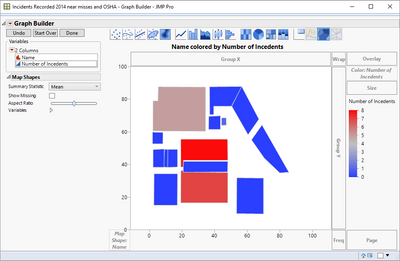

Also, make sure you save the -XY and - Name data tables to the correct folders:
JMP looks for these files in two locations. One location is shared by all users on a machine.
This location is:
• Windows: C:/Program Files/SAS/JMP/12/Maps/
• Macintosh: /Library/Application Support/JMP/12/Maps
The other location is specific for an individual user:
• On Windows: C:/Users/<user name>/AppData/Roaming/SAS/JMP/Maps
• On Macintosh: /Users/<user name>/Library/Application Support/JMP/Maps
- Mark as New
- Bookmark
- Subscribe
- Mute
- Subscribe to RSS Feed
- Get Direct Link
- Report Inappropriate Content
Re: Custom Map
The issue is that the column name in the data table needs to be the same as the column name in the -name shape table. You had specified "Name" in the -Name shape jmp table, but in the data table you called the column "Department". I changed the column name to "Name" and brought up Graph Builder, and produced the following output:
Also, make sure you save the -XY and - Name data tables to the correct folders:
JMP looks for these files in two locations. One location is shared by all users on a machine.
This location is:
• Windows: C:/Program Files/SAS/JMP/12/Maps/
• Macintosh: /Library/Application Support/JMP/12/Maps
The other location is specific for an individual user:
• On Windows: C:/Users/<user name>/AppData/Roaming/SAS/JMP/Maps
• On Macintosh: /Users/<user name>/Library/Application Support/JMP/Maps
- Mark as New
- Bookmark
- Subscribe
- Mute
- Subscribe to RSS Feed
- Get Direct Link
- Report Inappropriate Content
Re: Custom Map
Ho wow! Thank you very much. Now it worked for me. The only thing is that I cannot the original image to overlay with above. I noticed that on JMP help the author was able to overlay the floor plan drawing or image with the traced temperature.
Recommended Articles
- © 2026 JMP Statistical Discovery LLC. All Rights Reserved.
- Terms of Use
- Privacy Statement
- Contact Us