- Don’t miss your chance to experience Discovery Summit Europe at our best available rate! Early bird registration through 31 Oct.
- Graph Builder Toolbar streamlines interactive graphing. Creates shortcuts on Report and GraphBuilder Helpers toolbars. Download and install the extension.
- Subscribe to RSS Feed
- Mark Topic as New
- Mark Topic as Read
- Float this Topic for Current User
- Bookmark
- Subscribe
- Mute
- Printer Friendly Page
Discussions
Solve problems, and share tips and tricks with other JMP users.- User Community
- :
- Discussions
- :
- Re: Create a Tree Box in Application Builder

- Mark as New
- Bookmark
- Subscribe
- Mute
- Subscribe to RSS Feed
- Get Direct Link
- Report Inappropriate Content
Create a Tree Box in Application Builder
I'd like to add a dynamic Tree (Tree Node) object to a dialog in my Application Builder project. There is no container (Tree Box) available to drop into the dialog.
Is there a way to add the Tree Box container after the dialog is built through scripting or some other container?
Thank you,
Dave
Accepted Solutions


- Mark as New
- Bookmark
- Subscribe
- Mute
- Subscribe to RSS Feed
- Get Direct Link
- Report Inappropriate Content
Re: Create a Tree Box in Application Builder
Hi @dsm - you can definitely use JSL scripts to add to anything that App Builder does not have drag-and-drop support for. You can create a layout that contains everything that you are able to define statically, and then switch to the Scripts tab. There is a separate script for the Application and for each Module (usually the same as a window). The window, and the statically defined boxes, are created at the point of the statement thisModuleInstance << Create Objects in the script. After that point, you can create and append other boxes, or send messages to the boxes that were created automatically.
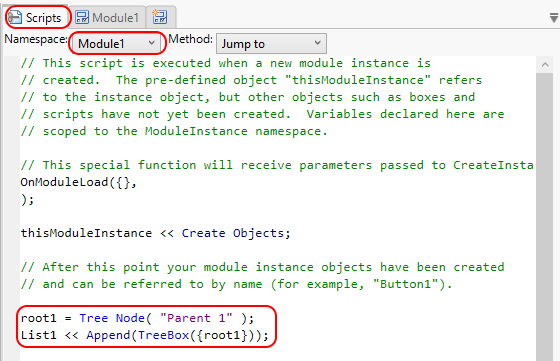
Hope that helps!
-Dan
- Mark as New
- Bookmark
- Subscribe
- Mute
- Subscribe to RSS Feed
- Get Direct Link
- Report Inappropriate Content
Re: Create a Tree Box in Application Builder
Hi @dsm - you can definitely use JSL scripts to add to anything that App Builder does not have drag-and-drop support for. You can create a layout that contains everything that you are able to define statically, and then switch to the Scripts tab. There is a separate script for the Application and for each Module (usually the same as a window). The window, and the statically defined boxes, are created at the point of the statement thisModuleInstance << Create Objects in the script. After that point, you can create and append other boxes, or send messages to the boxes that were created automatically.
Hope that helps!
-Dan
Recommended Articles
- © 2026 JMP Statistical Discovery LLC. All Rights Reserved.
- Terms of Use
- Privacy Statement
- Contact Us