- Don’t miss your chance to experience Discovery Summit Europe at our best available rate! Early bird registration through 31 Oct.
- Graph Builder Toolbar streamlines interactive graphing. Creates shortcuts on Report and GraphBuilder Helpers toolbars. Download and install the extension.
- Subscribe to RSS Feed
- Mark Topic as New
- Mark Topic as Read
- Float this Topic for Current User
- Bookmark
- Subscribe
- Mute
- Printer Friendly Page
Discussions
Solve problems, and share tips and tricks with other JMP users.- User Community
- :
- Discussions
- :
- Re: Corrected mean calculation

- Mark as New
- Bookmark
- Subscribe
- Mute
- Subscribe to RSS Feed
- Get Direct Link
- Report Inappropriate Content
Corrected mean calculation
Hi All,
I struggle to calculate a "corrected mean" out of 4 result columns with continuous numerical values that I get.
How I define the "corrected mean"? I want to exclude the value which is the furthest away from the mean and double count the value closest to it (effectively replacing the excluded "outlier" with the value closes to it).
See example below where excluded values are highlighted in red and duplicated ones in green.
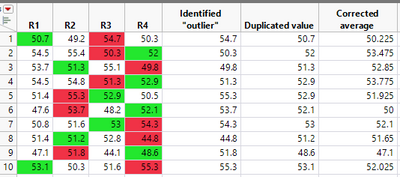
Thanks for your support! (I'm currently on JMP 17.0)
Please find script with the sample raw data below:
New Table( "corrected_mean_script",
	Add Rows( 10 ),
	New Column( "R1",
		Numeric,
		"Continuous",
		Format( "Best", 12 ),
		Color Cells( {36, {1, 10}} ),
		Set Values( [50.7, 54.5, 53.7, 54.5, 51.4, 47.6, 50.8, 51.4, 47.1, 53.1] )
	),
	New Column( "R2",
		Numeric,
		"Continuous",
		Format( "Best", 12 ),
		Color Cells( {{36, {3, 8}}, {3, {5, 6, 9}}} ),
		Set Values( [49.2, 55.4, 51.3, 54.8, 55.3, 53.7, 51.6, 51.2, 51.8, 50.3] ),
		Set Display Width( 48 )
	),
	New Column( "R3",
		Numeric,
		"Continuous",
		Format( "Best", 12 ),
		Color Cells( {{3, {1, 2, 4}}, {36, {5, 7}}} ),
		Set Values( [54.7, 50.3, 55.1, 51.3, 52.9, 48.2, 53, 52.8, 44.1, 51.6] )
	),
	New Column( "R4",
		Numeric,
		"Continuous",
		Format( "Best", 12 ),
		Color Cells( {{36, {2, 4, 6, 9}}, {3, {3, 7, 8, 10}}} ),
		Set Values( [50.3, 52, 49.8, 52.9, 50.5, 52.1, 54.3, 44.8, 48.6, 55.3] ),
		Set Display Width( 50 )
	)
)Accepted Solutions


- Mark as New
- Bookmark
- Subscribe
- Mute
- Subscribe to RSS Feed
- Get Direct Link
- Report Inappropriate Content
Re: Corrected mean calculation
Here is one way, in steps, to see a solution.
Names Default To Here( 1 );

dt = New Table( "corrected_mean_script",
	Add Rows( 10 ),
	New Column( "R1",
		Numeric,
		"Continuous",
		Format( "Best", 12 ),
		Color Cells( {36, {1, 10}} ),
		Set Values( [50.7, 54.5, 53.7, 54.5, 51.4, 47.6, 50.8, 51.4, 47.1, 53.1] )
	),
	New Column( "R2",
		Numeric,
		"Continuous",
		Format( "Best", 12 ),
		Color Cells( {{36, {3, 8}}, {3, {5, 6, 9}}} ),
		Set Values( [49.2, 55.4, 51.3, 54.8, 55.3, 53.7, 51.6, 51.2, 51.8, 50.3] ),
		Set Display Width( 48 )
	),
	New Column( "R3",
		Numeric,
		"Continuous",
		Format( "Best", 12 ),
		Color Cells( {{3, {1, 2, 4}}, {36, {5, 7}}} ),
		Set Values( [54.7, 50.3, 55.1, 51.3, 52.9, 48.2, 53, 52.8, 44.1, 51.6] )
	),
	New Column( "R4",
		Numeric,
		"Continuous",
		Format( "Best", 12 ),
		Color Cells( {{36, {2, 4, 6, 9}}, {3, {3, 7, 8, 10}}} ),
		Set Values( [50.3, 52, 49.8, 52.9, 50.5, 52.1, 54.3, 44.8, 48.6, 55.3] ),
		Set Display Width( 50 )
	)
);

dt << New Column( "Corrected Mean", Numeric, "Continuous" );

For Each Row(
	mean = Mean( :R1, :R2, :R3, :R4 );
	data = dt[Row(), 1::4];
	absDiff = Abs( data - mean );
	min = (data[Loc( absDiff == Min( absDiff ) )])[1];
	data[Loc( absDiff == Max( absDiff ) )[1]] = min;
	:Corrected Mean = Mean( data );
);- Mark as New
- Bookmark
- Subscribe
- Mute
- Subscribe to RSS Feed
- Get Direct Link
- Report Inappropriate Content
Re: Corrected mean calculation
Here is one way, in steps, to see a solution.
Names Default To Here( 1 );

dt = New Table( "corrected_mean_script",
	Add Rows( 10 ),
	New Column( "R1",
		Numeric,
		"Continuous",
		Format( "Best", 12 ),
		Color Cells( {36, {1, 10}} ),
		Set Values( [50.7, 54.5, 53.7, 54.5, 51.4, 47.6, 50.8, 51.4, 47.1, 53.1] )
	),
	New Column( "R2",
		Numeric,
		"Continuous",
		Format( "Best", 12 ),
		Color Cells( {{36, {3, 8}}, {3, {5, 6, 9}}} ),
		Set Values( [49.2, 55.4, 51.3, 54.8, 55.3, 53.7, 51.6, 51.2, 51.8, 50.3] ),
		Set Display Width( 48 )
	),
	New Column( "R3",
		Numeric,
		"Continuous",
		Format( "Best", 12 ),
		Color Cells( {{3, {1, 2, 4}}, {36, {5, 7}}} ),
		Set Values( [54.7, 50.3, 55.1, 51.3, 52.9, 48.2, 53, 52.8, 44.1, 51.6] )
	),
	New Column( "R4",
		Numeric,
		"Continuous",
		Format( "Best", 12 ),
		Color Cells( {{36, {2, 4, 6, 9}}, {3, {3, 7, 8, 10}}} ),
		Set Values( [50.3, 52, 49.8, 52.9, 50.5, 52.1, 54.3, 44.8, 48.6, 55.3] ),
		Set Display Width( 50 )
	)
);

dt << New Column( "Corrected Mean", Numeric, "Continuous" );

For Each Row(
	mean = Mean( :R1, :R2, :R3, :R4 );
	data = dt[Row(), 1::4];
	absDiff = Abs( data - mean );
	min = (data[Loc( absDiff == Min( absDiff ) )])[1];
	data[Loc( absDiff == Max( absDiff ) )[1]] = min;
	:Corrected Mean = Mean( data );
);- Mark as New
- Bookmark
- Subscribe
- Mute
- Subscribe to RSS Feed
- Get Direct Link
- Report Inappropriate Content
Re: Corrected mean calculation
Many thanks Mark, it works well.
For future reference for others, using tips from this topic should allow to localise the 4 columns in a wider data table:
https://community.jmp.com/t5/Discussions/How-to-get-column-number-from-column-name-JMP/td-p/5987
Thanks again!
Recommended Articles
- © 2026 JMP Statistical Discovery LLC. All Rights Reserved.
- Terms of Use
- Privacy Statement
- Contact Us