cancel
Showing results for 
Show  only  | Search instead for 
Did you mean: 
  • Sign-in to the JMP Community will be unavailable intermittently Dec. 6-7 due to a system update. Thank you for your understanding!
  • We’re retiring the File Exchange at the end of this year. The JMP Marketplace is now your destination for add-ins and extensions.
  • JMP 19 is here! Learn more about the new features.

Discussions

Solve problems, and share tips and tricks with other JMP users.
Choose Language Hide Translation Bar
gandi2223
Level III

Contour plot, set X and Y ranges in JSL

When creating a contour plot in JSL, is there a way to set fixed (pre-determined) values for the X and Y maximum and minimum? I.e. to define the area the contour plot will cover, as can be done manually in the X / Y Axis Settings dialogue?


My datasets cover different ranges in x and y, but I would like all contour plots to have the same x and y extents.


Something like:

Contour Plot(
	X( :X_col, :Y_col ),
	Y( :data ),
	X_minimum(-75000),
	X_maximum(75000)
)

(This obviously does not work.)

10 REPLIES 10
Jeff_Perkinson
Community Manager Community Manager

Re: Contour plot, set X and Y ranges in JSL

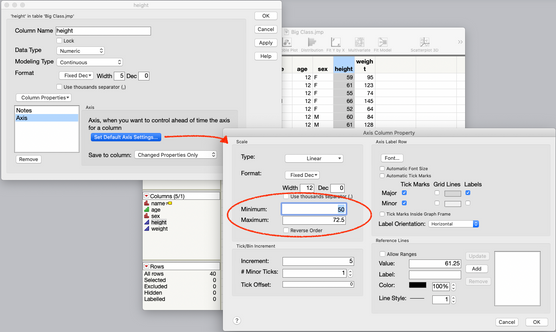
An easy way to do this might be to set the Axis Property for your X and Y columns. That will ensure that every plot made with those columns has the scaling that you want.


2021-01-03_13-48-27.778.png

-Jeff

Recommended Articles