cancel
Showing results for 
Show  only  | Search instead for 
Did you mean: 
  • JMP will suspend normal business operations for our Winter Holiday beginning on Wednesday, Dec. 24, 2025, at 5:00 p.m. ET (2:00 p.m. ET for JMP Accounts Receivable).
    Regular business hours will resume at 9:00 a.m. ET on Friday, Jan. 2, 2026.
  • We’re retiring the File Exchange at the end of this year. The JMP Marketplace is now your destination for add-ins and extensions.

Discussions

Solve problems, and share tips and tricks with other JMP users.
Choose Language Hide Translation Bar
gandi2223
Level III

Contour plot, set X and Y ranges in JSL

When creating a contour plot in JSL, is there a way to set fixed (pre-determined) values for the X and Y maximum and minimum? I.e. to define the area the contour plot will cover, as can be done manually in the X / Y Axis Settings dialogue?


My datasets cover different ranges in x and y, but I would like all contour plots to have the same x and y extents.


Something like:

Contour Plot(
	X( :X_col, :Y_col ),
	Y( :data ),
	X_minimum(-75000),
	X_maximum(75000)
)

(This obviously does not work.)

10 REPLIES 10
Jeff_Perkinson
Community Manager Community Manager

Re: Contour plot, set X and Y ranges in JSL

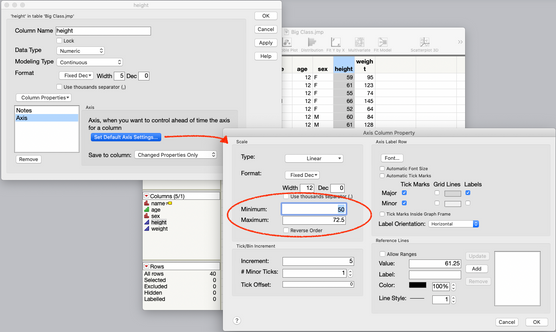
An easy way to do this might be to set the Axis Property for your X and Y columns. That will ensure that every plot made with those columns has the scaling that you want.


2021-01-03_13-48-27.778.png

-Jeff

Recommended Articles